

Ink: Notes, Lists & To-Dos
Sean Trapani · Productivity
Independent analytics for this App Store listing. AppTracker is not affiliated with Sean Trapani.
Chart standing · US
What changed · US
Listing changes AppTracker has observed for this app in this storefront — new versions, price moves, rating shifts, and store copy.
What's New in 5.4 • Ready for iPhone Duo. Ink fits the open and closed screens, and a fold keeps your place, down to a sheet you have open. • A note title you change now stays changed, even if iOS closes Ink in the background before you leave the note. • Send feedback can include your email, if you'd like an answer. • The large Today widget shows as many rows as fit, so its footer stays whole.
Ratings breakdown · US
The star breakdown behind this app's rating in this storefront.
Screenshots





About
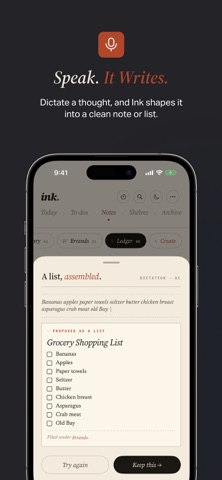
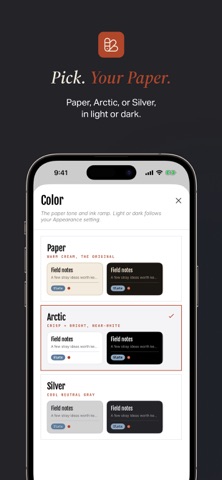
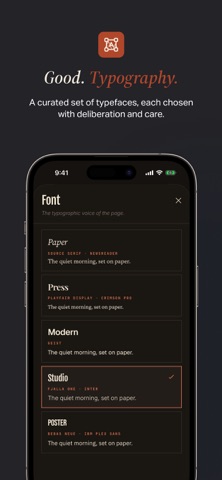
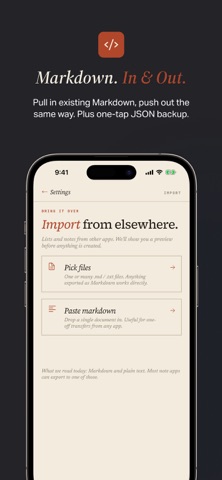
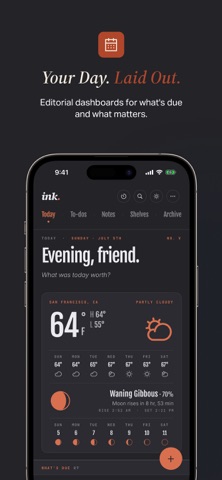
Ink turns your voice into finished notes and lists. No re-typing, no cleanup. Tap the microphone, speak naturally, and watch your words land as a clean list, a note, or a tidy paragraph. Ink shapes the transcript while you watch, so you see the result before it's saved. WHAT'S INCLUDED, WHAT'S PRO Notes, to-dos, reminders, repeats, links, shelves, Markdown export, and iCloud sync are free, no account required. Pro adds dictation with AI formatting, file import, your own templates, version history, a focus timer, ledger mode, the richer copy formats, shared lists, Today layouts you can arrange, font packs, accent colors, and paper tones. Your 14 days of Pro don't begin when you install. They begin the first time you open something Pro, so the two weeks are two weeks you spend. EARLIER VERSIONS OF EVERY PAGE Ink keeps a version of a page as you leave it. Read last week's draft beside today's, lift a paragraph back out, or bring the whole thing back as a new page, which leaves everything you have written since where it is. Stored on your device, the newest 50 per page. THE INDEX AT THE BACK OF THE NOTEBOOK Every unfinished checkbox scattered through your notes, gathered on one page. Every passage you marked, on another. Check something off and it leaves the index on its own. Nothing to file, nothing to keep tidy. TEMPLATES FOR THE THINGS YOU DO AGAIN Turn a list you already keep into one you can run again. Ink clears last time's checkmarks and amounts, then asks for a name and a date, so "book transport seven days before" lands on the right day this time. PULL THE WORDS OUT OF A FILE Send a PDF, a document, or a photo of a page to Ink, or tap + and choose Import, and it reads the words into a note. Ink keeps the words, not the file. Scans and photos are read on your device, so nothing is sent anywhere. ON YOUR WRIST Ink on Apple Watch shows what's due and lets you check it off without reaching for your phone. Put the next thing on your watch face and it's there at a glance. ASK SIRI, WITHOUT OPENING THE APP Say "Add an item to Ink" or "Show my Ink today" and it happens. Every action works in Shortcuts and on the Action Button, and your notes turn up in Spotlight. DATES YOU CAN JUST TYPE Write "Dentist Friday 4pm" or "rent next week" and Ink reads the date and leaves the title clean. A chip shows what it heard, so you can wave it off and keep your exact words. DESIGNED LIKE A BOOK, NOT AN APP Ink draws from print: warm cream paper, ink-dark serif type, the editorial details of well-made books. Four Today layouts to open to, from a newsprint spread to a magazine front page. WRITE IT THE WAY YOU MEAN IT Bold, italic, strikethrough, underline. Section headers. Checklists inside a note, tap a line to check it off. REMINDERS, ONLY IF YOU ASK One quiet notification on the day something is due, at the time you choose. Off by default. Set an item to repeat daily, weekly, monthly, or yearly and it comes back on its own. A TIMER FOR SITTING DOWN TO WORK Set 15, 25, 45, or 60 minutes and Ink keeps a quiet countdown, then sounds a soft chime you choose. SHARE A LIST, KEEP IT IN SYNC Invite another Ink user by email. Check off, add, reorder, even dictate, and both copies stay in sync. A quiet byline shows who added each item. LISTS THAT KEEP A LEDGER Flip a list into Ledger mode and it keeps score. Type signed amounts (+$25, -$10, +200) and Ink totals each section, then the whole list. BRING IT WITH YOU, OR TAKE IT SOMEWHERE ELSE • Import PDFs, HTML, rich text, Markdown, plain text, and photos of a page • Copy any note or list as Markdown, or as plain text, HTML, or rich text with Pro • One-tap JSON backup and one-tap restore • iCloud sync across iPhone, iPad, Apple Watch, and Mac • Universal purchase, buy once, use everywhere Terms of Use: https://www.apple.com/legal/internet-services/itunes/dev/stdeula/ Privacy Policy: https://basicapps.tech/privacy
What's new · 5.4
What's New in 5.4 • Ready for iPhone Duo. Ink fits the open and closed screens, and a fold keeps your place, down to a sheet you have open. • A note title you change now stays changed, even if iOS closes Ink in the background before you leave the note. • Send feedback can include your email, if you'd like an answer. • The large Today widget shows as many rows as fit, so its footer stays whole.
Details