
Chart standing · US
What changed · US
Listing changes AppTracker has observed for this app in this storefront — new versions, price moves, rating shifts, and store copy.
Fixes trash requests that could get stuck permanently. If a trash run was interrupted partway through — server unreachable, connection dropped mid-sync, VPN down — the queued retry could wedge and report "A tag with that name already exists" on every attempt after that, and no amount of retrying could clear it. Every trash run writes a breadcrumb tag to Immich so the run can be reconstructed later, and cairn was creating those tags with an endpoint that rejects duplicates rather than the one that reuses an existing tag. Because a retry reuses its original run's tag, every attempt after the first was refused. Retries now reuse the run's existing tag instead of failing on it, and any request already stuck this way clears itself on the next sync after you update. Run breadcrumbs also nest properly under cairn / v1 / run in Immich's tag list now, instead of appearing as one flat entry.
Ratings breakdown · US
The star breakdown behind this app's rating in this storefront.
Screenshots






About
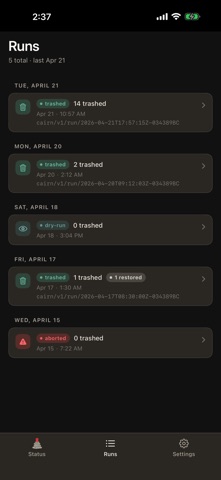
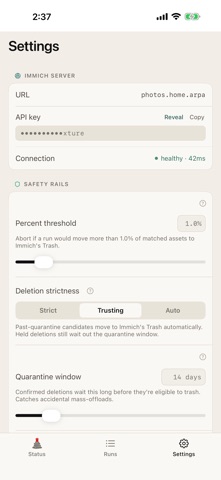
cairn reconciles your iPhone photo library against your own Immich server. When you delete a photo on your phone, cairn moves the matching photo on Immich to Trash. That's the whole job. cairn doesn't upload photos, show albums, edit metadata, or run AI — the Immich app already does those things. cairn closes the one loop the Immich app doesn't: photos that live on the server after you've deleted them from your phone. HOW IT WORKS — Content identity is SHA1 (the same identifier Immich uses server-side). — cairn subscribes to iOS's deletion log, so it sees soft-deletes as you make them. — A configurable quarantine window holds confirmed deletions before anything moves, so an accidental mass-offload has time to be caught. — Every run shows you the candidate list first. Nothing happens on the server until you confirm. SAFETY MODEL — Trash, not delete. cairn moves assets into your Immich Trash — Immich retains them for 30 days, and restore is one tap. — Percent cap + floor. If a single run would move more than a threshold of your matched photos to Trash, it aborts without touching the server. — Breadcrumbs. Every run is tagged on Immich (cairn/v1/run/[id]) so you can find it server-side. — Forensic journal. Local append-only log records every step — planned, tagged, trashed, restored, failed. — Exclusions. Protect specific photos from ever being flagged. — Indexing scope. Restrict cairn to a specific set of Photos albums. Photos outside the scope are silently ignored — never hashed, never proposed for trash. Useful if you want to manage just one album and leave synced family albums alone. PRIVACY — No analytics, no telemetry, no crash reporting, no ads. — No cairn backend. Your iPhone talks directly to your Immich server using your API key. — Credentials stay in the iOS Keychain. Nothing leaves your device besides requests you configured. REQUIREMENTS — An Immich server you run or control. — An Immich API key. cairn requests these scopes: asset.read, asset.view, asset.download, asset.delete, tag.create, tag.asset, tag.read. The Setup screen lists them when you paste your key. cairn is not affiliated with the Immich project. It talks to Immich over its public API; compatibility only. Source is MIT-licensed at github.com/glarue/cairn.
What's new · 0.4.4
Fixes trash requests that could get stuck permanently. If a trash run was interrupted partway through — server unreachable, connection dropped mid-sync, VPN down — the queued retry could wedge and report "A tag with that name already exists" on every attempt after that, and no amount of retrying could clear it. Every trash run writes a breadcrumb tag to Immich so the run can be reconstructed later, and cairn was creating those tags with an endpoint that rejects duplicates rather than the one that reuses an existing tag. Because a retry reuses its original run's tag, every attempt after the first was refused. Retries now reuse the run's existing tag instead of failing on it, and any request already stuck this way clears itself on the next sync after you update. Run breadcrumbs also nest properly under cairn / v1 / run in Immich's tag list now, instead of appearing as one flat entry.
Details