

AVR Maestro For Denon Marantz
MiyaraHub Technologies LLC · Utilities
Independent analytics for this App Store listing. AppTracker is not affiliated with MiyaraHub Technologies LLC.
Chart standing · US
What changed · US
Listing changes AppTracker has observed for this app in this storefront — new versions, price moves, rating shifts, and store copy.
New: - Guided Scenes: pick exactly the settings your receiver supports, then see what it actually applied. - Guided setup on first launch. - Smart Select / Quick Select names sync both ways, every slot shown. - Seperate custom input icons stay with their own receiver (Multi AVR users). Enhancement: - Faster connecting and instant “Applying...” on Scene recall. Fixes: But fixes for Cinema 30, SR7015/SR8015 and X4500H.
Price & rating history · US
Reconstructed from the listing changes AppTracker has observed in this storefront. A field is charted once it has changed more than once, and each line starts at the value it moved from.
Average rating · ★ 4.86 now · 13 changes on record
Ratings breakdown · US
The star breakdown behind this app's rating in this storefront.
In-app purchases · US
What this app sells inside itself, grouped by kind and priced for this storefront.
Screenshots



Keywords this app targets
Search terms AppTracker associates with this app — estimates, not search volume. ❝ = in the app's title; a highlighted number is its current position for that term.
Similar apps
Competitors and close alternatives, as estimated by AppTracker.
 DeRemote for Denon and Marantz
Frans Bouwmeester
2 shared topics · 2 shared title words
DeRemote for Denon and Marantz
Frans Bouwmeester
2 shared topics · 2 shared title words
 Enhanced Music Controller
Mikhail Kulesh
2 shared topics
Enhanced Music Controller
Mikhail Kulesh
2 shared topics
 Audyssey MultEQ Editor app
D&M Holdings
Audyssey MultEQ Editor app
D&M Holdings
 MyURemote - Universal Remote
Danny Wille
1 shared topic
MyURemote - Universal Remote
Danny Wille
1 shared topic
 Monoprice Whole Home Audio
NT Mobile Innovations
1 shared topic
Monoprice Whole Home Audio
NT Mobile Innovations
1 shared topic
 JRemote
JRiver
1 shared topic
JRemote
JRiver
1 shared topic
 SoloLive
Frederic Ratsimiveh
1 shared topic
SoloLive
Frederic Ratsimiveh
1 shared topic
 Remote, Mouse & Keyboard Pro
Remote Sunrise LTD
2 shared topics
Remote, Mouse & Keyboard Pro
Remote Sunrise LTD
2 shared topics
About
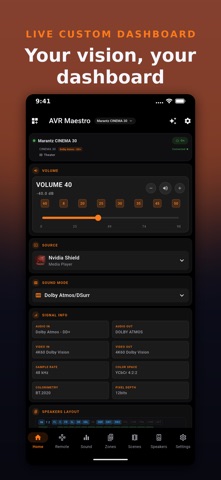
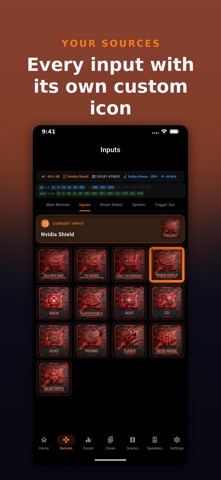
The Ultimate Control Experience for your Denon or Marantz Receiver. Join our discord community: discord.gg/UmVtxE5fXN Join our facebook community: https://www.facebook.com/groups/avrmaestro AVR Maestro is a premium, high-performance mobile controller designed for AV enthusiasts who demand absolute precision. Moving beyond basic volume and input switching, AVR Maestro gives you deep access to the most advanced settings of your receiver - all through a beautiful, dark-themed interface optimized for your modern home theater. UNMATCHED CONTROL & CALIBRATION While other apps only scratch the surface, AVR Maestro provides full visibility and control over your system’s most critical processing: Audyssey MultEQ: Toggle Dynamic EQ, Dynamic Volume, LFC, and Containment on the fly. Dirac Live: Instantly switch between filter slots to match your listening content. Immersive Audio: Fine-tune IMAX Enhanced crossover settings and Auro-3D processing strength. Speaker Levels: Independently adjust gain for every channel, including height and subwoofers, for perfect real-time balancing. COMPLETE SYSTEM MANAGEMENT Multi-Zone Mastery: Independent power, volume, and source control for Zone 2 and Zone 3 from a single dashboard. Virtual Remote: A high-response D-Pad and transport control layout that makes your physical remote obsolete. Quick Selects: Recall your favorite input, volume, and sound mode combinations with one tap. System Deep-Dive: Manage HDMI settings, 12V triggers, eco modes, front panel dimming, and Bluetooth transmission settings. PRIVACY-FIRST, LOCAL PERFORMANCE MiyaraHub Technologies believes your home infrastructure should be private. No Cloud, No Account: AVR Maestro communicates directly with your receiver over your local Wi-Fi. No external servers, no mandatory sign-ups, and no data tracking. Zero-Latency Response: Uses native HTTP and Telnet protocols for near-instant feedback and real-time volume streaming. Album Art & Metadata: View "Now Playing" information and high-resolution album art via HEOS protocol integration. COMPATIBILITY AVR Maestro supports all networked Denon and Marantz AV receivers from the last 10+ years that support IP control. The app automatically detects supported features upon connection. Disclaimer: AVR Maestro is an independent third-party application developed by MiyaraHub Technologies LLC. It is not affiliated with or endorsed by Denon, Marantz, or Masimo Corporation. All trademarks are the property of their respective owners.
What's new · 5.2.0
New: - Guided Scenes: pick exactly the settings your receiver supports, then see what it actually applied. - Guided setup on first launch. - Smart Select / Quick Select names sync both ways, every slot shown. - Seperate custom input icons stay with their own receiver (Multi AVR users). Enhancement: - Faster connecting and instant “Applying...” on Scene recall. Fixes: But fixes for Cinema 30, SR7015/SR8015 and X4500H.
Details