

Elapsed - Day Counter
Jonathan Maurice · Productivity
Independent analytics for this App Store listing. AppTracker is not affiliated with Jonathan Maurice.
Chart standing · US
What changed · US
Listing changes AppTracker has observed for this app in this storefront — new versions, price moves, rating shifts, and store copy.
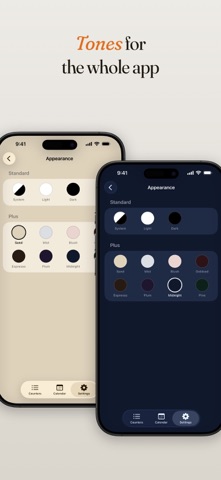
Fog rolls in, a dark Home Screen, and three new languages. • Fog, a new Plus design. Your counter sits behind slow, drifting fog, and its icon shows through as a faint apparition. On the Counters page and in the Home Screen widget. • Icons on Neon and Concrete, and six app icons to match the designs. • A night look for every widget, the free ones included. Hold a widget, tap Edit Widget, and set Appearance to Dark, or to System to follow your phone's dark mode. • Dark and Tinted app icons. All seven icons now have proper renditions for iOS's icon appearances. • Elapsed now speaks Spanish, Portuguese and German: the whole app, its widgets, reminders, example counters and icon search. Pick the app's language from the Language row in Settings. • Log any day in the past, even before a counter started, and it slots into place. Older entries in History now show their year. • Small fixes all around.
Price & rating history · US
Reconstructed from the listing changes AppTracker has observed in this storefront. A field is charted once it has changed more than once, and each line starts at the value it moved from.
Average rating · ★ 4.84 now · 10 changes on record
Ratings breakdown · US
The star breakdown behind this app's rating in this storefront.
In-app purchases · US
What this app sells inside itself, grouped by kind and priced for this storefront.
Screenshots



About
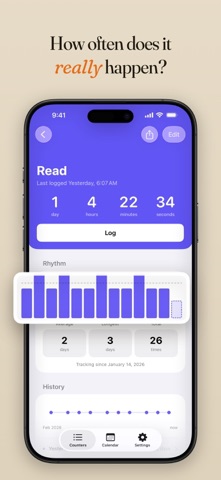
How long has it been? Since you last called your dad, changed the air filter, took a real day off, or had a drink. These are the things you do when you remember, not on a schedule, so the days quietly pile up. Elapsed is a day counter for exactly that: it shows the days since each one as a single big number, so a glance tells you how long it's been. No menus, no clutter, just the number. Pick a Design You Love Give each counter its own look, from clean and minimal to bold and graphic. That look follows it everywhere, on its card in the app and its widget on your home screen, so the whole thing ends up feeling like yours. Right on Your Home Screen You see "Call dad, 14 days" while you're checking the weather. Done? One tap on the widget and the count starts over. Most days you never open the app. A Counter for Anything Open one for whatever you lose track of, and watch the days since add up: - The people you mean to call, see, or write to - The things at home: the filter, the sheets, the deep clean - The habits you're leaving behind: no alcohol, no coffee, no cigarettes - The appointments you put off: the dentist, the haircut, the check-up - The good things you want more of: a real day off, time outside, a proper meal Never Forget Again Add an optional reminder and it reschedules itself every time you log, so it only nudges you when it has genuinely been a while. Anything overdue gets a quiet dot, so what's slipped stands out even without a notification. See How Often It Really Happens Feels like you saw your friends just last week. The counter keeps the honest record: every log, an optional note to remember the details, and the stats that show your real pattern, like your average gap and your longest stretch. Simple by Design No account, no setup. Add a counter and you're set in seconds. Your counters stay on your device, and nothing is ever sold or shared. Free to Use, Yours to Keep Elapsed is free. When you want the full design library and the background tones, Elapsed Plus is a single purchase: pay once, own it forever, and every future addition is included. No subscription, ever. No streaks to keep up. No guilt for letting something slide. Just a calm, honest count of the days that have passed. How long has it been? Open Elapsed and find out.
What's new · 1.2.1
Fog rolls in, a dark Home Screen, and three new languages. • Fog, a new Plus design. Your counter sits behind slow, drifting fog, and its icon shows through as a faint apparition. On the Counters page and in the Home Screen widget. • Icons on Neon and Concrete, and six app icons to match the designs. • A night look for every widget, the free ones included. Hold a widget, tap Edit Widget, and set Appearance to Dark, or to System to follow your phone's dark mode. • Dark and Tinted app icons. All seven icons now have proper renditions for iOS's icon appearances. • Elapsed now speaks Spanish, Portuguese and German: the whole app, its widgets, reminders, example counters and icon search. Pick the app's language from the Language row in Settings. • Log any day in the past, even before a counter started, and it slots into place. Older entries in History now show their year. • Small fixes all around.
Details