

Vangu: Learn to Draw
Jesse Deng · Education
Independent analytics for this App Store listing. AppTracker is not affiliated with Jesse Deng.
Chart standing · US
What changed · US
Listing changes AppTracker has observed for this app in this storefront — new versions, price moves, rating shifts, and store copy.
Improved subscription and credit-pack screens, with clearer pricing and credit allowances. Reliability improvements and bug fixes.
Price & rating history · US
Reconstructed from the listing changes AppTracker has observed in this storefront. A field is charted once it has changed more than once, and each line starts at the value it moved from.
Average rating · ★ 4.50 now · 30 changes on record
In-app purchases · US
What this app sells inside itself, grouped by kind and priced for this storefront.
Screenshots



About
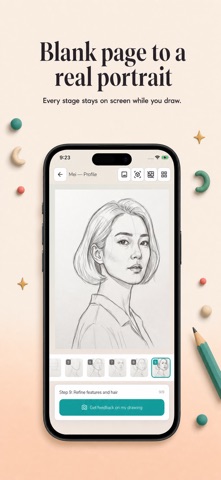
Learn to draw anything — starting with any photo from your camera roll. Pick a photo. Pick a style. In moments, you get a 9-step sketch tutorial laid out panel by panel, just like the structured exercises real artists use. Follow along on paper, on a tablet, or anywhere you can hold a pencil. HOW IT WORKS 1. Upload any photo — a portrait, a pet, a flower, a building, a landscape. 2. Choose your medium — pencil, black ink, or ink & watercolor. 3. Get 9 progressive panels showing exactly how the drawing is built up, from the first light construction lines to the final rendered piece. 4. Swipe panel by panel and sketch each step at your own pace. BUILT ON REAL ARTIST TECHNIQUES Every tutorial follows the same construction methods professional artists teach — the Loomis head method for portraits, gesture-first figure construction, silhouette-before-detail for animals, perspective grids for architecture. You're not tracing. You're learning the thinking behind the drawing. THREE STYLES, ONE PRACTICE • Pencil Sketch — graphite fundamentals, shading, proportion • Black Ink — confident line work, cross-hatching, high contrast • Ink & Watercolor — loose gestural lines with color washes DRAW ANY SUBJECT Portraits. Figures. Animals. Landscapes. Still life. Architecture. Bring your own reference photo or start with the curated examples inside the app. GET FEEDBACK ON YOUR WORK Snap a photo of your finished sketch and get a focused critique — what's working, what to tighten next time, and the one fix that will level you up the fastest. PERFECT FOR • Complete beginners who've always wanted to draw • Hobbyists looking for structured daily practice • Artists learning a new medium • Anyone who learns best by doing Every new user gets free credits to try it out. No subscription required to start. Designed for phone and tablet. Dark mode supported. Screen stays awake while you sketch. Uses Apple's EULA: https://www.apple.com/legal/internet-services/itunes/dev/stdeula/
What's new · 1.1.7
Improved subscription and credit-pack screens, with clearer pricing and credit allowances. Reliability improvements and bug fixes.
Details