

Foreframe
Marcin Sporysz · Photo & Video
Independent analytics for this App Store listing. AppTracker is not affiliated with Marcin Sporysz.
Chart standing · US
What changed · US
Listing changes AppTracker has observed for this app in this storefront — new versions, price moves, rating shifts, and store copy.
New in Foreframe 1.5: • Added Duo support with an interface adapted to the inner display in landscape orientation. • Rebuilt with the latest iOS 27 SDK (27.1). • Renamed the spot status “Want to return” to “Planned”. • Improved viewfinder orientation and consistency between the preview and saved photos, including black-and-white captures. • Improved map framing, especially in landscape. • Improved keyboard handling when creating a spot.
In-app purchases · US
What this app sells inside itself, grouped by kind and priced for this storefront.
Screenshots



Keywords this app targets
Search terms AppTracker associates with this app — estimates, not search volume. ❝ = in the app's title; a highlighted number is its current position for that term.
Similar apps
Competitors and close alternatives, as estimated by AppTracker.



About
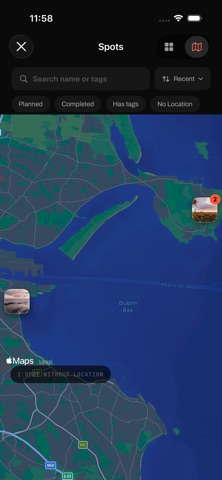
Foreframe turns your iPhone into a pocket viewfinder for your real camera. You see a scene, but your camera is in the bag — or at home. Instead of guessing, open Foreframe, pick your sensor format and focal length, and see exactly what your camera would frame. In seconds you know whether the shot is worth setting up for, or worth coming back for. And when a place deserves a second visit, don't let it slip away. Save the frame as a spot: it keeps the preview photo, the location, your framing settings, and your notes — so the idea survives until you return with the right gear and the right light. A VIEWFINDER THAT SPEAKS YOUR CAMERA'S LANGUAGE - Simulate framing for Full Frame, APS-C 1.5x, APS-C 1.6x, and Micro 4/3 - Dial in focal length and aspect ratio right on the viewfinder - Jump between six customizable quick focal presets while scouting - Automatically uses the best-matching physical iPhone lens for a believable preview - Tap to focus and AE/AF Lock for stable framing at longer focal lengths - Composition guides for thirds, center, diagonals, golden ratio, and golden spiral - Optional 4:5 and square safe areas, plus a live level for precise alignment - Live technical readout: field of view, matched lens, digital zoom SPOTS: A MEMORY FOR PLACES WORTH RETURNING TO - Save any preview as a spot, or add new captures to a spot you already know - Each spot holds its photos, location, tags, a note, and a status — "planned" or "completed" - Browse your spots in a photo-first gallery with search, filters, and sorting - Sort by nearest to see which saved compositions are within reach right now - See all your spots on a map when you're planning a route - Share a complete spot — including every capture, note, tag, location, and framing setting — as a portable .ffspot file - Open shared .ffspot files in Foreframe, preview their contents, and save an independent copy to your own library - Share or save any capture to Photos whenever you want — nothing leaves the app on its own BUILT FOR THE FIELD - Works fully offline — no account, no sign-in, no subscription - All spots stay on your device; Photos access is add-only, your library is never read - Your framing settings and presets are remembered between launches - Fast, native, and designed to stay out of your way FREE TO USE, ONE-TIME UPGRADE Foreframe is free to download, and the viewfinder is free without limits. The free tier includes up to 5 spots with 5 captures each. Foreframe Prime — a single one-time purchase, no subscription — removes the spot limits and includes every future Prime feature. Family Sharing is supported.
What's new · 1.5.0
New in Foreframe 1.5: • Added Duo support with an interface adapted to the inner display in landscape orientation. • Rebuilt with the latest iOS 27 SDK (27.1). • Renamed the spot status “Want to return” to “Planned”. • Improved viewfinder orientation and consistency between the preview and saved photos, including black-and-white captures. • Improved map framing, especially in landscape. • Improved keyboard handling when creating a spot.
Details