

PDF Watch Viewer: WristFile
OBZENA LLC · Education
Independent analytics for this App Store listing. AppTracker is not affiliated with OBZENA LLC.
Chart standing · US
What changed · US
Listing changes AppTracker has observed for this app in this storefront — new versions, price moves, rating shifts, and store copy.
Price & rating history · US
Reconstructed from the listing changes AppTracker has observed in this storefront. A field is charted once it has changed more than once, and each line starts at the value it moved from.
Average rating · ★ 4.89 now · 5 changes on record
Ratings breakdown · US
The star breakdown behind this app's rating in this storefront.
In-app purchases · US
What this app sells inside itself, grouped by kind and priced for this storefront.
Screenshots


About
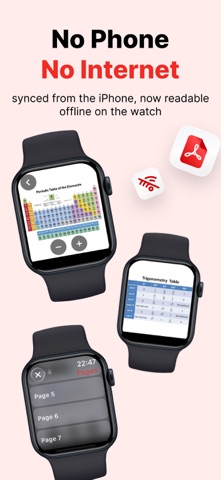
PDF Watch - Read Your Documents on Apple Watch Send documents from your iPhone to your Apple Watch with one tap and read them page by page right on your wrist. Glance at your files quickly without taking out your phone — in meetings, classes, walks, on the go, while studying, or when your hands are full. SUPPORTED DOCUMENT TYPES • PDF files • Word documents (DOCX) • Excel spreadsheets (XLSX) • Photos (JPEG, HEIC, PNG) • Plain text and notes READING ON THE WATCH • Smooth page-to-page navigation • Zoom with the Digital Crown • Quick double-tap to zoom • Pan and drag to move around the page • Single tap hides controls so you can focus on the document • All pages are stored on the Watch — no internet needed to read WHY PDF WATCH • Convenient access: check documents while your phone stays in your pocket • Works offline: in flight, on the subway, or out of coverage • Compact view: pages are optimized for the Watch screen • Fast transfer: small files reach the Watch in seconds • Privacy first: your documents stay on your devices, never uploaded to a server USE CASES • Glance at speaker notes during a presentation as a teleprompter • Follow meeting agendas and action items • Review formulas, tables, and definitions you find hard to memorize while studying • Practice with vocabulary lists or topic summaries • Keep prescriptions, appointments, or travel info on your wrist • Read articles or chapters during walks and runs • Track shopping lists, to-dos, and daily plans • Follow recipe steps hands-free in the kitchen SUBSCRIPTION PLANS PDF Watch Premium is offered with three options: • Weekly subscription • Yearly subscription • Lifetime access (one-time purchase) Prices are shown in the app and may vary by region. Payment will be charged to your Apple ID account at confirmation of purchase. Your subscription automatically renews unless it is canceled at least 24 hours before the end of the current period; the renewal fee is charged to your account at the end of each period. CANCELING YOUR SUBSCRIPTION You can cancel your subscription anytime in Settings > your Apple ID > Subscriptions on your iPhone. Cancellation takes effect at the end of the current billing period. PRIVACY AND TERMS Privacy Policy: https://pdfapplewatch.com/privacy-policy/ Terms of Use: https://pdfapplewatch.com/term-of-use We're always available for your questions and feedback. Carry your information on your wrist with PDF Watch.
What's new · 4.0.1
Major update! • Faster file transfer • New logo • User-friendly interface changes • Dark mode support for your documents Update now for a better experience.
Details