

MatGlass
存滨 崔 · Photo & Video
Independent analytics for this App Store listing. AppTracker is not affiliated with 存滨 崔.
Chart standing · US
What changed · US
Listing changes AppTracker has observed for this app in this storefront — new versions, price moves, rating shifts, and store copy.
3.4 Room scale has been recalibrated. In the app’s built-in rooms, your piece will look larger than before — closer to its true size. If works on a photo wall now sit too close or overlap, rearrange them. Walls you photographed yourself are unchanged. Next to + on the Home screen, use New from Template: pick a framing and a room, then add your own photo. Templates grow from 12 to 24. Rooms grow to 358. Browse All Rooms lets you search, save favorites, and show only rooms with generous empty wall. After you calibrate a photo of your own wall, save it as My Rooms and reuse it. Besides comparing the framing, Compare Full Looks places each saved room and hang side by side.
In-app purchases · US
What this app sells inside itself, grouped by kind and priced for this storefront.
Screenshots




About
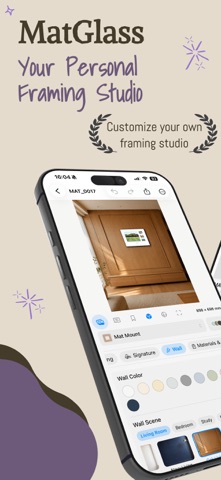
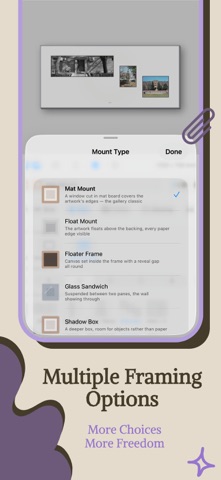
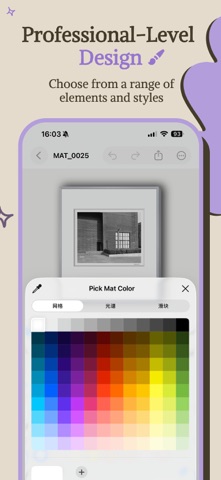
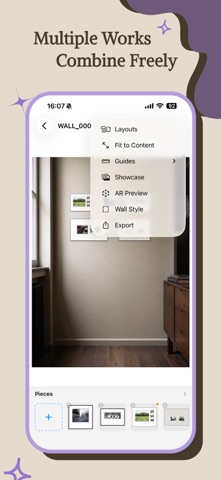
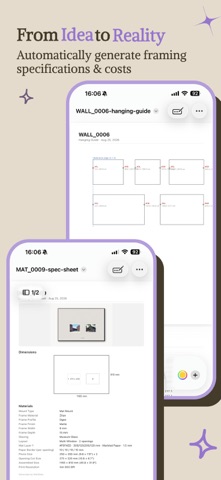
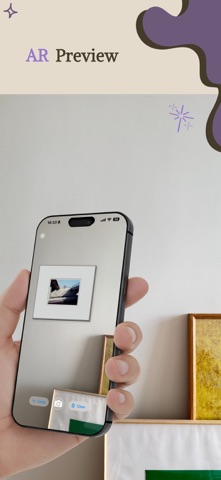
MatGlass is a framing studio for photographers and art lovers. Before you print, see the finished piece on iPhone or iPad: choose a frame, lay the mat, add glazing, then hang the work at true size in a room — every wall has a real width and light, so shadows follow the windows and lamps. Group several pieces into a photo wall, preview the whole arrangement, and export a spec sheet a print shop can follow, plus a hanging guide marked nail by nail. — Rooms — • A hundred-plus realistic rooms in a dozen-plus categories, and growing: living rooms, bedrooms, galleries, studies, dining rooms, and more • Each wall is marked with its true width, a hangable area, and where the light comes from; the piece hangs at real size, at standing eye level • Or use a photo of your own wall; after a three-step calibration it hangs at the same true scale — Framing — • 30 frame finishes: classic woods, brushed metals, European carving, Chinese hardwoods • 11 mounts: window mat, float, floater frame, glass sandwich, shadow box, acrylic face-mount, gallery wrap, dry mount, hanging scroll, and more • Mat styles: single / double / triple, museum, weighted bottom, oriental proportions, French mat, float • Multi-opening mats: 2 to 6 windows in one board — grid, stack, diagonal, staircase, hero, and more — with adjustable gaps and margins • Layered mats: width, colour, and bevel set per layer • Deckle edges, paper borders, and a signature, all adjustable to the millimetre (inches too) • Enlarge a corner sample, the way you would in a framing shop — Smart & efficient — • Smart colour: pull a palette from the photo and build a full mat + frame + wall scheme in one tap (Pro) • Materials & cost: usage from the same sizes as the preview; you enter the unit prices; export with the spec sheet (Pro) • Print-quality check: DPI updates with the output size, and warns if it falls below press standard • Undo / redo, variant compare, save and share framing presets • 12 built-in samples so you can see the styles at a glance — Photo wall (Pro) — • Arrange several pieces freely, at millimetre-true scale • 14 layout templates, plus auto-arrange; adjustable grid snap and alignment guides • Hang them in the rooms above, or on a photo of your own wall • Export the mock-up, a full spec sheet, and a hanging-guide PDF in one go (single-nail cord or two D-rings) — Preview & export — • Live 3D preview, with real shadow and depth • Hold the peek control while you design to see frame thickness; the layout itself never tilts • Showcase: four camera angles, drag to look around, export at original / 1:1 / 4:5 / 9:16 (Pro) • AR preview: place the framed piece in a real room (Pro) • Export a high-resolution image to Photos or share it; spec-sheet PDF in millimetres and inches (Pro) — Data — • Unlimited local saves; one-tap backup and restore (.matglass archive) • Fully offline. No account. No tracking. — Languages — Simplified Chinese, Traditional Chinese, English, 日本語, Deutsch, Français. MatGlass Pro (one-time purchase) unlocks more rooms, Showcase, premium frames and mounts, smart colour, materials & cost, photo walls, your own wall photo, AR preview, and the spec-sheet PDF. The free edition is enough for everyday framing.
What's new · 3.4
3.4 Room scale has been recalibrated. In the app’s built-in rooms, your piece will look larger than before — closer to its true size. If works on a photo wall now sit too close or overlap, rearrange them. Walls you photographed yourself are unchanged. Next to + on the Home screen, use New from Template: pick a framing and a room, then add your own photo. Templates grow from 12 to 24. Rooms grow to 358. Browse All Rooms lets you search, save favorites, and show only rooms with generous empty wall. After you calibrate a photo of your own wall, save it as My Rooms and reuse it. Besides comparing the framing, Compare Full Looks places each saved room and hang side by side.
Details