

SoloMD
向东 李 · Productivity
Independent analytics for this App Store listing. AppTracker is not affiliated with 向东 李.
Chart standing · US
What changed · US
Listing changes AppTracker has observed for this app in this storefront — new versions, price moves, rating shifts, and store copy.
SoloMD 5.0 — a calmer place to write. • A redesigned window: a quiet header with Live / Source / Split / Preview one tap apart, a sidebar for your folders and notes, pill-shaped tabs, and a small word-count pill instead of a status bar. • iPhone: a notes home screen, search and a new-note button at the bottom, and a full-screen editor. • iPad: in portrait the sidebar slides over the page instead of squeezing it. • A new find bar: it stays out of the way, keeps your place, and supports match case, whole word and regular expressions. • Select text for a formatting bubble; on iPhone and iPad a keyboard bar adds headings, lists, links and code. • Fold headings from the gutter to see the shape of a long document. • Menus and shortcuts reorganized; every shortcut can be rebound, and shortcuts show ⌘ on iPad. • Faster first paint: math and code highlighting load after the page appears. • Chinese proofreading no longer flags file names like 文档.md or an ellipsis as punctuation mistakes. Thanks to 张工 for weeks of careful testing that shaped this release.
Ratings breakdown · US
The star breakdown behind this app's rating in this storefront.
Screenshots

About
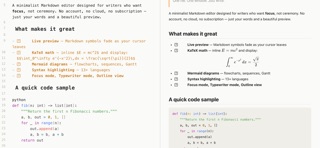
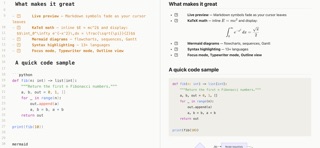
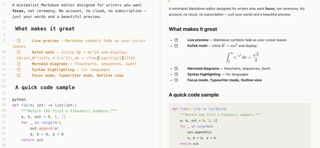
SoloMD is a lightweight, distraction-free Markdown editor for iPad. One file. One window. Just write. Built from the ground up as a focused writing tool - no account, no cloud, no telemetry, no subscription. Your notes stay in plain .md and .txt files on your iPad, readable by any editor on any platform, today and in ten years. CORE EDITING - Live preview - Markdown symbols fade out after the cursor leaves the line. - Rich syntax styling - real big headings, real bold, real monospace for code. - Light and Dark themes that follow iPad system appearance. - Multi-encoding - auto-detects UTF-8, UTF-16, GBK, Big5. - Tabs with dirty indicators. - File tree sidebar, outline view, and global search. MARKDOWN POWER - KaTeX math - inline and block math render instantly. - Mermaid diagrams - flowcharts, sequence diagrams, Gantt charts. - Task lists with clickable checkboxes. - Footnotes, YAML front-matter, text highlighting. - Syntax highlighting for 13 plus languages. - Synced split-pane scroll. - Tap an image or Mermaid diagram to open a pinch-zoomable overlay. BUILT FOR IPAD - 44 pt touch targets across toolbar, outline, and file tree. - Larger default font sizes tuned for iPad screen distance. - Split-view and multitasking friendly. - Works with hardware keyboards. - Portrait and landscape, every orientation. WRITER TOOLS - Focus mode - non-current paragraphs dim for deep work. - Typewriter mode. - Session restore - auto-saves so you never lose a line. - Chinese power tools - simplified/traditional conversion, pinyin, CJK word counts. - Spell check. - Custom CSS. EXPORT - HTML (newsletter quality) - PDF with KaTeX and Mermaid baked in - Word (.docx) with tables preserved - Copy as HTML, plain text, or Markdown PRIVACY FIRST SoloMD collects no personal data. No account. No analytics. No ads. No tracking. All your notes live locally in files you own. SoloMD is open source (MIT). Source: github.com/zhitongblog/solomd
What's new · 5.0.0
SoloMD 5.0 — a calmer place to write. • A redesigned window: a quiet header with Live / Source / Split / Preview one tap apart, a sidebar for your folders and notes, pill-shaped tabs, and a small word-count pill instead of a status bar. • iPhone: a notes home screen, search and a new-note button at the bottom, and a full-screen editor. • iPad: in portrait the sidebar slides over the page instead of squeezing it. • A new find bar: it stays out of the way, keeps your place, and supports match case, whole word and regular expressions. • Select text for a formatting bubble; on iPhone and iPad a keyboard bar adds headings, lists, links and code. • Fold headings from the gutter to see the shape of a long document. • Menus and shortcuts reorganized; every shortcut can be rebound, and shortcuts show ⌘ on iPad. • Faster first paint: math and code highlighting load after the page appears. • Chinese proofreading no longer flags file names like 文档.md or an ellipsis as punctuation mistakes. Thanks to 张工 for weeks of careful testing that shaped this release.
Details