

Jeomatik Viewer
Erdinc Orsan Unal · Graphics & Design
Independent analytics for this App Store listing. AppTracker is not affiliated with Erdinc Orsan Unal.
Chart standing · US
What changed · US
Listing changes AppTracker has observed for this app in this storefront — new versions, price moves, rating shifts, and store copy.
- New home screen: A map, the Jeomatik logo, and access to Open File and Settings. - Recent files: Reopen your last 5 files and reselect files that are no longer accessible. - Full-screen iPad layout: Removed the empty space at the top and expanded the map area. - Simplified tool menus: Measurement, Query and More groups, with larger touch targets. - Multiple windows on iPad: Each window has its own drawing and working state. - Keyboard shortcuts: Open files, save, undo draft points, exit tools, zoom to the drawing and open a new window. - Apple Pencil support: Hover, double-tap and squeeze actions on compatible devices. - Improved label display: Fixed on-screen size, automatic visibility based on zoom, and more consistent placement. - Added a linear scale bar and removed the application's drawing zoom-in limit. - Improved information panels: Content-sized height and better placement when the keyboard is open. - Layers and Settings layout: GPS points are grouped under KULLANICI_NOKTALAR; Thick Drawing is in the layer panel; Web Services has a separate page. - User experience and interface improvements.
Screenshots



Keywords this app targets
Search terms AppTracker associates with this app — estimates, not search volume. ❝ = in the app's title; a highlighted number is its current position for that term.
Similar apps
Competitors and close alternatives, as estimated by AppTracker.




About
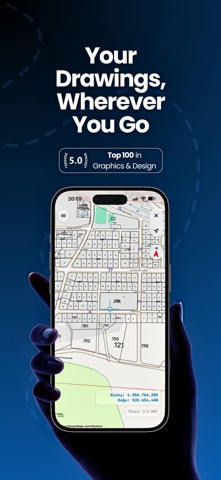
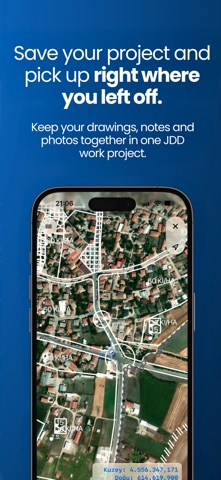
Open CAD drawings and geospatial data on iPhone, iPad and Mac, inspect them on a map, and add new geometry and photos to your drawing. Jeomatik Viewer supports Netcad NCZ, DXF, DWG, DGN V7, KML, KMZ and ESRI Shapefile (SHP) files. WORK MORE COMFORTABLY Open files from the refreshed home screen and quickly access your five most recent files. Work with a full-screen map and independent windows on iPad. Use keyboard shortcuts and Apple Pencil hover, double-tap and squeeze actions on compatible devices. EXPLORE YOUR DRAWINGS Search layers, view them under group headings, expand or collapse groups, and toggle child layers together. Navigate with pan, zoom, zoom window and zoom extents. Display point and area labels, closed-area fills, coordinates and scale information. Add references to multiple different file types. Thicken the drawing for comfortable work in the field. Change the layer color. CREATE POINTS, LINES AND AREAS Create points, polylines and closed areas in an open drawing. Edit a point's name and attach photos before saving it. Move draft vertices, undo the last point or cancel a line or area. Completed geometry is added to the user drawings layer; the source file is not automatically overwritten. Use Pro export tools to save the result as a file. QUERY PARCELS Download parcel geometry from TKGM using the parcel query tool—either by specifying the block and parcel numbers or by selecting the location directly on the map. MAPS AND COORDINATE SYSTEMS View supported georeferenced data over Apple Maps, Apple Satellite, OpenStreetMap, XYZ web services or offline MBTiles. Add XYZ services from the map service catalog or use your own service URL. Select your basemap from a single list and add WMS services as reference layers. Assign a coordinate system by selecting a datum and projection or searching for a supported EPSG code. Common options cover TUREF, WGS 84, ED50, ETRS89, NAD83 and GDA2020. Not every EPSG code or Shapefile projection is supported. KML and KMZ folders become layers, with support for style colors and multipart geometry. Matching PRJ and DBF sidecar files provide coordinate-system and object information for SHP data. JDD WORK PROJECTS Save the main drawing, view, object notes and photos in a JDD project. Use Save Project to save your work. Reference drawings and MBTiles sources remain linked files. FREE AND PRO TOOLS Opening files, viewing drawings, controlling layers and creating points, lines and areas are free. A one-time Pro purchase unlocks adding reference files and web services, object properties, distance and area measurement, and export to NCZ, DXF, DWG, DGN V7, PNG, PDF, KMZ and GeoJSON. No subscription is required. Snapping options include points, endpoints, midpoints, positions on lines, centers and intersections. IMPORTANT DETAILS DGN support is limited to V7/ISFF; DGN V8 is not supported. PNG/PDF exports contain the drawing, not the basemap. KMZ/GeoJSON export requires a supported coordinate transformation. Local file viewing does not require an account; online maps and purchases use an internet connection. DWG is a trademark or registered trademark of Autodesk, Inc. Jeomatik Viewer is an independent application and is not affiliated with or endorsed by Autodesk.
What's new · 2.7
- New home screen: A map, the Jeomatik logo, and access to Open File and Settings. - Recent files: Reopen your last 5 files and reselect files that are no longer accessible. - Full-screen iPad layout: Removed the empty space at the top and expanded the map area. - Simplified tool menus: Measurement, Query and More groups, with larger touch targets. - Multiple windows on iPad: Each window has its own drawing and working state. - Keyboard shortcuts: Open files, save, undo draft points, exit tools, zoom to the drawing and open a new window. - Apple Pencil support: Hover, double-tap and squeeze actions on compatible devices. - Improved label display: Fixed on-screen size, automatic visibility based on zoom, and more consistent placement. - Added a linear scale bar and removed the application's drawing zoom-in limit. - Improved information panels: Content-sized height and better placement when the keyboard is open. - Layers and Settings layout: GPS points are grouped under KULLANICI_NOKTALAR; Thick Drawing is in the layer panel; Web Services has a separate page. - User experience and interface improvements.
Details