

iPhonotype
Vinicius Lube · Utilities
Independent analytics for this App Store listing. AppTracker is not affiliated with Vinicius Lube.
Chart standing · US
What changed · US
Listing changes AppTracker has observed for this app in this storefront — new versions, price moves, rating shifts, and store copy.
• Keep your presentation scans together in Favorites, and add or remove multiple scans from the selection toolbar. • View supported reconstructed models with native AR and Object viewing. • Improved Gaussian splat loading and viewing on iPhone. • Improved root-analysis overlays, image inspection and Petri-dish time-series workflows. • Spatial Orbit capture now starts with 2 GB of available storage.
In-app purchases · US
No in-app purchases.
Screenshots





About
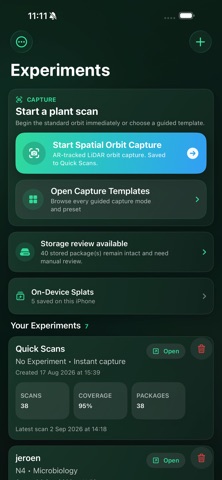
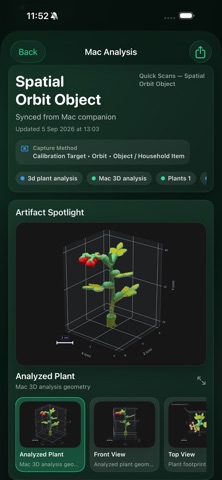
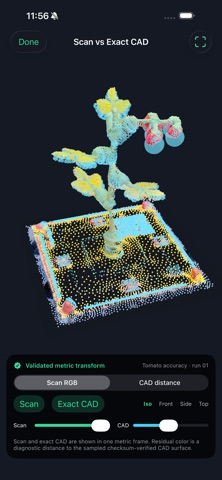
iPhonotype is a mobile plant phenotyping app for researchers, labs, and controlled-environment workflows. Capture structured plant datasets directly on iPhone and organize them into experiments that are ready for downstream analysis. Use iPhonotype to record 3D plant scans, root imaging datasets, environmental light measurements, leaf reflectance readings, and top-view phenotyping sessions from a single mobile workflow. Key capabilities include: • 3D plant scanning and packaged capture sessions • Root capture workflows for dishes, videos, and scanner-style datasets • Environmental light and leaf reflectance measurements • 2D phenotyping workflows for foliage, seed lots, and fruit lots • On-device organization of experiments, sessions, and packaged results • Batch 3D preview building for selected scans, paced to protect device stability • Export of available preliminary traits and segmentation-mask evidence • Sync and handoff to iPhonotype Studio for deeper desktop analysis iPhonotype is built for scientific imaging workflows where traceable capture, organized data packaging, and flexible downstream analysis matter. Preliminary on-device traits support field checks. iPhonotype Studio remains the recommended workflow for final desktop analysis.
What's new · 2.3.1
• Keep your presentation scans together in Favorites, and add or remove multiple scans from the selection toolbar. • View supported reconstructed models with native AR and Object viewing. • Improved Gaussian splat loading and viewing on iPhone. • Improved root-analysis overlays, image inspection and Petri-dish time-series workflows. • Spatial Orbit capture now starts with 2 GB of available storage.
Details