

growDay -Health Habit Agent
天舒 姚 · Health & Fitness
Independent analytics for this App Store listing. AppTracker is not affiliated with 天舒 姚.
Chart standing · US
What changed · US
Listing changes AppTracker has observed for this app in this storefront — new versions, price moves, rating shifts, and store copy.
New Features: - iPhone Duo · Full support: folded, unfolded portrait, unfolded landscape — every page adapts to the posture. Overview tiles keep one consistent size in every pose; the mood page's sky and clouds, the readiness flower field, and the body-age backdrop all extend to the physical screen edge; 16 habit detail headers stretch right along with the shape; the workout detail page splits in landscape — map on the left, a glass data panel on the right; the onboarding pages center on wide screens; and toolbar buttons tuck themselves into Duo's vertical sidebar. Every side of the fold, just right. - Duo-HRV friend picker on Watch: with several friends, tap the friend column on the duo-HRV detail page to choose who appears on your watch face — the complication follows your choice. - Readiness wilting flowers: when the score is 5 or below, the header turns to wilted leaves; above 5 it still blooms. How today looks, the background tells you first. - Custom water quick-add: long-press any of the 6 quick amounts to set its ml, and the Home Screen water widget buttons follow instantly; long-press a water record to edit that entry's ml too. - Body age computed on Watch: the full nine-factor engine now runs on the watch itself — no more waiting for the iPhone push. Raise your wrist, your body age is there. Bug Fixes: - Fixed friends missing from the watch duo-HRV (major, production): a debug-only switch leaked into release builds and pushed an empty friend list — your friends are truly back on the watch face. - Fixed the duo-HRV friend showing "--" on the watch face: when HealthKit was slowed down by the system, friend data was discarded along with the slow local query; now a timeout only degrades your own value, and friend data is kept from local storage. - A string of competition-friend annoyances fixed: you're visible to each other right after accepting an invite — no more quarter-hour waits; custom care messages no longer come and go — every word stays pinned to its moment; care reaches across different circles; reading A's timeline no longer marks B's new care as read; and you can no longer remove yourself from a competition by accident. - Fixed the competition "+" invite button not responding: a storm of startup pop-ups deadlocked the root controller — they now queue up one by one. - Fixed Readiness scores disagreeing between iPhone and Watch: the phone renews its authority all day, pushes the moment the score changes, and the watch pulls when its copy goes stale — identical to the point. - Three fixes for friend-care bubbles on the overview: added the missing "me → friend" direction bubble, custom care text now shows fully in the timeline, and bubbles are no longer clipped sideways. - Fixed the dark blur veiling the top hero of 18 habit detail pages (a new iOS 26 system behavior) — true colors again. - Fixed half of the readiness flower field blooming in reverse: it now scrolls one way, in perfect order. - Fixed sleep durations wrapping to two lines in Health Calendar history. - Fixed an occasional crash in weather location.
Ratings breakdown · US
The star breakdown behind this app's rating in this storefront.
In-app purchases · US
No in-app purchases.
Screenshots



About
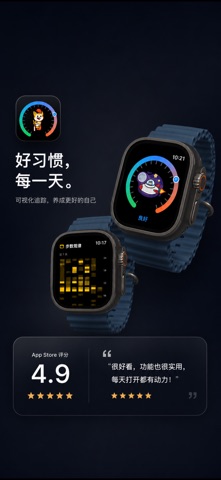
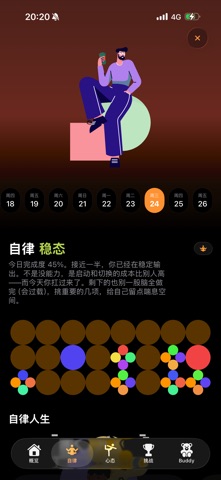
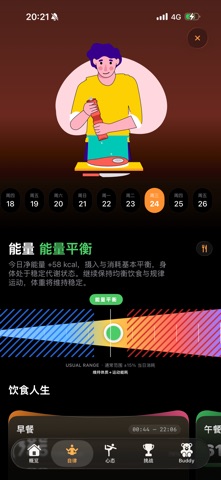
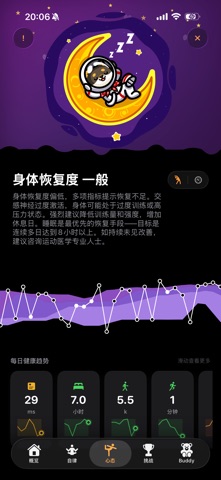
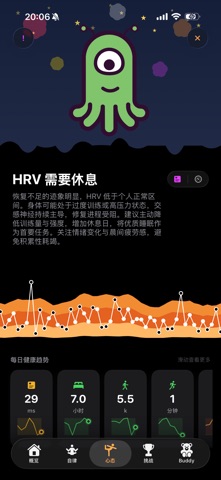
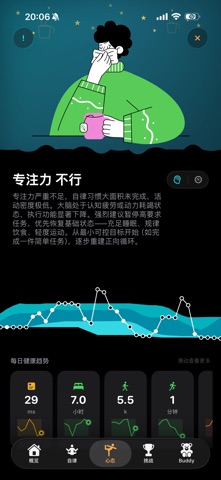
Healthcare is an Apple Intelligence-powered personal health companion that helps you manage your physical and mental wellbeing. Dashboard: At-a-glance view of 20 health metrics including steps, sleep, water, exercise, heart rate, blood oxygen, wrist temperature, and HRV. A large progress ring shows daily goal completion, with a 7-day mini-ring strip for trend tracking. Confetti celebrates perfect days. Discipline Habits: Six life categories (Learning, Life, Parenting, Pets, Social, Work) with 60 preset activities and custom options. Dual concentric rings display habit and diet progress simultaneously. Gantt timeline shows daily activity schedule, and weekly reports summarize achievements. Category completion triggers exclusive Lottie celebration animations. Diet Tracking: Log breakfast, lunch, and dinner with an 80+ food database covering 22 nutrients (calories, protein, carbs, fat, fiber, vitamins, minerals). All 39 dietary nutrients automatically sync to Apple Health. A 7-day calorie trend curve compares intake versus expenditure. AI Daily Analysis: Every night at 8 PM, a smart analysis report is generated based on your day's habits and diet data, streamed by MiniMax M2.7 with personalized insights and recommendations. Health Assistant: An AI chatbot that answers health questions, generates daily schedules, and accesses real-time weather and health knowledge. Mood Tracking: 10-level mood recording with notes. A 30-day curve and calendar view track emotional patterns, with a Mood x HRV cross-analysis chart. Challenges & Badges: 19 seasonal sports challenges with rotating seasonal artwork and poetry. Earn badges for completion. CloudKit leaderboards and friend competition. Buddy Pets: Capture a procedurally generated virtual pet daily by completing 5 habits. Visit landmarks to find rare Golden Buddies. A gallery displays all collected buddies with GIF sharing. Sleep Analysis: Sleep stage hypnogram, sleeping heart rate curve, blood oxygen during sleep, and composite quality score. Snore Detection: Real-time microphone analysis with per-stage snore severity rings. Audio clip playback. Auto sleep stage estimation without Apple Watch. Coffee & Water Tracking: Log coffee with caffeine metabolism curve and safe bedtime alerts. Water intake with time-distribution charts and hydration scoring. Widget: iOS home screen widget showing daily habit progress. Multi-language: Chinese Simplified, Chinese Traditional, English, Japanese, Korean, Spanish, French, German.
What's new · 1.3.87
New Features: - iPhone Duo · Full support: folded, unfolded portrait, unfolded landscape — every page adapts to the posture. Overview tiles keep one consistent size in every pose; the mood page's sky and clouds, the readiness flower field, and the body-age backdrop all extend to the physical screen edge; 16 habit detail headers stretch right along with the shape; the workout detail page splits in landscape — map on the left, a glass data panel on the right; the onboarding pages center on wide screens; and toolbar buttons tuck themselves into Duo's vertical sidebar. Every side of the fold, just right. - Duo-HRV friend picker on Watch: with several friends, tap the friend column on the duo-HRV detail page to choose who appears on your watch face — the complication follows your choice. - Readiness wilting flowers: when the score is 5 or below, the header turns to wilted leaves; above 5 it still blooms. How today looks, the background tells you first. - Custom water quick-add: long-press any of the 6 quick amounts to set its ml, and the Home Screen water widget buttons follow instantly; long-press a water record to edit that entry's ml too. - Body age computed on Watch: the full nine-factor engine now runs on the watch itself — no more waiting for the iPhone push. Raise your wrist, your body age is there. Bug Fixes: - Fixed friends missing from the watch duo-HRV (major, production): a debug-only switch leaked into release builds and pushed an empty friend list — your friends are truly back on the watch face. - Fixed the duo-HRV friend showing "--" on the watch face: when HealthKit was slowed down by the system, friend data was discarded along with the slow local query; now a timeout only degrades your own value, and friend data is kept from local storage. - A string of competition-friend annoyances fixed: you're visible to each other right after accepting an invite — no more quarter-hour waits; custom care messages no longer come and go — every word stays pinned to its moment; care reaches across different circles; reading A's timeline no longer marks B's new care as read; and you can no longer remove yourself from a competition by accident. - Fixed the competition "+" invite button not responding: a storm of startup pop-ups deadlocked the root controller — they now queue up one by one. - Fixed Readiness scores disagreeing between iPhone and Watch: the phone renews its authority all day, pushes the moment the score changes, and the watch pulls when its copy goes stale — identical to the point. - Three fixes for friend-care bubbles on the overview: added the missing "me → friend" direction bubble, custom care text now shows fully in the timeline, and bubbles are no longer clipped sideways. - Fixed the dark blur veiling the top hero of 18 habit detail pages (a new iOS 26 system behavior) — true colors again. - Fixed half of the readiness flower field blooming in reverse: it now scrolls one way, in perfect order. - Fixed sleep durations wrapping to two lines in Health Calendar history. - Fixed an occasional crash in weather location.
Details