

FileStasher: Photo Vault Safe
ALEX ALEKSEYEV · Utilities
Independent analytics for this App Store listing. AppTracker is not affiliated with ALEX ALEKSEYEV.
Chart standing · US
What changed · US
Listing changes AppTracker has observed for this app in this storefront — new versions, price moves, rating shifts, and store copy.
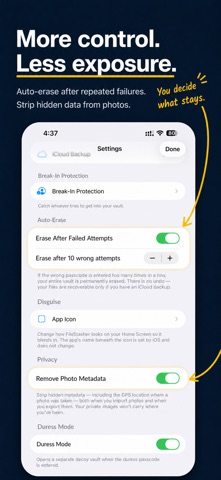
Introducing Break-In Protection — see who tries to get into your vault. • Catch failed unlock attempts. With Break-In Protection enabled and camera access granted, a wrong passcode can trigger a front-camera photo. There is no in-app preview or shutter animation; standard iOS camera privacy controls still apply. • Backed up to your iCloud. Each break-in photo is encrypted on device and saved to your own iCloud when a connection is available, so you'll still have the evidence even if your phone is lost, stolen, or wiped. • See them on any device. Sign in with your passcode on another iPhone and your break-in photos are right there — protected by your passcode, not tied to a single device. • Optional location. Choose to tag each photo with where the attempt happened — handy if your phone goes missing. • New: Auto-Erase. For maximum protection, set your vault to permanently erase itself after too many wrong passcode attempts in a row — a safeguard if your phone is lost, stolen, or taken. It's off by default, the number of attempts is up to you, and you confirm before it's armed. • New: Disguise. Give FileStasher a low-key Home Screen icon — like a calculator, clock, or notes app — so it blends in. The icon changes; the displayed app name remains FileStasher. • New: Remove Photo Metadata. Strip hidden data — including the GPS location where a photo was taken — from photos both when you import them and when you export them, so your private images don't quietly carry where you've been. Break-In Protection, Auto-Erase, Disguise, and Remove Photo Metadata are part of Premium. If you already own Premium, they're yours at no extra cost — just update and turn them on. Also in this version: • Now available in Japanese, Italian, and Brazilian Portuguese, bringing the total to eight languages: English, Russian, German, Spanish, French, Japanese, Italian, and Brazilian Portuguese. Every button, label, prompt, error message, and the camera and Face ID permission dialogs have been translated. iOS picks the right language automatically based on your phone's Language & Region setting. • Reduce Motion is now honored throughout. If you've turned on Settings → Accessibility → Motion → Reduce Motion, FileStasher's screen transitions, fades, and step animations switch to instant state changes instead of tweening. Helpful for anyone with vestibular sensitivity, motion sickness, or migraines. • A small visual polish on two pill badges (the "Premium" badge in Settings and the "Latest" badge on the most recent iCloud backup) so they read more clearly at small sizes and meet contrast standards. • Photos and videos now keep their original format when you add them — a HEIC stays a HEIC — and you can share more files into the vault at once, with a progress indicator for larger batches. • Faster, more reliable iCloud restore. Setting up on a new device now brings your encrypted backups back more quickly and dependably. • As always, FileStasher collects no data — break-in photos go only to your own iCloud, never to us. No changes to encryption or your existing files.
Screenshots






About
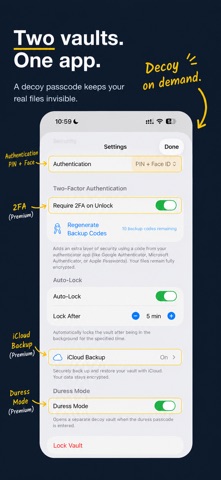
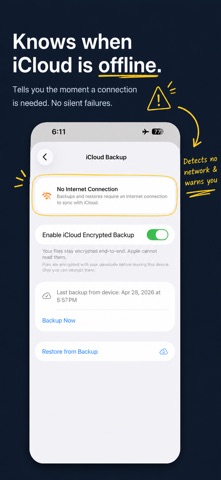
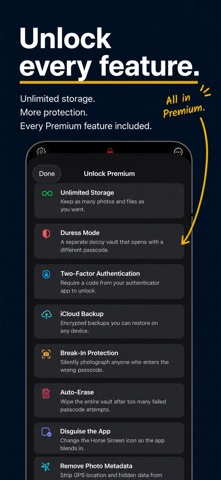
Hide photos, videos, IDs, and private files in an encrypted vault built for iPhone. No account, ads, analytics, or subscription. FREE & PREMIUM New free installs can store up to 30 items (250 MB), scan documents, organize folders, preview PDFs, and import from Photos, Files, or the share sheet. Existing users who had a vault before this limit was introduced stay unlimited. Premium is one purchase: unlimited storage plus a decoy vault, two-factor authentication, encrypted iCloud backup, Break-In Protection, Auto-Erase, Disguise, and photo-metadata removal. Existing Premium owners get every Premium feature at no extra cost. WHAT MAKES FILESTASHER DIFFERENT ▸ DECOY VAULT [Premium] A second passcode opens a separate decoy vault with different contents. Your real vault remains hidden, with no sign that it exists. ▸ BREAK-IN PROTECTION [Premium] When enabled and granted camera access, a wrong passcode can trigger a front-camera photo. Captures are encrypted and backed up to your own iCloud when available, so you can review them from another iPhone after unlocking with your real passcode. Location tagging is optional. ▸ AUTO-ERASE [Premium] Choose whether the vault should permanently erase itself after repeated wrong passcodes. It is off by default, the threshold is configurable, and arming it requires confirmation. ▸ DISGUISE [Premium] Choose a low-key alternate Home Screen icon. iOS changes the icon only; the displayed app name remains FileStasher. ▸ REMOVE PHOTO METADATA [Premium] Strip hidden GPS, EXIF, IPTC, and TIFF metadata from images on import and export while preserving orientation. Your original photo-library copy is not changed. ▸ TWO-FACTOR AUTHENTICATION [Premium] Add a second layer with any standard authenticator app. Ten emergency backup codes help you regain access. ▸ END-TO-END ENCRYPTED iCLOUD BACKUP [Premium] Optional snapshots are encrypted on your device with your passcode before upload to your own iCloud. Restore them on another iPhone signed in to the same iCloud account. ▸ BUILT-IN DOCUMENT SCANNER Scan one or many pages straight into the vault as an encrypted PDF. Included with the free app. ▸ ZERO DATA COLLECTED No tracking, analytics, telemetry, third-party SDKs, or developer server. Your files and break-in captures are never sent to us. WHAT YOU CAN STORE • Photos and videos in their original format • IDs, passports, and driver's licenses • Tax forms, contracts, receipts, and medical documents • PDFs, including multi-page camera scans • Anything you can share from Files, Safari, Mail, Photos, Notes, and more HOW YOU UNLOCK Choose PIN, Face ID / Touch ID, or biometrics plus PIN. Premium can add authenticator-based 2FA. Repeated failures trigger a timed lockout. INSIDE THE VAULT • Color-coded folders nested as deeply as you need • Built-in image, video, and PDF previews • Batch export, move, and delete • Configurable auto-lock and instant lock when your device locks • VoiceOver support, accessibility labels, and Reduce Motion support SECURITY DETAILS Files use AES-256-GCM encryption via Apple's CryptoKit. Your encryption key is derived from your passcode using PBKDF2-HMAC-SHA256. There is no master key, backdoor, or passcode-reset link; if you forget your passcode and have no usable backup path, your files cannot be recovered. LANGUAGES English, Russian, German, Spanish, French, Japanese, Italian, and Brazilian Portuguese. Every screen, prompt, and permission dialog is translated. iOS selects the language from your device settings. REQUIREMENTS • iPhone running iOS 18 or later • An iCloud account only for optional encrypted backup and Break-In Protection sync
What's new · 1.0.9
Introducing Break-In Protection — see who tries to get into your vault. • Catch failed unlock attempts. With Break-In Protection enabled and camera access granted, a wrong passcode can trigger a front-camera photo. There is no in-app preview or shutter animation; standard iOS camera privacy controls still apply. • Backed up to your iCloud. Each break-in photo is encrypted on device and saved to your own iCloud when a connection is available, so you'll still have the evidence even if your phone is lost, stolen, or wiped. • See them on any device. Sign in with your passcode on another iPhone and your break-in photos are right there — protected by your passcode, not tied to a single device. • Optional location. Choose to tag each photo with where the attempt happened — handy if your phone goes missing. • New: Auto-Erase. For maximum protection, set your vault to permanently erase itself after too many wrong passcode attempts in a row — a safeguard if your phone is lost, stolen, or taken. It's off by default, the number of attempts is up to you, and you confirm before it's armed. • New: Disguise. Give FileStasher a low-key Home Screen icon — like a calculator, clock, or notes app — so it blends in. The icon changes; the displayed app name remains FileStasher. • New: Remove Photo Metadata. Strip hidden data — including the GPS location where a photo was taken — from photos both when you import them and when you export them, so your private images don't quietly carry where you've been. Break-In Protection, Auto-Erase, Disguise, and Remove Photo Metadata are part of Premium. If you already own Premium, they're yours at no extra cost — just update and turn them on. Also in this version: • Now available in Japanese, Italian, and Brazilian Portuguese, bringing the total to eight languages: English, Russian, German, Spanish, French, Japanese, Italian, and Brazilian Portuguese. Every button, label, prompt, error message, and the camera and Face ID permission dialogs have been translated. iOS picks the right language automatically based on your phone's Language & Region setting. • Reduce Motion is now honored throughout. If you've turned on Settings → Accessibility → Motion → Reduce Motion, FileStasher's screen transitions, fades, and step animations switch to instant state changes instead of tweening. Helpful for anyone with vestibular sensitivity, motion sickness, or migraines. • A small visual polish on two pill badges (the "Premium" badge in Settings and the "Latest" badge on the most recent iCloud backup) so they read more clearly at small sizes and meet contrast standards. • Photos and videos now keep their original format when you add them — a HEIC stays a HEIC — and you can share more files into the vault at once, with a progress indicator for larger batches. • Faster, more reliable iCloud restore. Setting up on a new device now brings your encrypted backups back more quickly and dependably. • As always, FileStasher collects no data — break-in photos go only to your own iCloud, never to us. No changes to encryption or your existing files.
Details