

DoodleRise - Draw Alarm
Kokado Ryosuke · Lifestyle
Independent analytics for this App Store listing. AppTracker is not affiliated with Kokado Ryosuke.
Chart standing · US
What changed · US
Listing changes AppTracker has observed for this app in this storefront — new versions, price moves, rating shifts, and store copy.
Vibration-only alarms and iPad support are here! NEW • Choose the new vibration-only setting to use your alarm without an alarm sound. • Enjoy drawing and browsing your gallery on iPad, with layouts that adapt to the larger screen. • Find the latest updates in the new in-app News list. Unread indicators make it easy to see what you haven't read yet. IMPROVED & FIXED • Alarm settings and drawing challenge settings now have separate sections, making your morning setup easier to navigate. • Fixed the gallery order so your drawings appear correctly by the date and time you created them. • Made sign-in error messages clearer so you can better understand what to do when sign-in fails.
Price & rating history · US
Reconstructed from the listing changes AppTracker has observed in this storefront. A field is charted once it has changed more than once, and each line starts at the value it moved from.
Average rating · ★ 0.00 now · 2 changes on record
In-app purchases · US
What this app sells inside itself, grouped by kind and priced for this storefront.
Screenshots



Keywords this app targets
Search terms AppTracker associates with this app — estimates, not search volume. ❝ = in the app's title; a highlighted number is its current position for that term.
Similar apps
Competitors and close alternatives, as estimated by AppTracker.
 Alarmy - Loud alarm clock
Delight Room Co., Ltd.
1 shared topic · 1 shared title word
Alarmy - Loud alarm clock
Delight Room Co., Ltd.
1 shared topic · 1 shared title word
 Arcana Alarm
Bernar Omarshayev
1 shared topic · 1 shared title word
Arcana Alarm
Bernar Omarshayev
1 shared topic · 1 shared title word
 Drawsy: AR Draw for Sketching
EIGEN SOFTWARE LIMITED
1 shared title word
Drawsy: AR Draw for Sketching
EIGEN SOFTWARE LIMITED
1 shared title word
 ArtWorkout: Learn How to Draw
Aleksandr Ulitin
1 shared title word
ArtWorkout: Learn How to Draw
Aleksandr Ulitin
1 shared title word
 Clucky - Loud Alarm Clock
Adrian Angelo Abelarde
1 shared topic · 1 shared title word
Clucky - Loud Alarm Clock
Adrian Angelo Abelarde
1 shared topic · 1 shared title word
 ArtCoach:Learn to Draw & Paint
PIXELCELL.LIMITED
1 shared title word
ArtCoach:Learn to Draw & Paint
PIXELCELL.LIMITED
1 shared title word
 Draw Every Day
Sam Bleckley
1 shared title word
Draw Every Day
Sam Bleckley
1 shared title word
 Lockscreen Drawing Together
Egor Barabash
Lockscreen Drawing Together
Egor Barabash
About
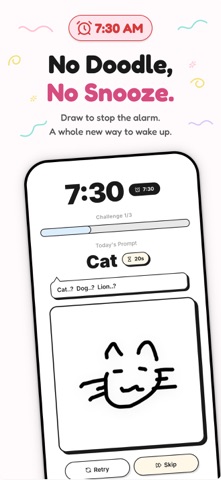
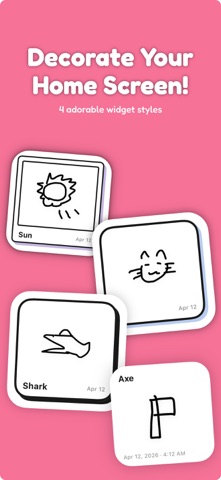
Stop snoozing. Start drawing. DoodleRise is a challenge alarm clock: complete the drawing challenge to turn off your alarm. Turn your morning wake-up into a small creative achievement, and share it with friends. 【DRAW TO STOP YOUR ALARM】 Set a wake-up time, draw the prompted subject, and pass the drawing check to stop the alarm. Choose the number of challenges and difficulty to suit your morning. With more than 300 prompts, from animals to everyday objects, you do not need to be an artist to get started. Drawing recognition runs on your device, so alarms and drawing challenges work offline. 【ALARM SOUNDS OR VIBRATION ONLY】 Choose from 12 free alarm sounds, or enable vibration-only mode for an alarm without an audible alarm sound. Vibration depends on your iPhone hardware and system settings; iPad does not vibrate. 【BUILD A MORNING HABIT WITH FRIENDS】 Create a private group with friends or family. Share your completed drawings as photo-style cards and react with stamps and comments. Posting a drawing lets you view the group's drawings for that day. Sharing is optional: you can also use your alarm on your own. 【A GALLERY OF YOUR MORNINGS】 Your drawings are saved in your gallery. Look back on your morning art, keep a visual journal, and see your progress through wake-up streaks and monthly reflections. Add a drawing widget to keep your creations close. 【DRAW ANYTIME, ON IPHONE OR IPAD】 Use Free Play to sketch outside your alarm. On iPad, enjoy layouts adapted to the larger screen. Find app updates in the News list, with unread indicators to help you catch up. Set an alarm tonight. Start tomorrow with a drawing. 【ABOUT PREMIUM PLANS】 This app offers monthly and annual subscription plans. For the latest pricing, duration, and free trial availability, please see the in-app purchase screen or the "In-App Purchases" section on the product page. Payment will be charged to your App Store account. You can cancel auto-renewal at any time up to 24 hours before the end of the current period. Manage your subscription and turn off auto-renewal in your App Store account settings. Terms of Use: https://doodlerise.yasai.dev/en/terms/ Privacy Policy: https://doodlerise.yasai.dev/en/privacy/
What's new · 2.0.9
Vibration-only alarms and iPad support are here! NEW • Choose the new vibration-only setting to use your alarm without an alarm sound. • Enjoy drawing and browsing your gallery on iPad, with layouts that adapt to the larger screen. • Find the latest updates in the new in-app News list. Unread indicators make it easy to see what you haven't read yet. IMPROVED & FIXED • Alarm settings and drawing challenge settings now have separate sections, making your morning setup easier to navigate. • Fixed the gallery order so your drawings appear correctly by the date and time you created them. • Made sign-in error messages clearer so you can better understand what to do when sign-in fails.
Details