

Chart standing · US
What changed · US
Listing changes AppTracker has observed for this app in this storefront — new versions, price moves, rating shifts, and store copy.
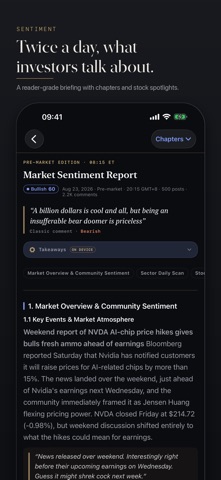
One thing in this release: the sentiment report scrolls smoothly the first time you open it. • Sentiment report — Opening the report from a notification and scrolling could drop frames. Two things were to blame: the page re-parsed the whole report on every scroll tick, and at the same moment the app was drawing dozens of Spotlight thumbnails on the main thread. The report is now parsed once, and a scroll only moves the reading-progress line at the top; the Spotlight thumbnails draw in the background and are skipped when nothing has changed.
Ratings breakdown · US
The star breakdown behind this app's rating in this storefront.
Screenshots





About
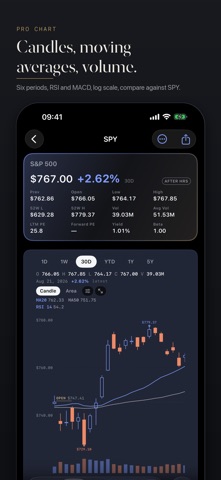
A market environment dashboard for self-directed investors. One percentile reading tells you where macro liquidity sits; nine surfaces tell you what's moving and why; a Pro Chart on every ticker shows how. No account, no subscription, no ads. Never will be. WHAT IT DOES • Nine Languages — English, 简体中文, 繁體中文, 日本語, 한국어, Français, Español, Deutsch and Tiếng Việt, across the app, the widgets, the Dynamic Island and Siri. Follow your phone's language, or pick one. • Liquidity Regime — The Dollar Liquidity Index: 12 macro indicators (Fed balance sheet, TGA, ON-RRP, SOFR and HY spreads, VIX) in one percentile and four regimes, with a 10-year history and A–D sub-scores. • Liquidity Signal Field — Policy, Funding, Credit and Risk as a live heat map, so tightening shows before it reaches prices. • Risk Radar — A turbulence index (Mahalanobis distance across cross-asset returns) with a Danger-Zone alert when equities decouple from the broader risk signal. • US, Global and Commodities — Breadth, exposure scoring, Key Takeaways, a tier ruler under every gauge, and sortable tables across benchmarks, rates, FX, crypto, ADRs and Treasury yields. • Pro Chart — Line, Area, Baseline or Candle, MA10 / 20 / 50 / 200, volume band, RSI 14 and MACD, log scale, compare against SPY or QQQ, pinch to zoom, landscape full screen, scrub with an OHLCV read-out. • Dynamic Island — Pin up to three tickers to a Live Activity: live quotes and big-move alerts during the session. Control Center buttons jump to the next pin or open your watchlist. • Siri, Shortcuts, Spotlight — Ask how liquidity is or what the mood is, open any ticker, indicator or manager, add to watchlist, pin, compare. • Most Traded — Top 50 by dollar volume, refreshed all session. • Sentiment Briefings — Twice-daily automated analysis of public discussion in popular investor communities (e.g. WSB): a mood score, the most-mentioned tickers and verbatim quotes, in a chaptered reader. Quotes reflect the community, not MarketGrep. • 13F Research — A curated manager universe (Berkshire, Tiger Global, Pershing Square, more) with quarter chapters: notes, a scrubbable AUM arc, top 10 holdings, new positions, adds and reduces. • Search & Watchlist — Every US-listed ticker, the 13F managers and the app's indicators, from one search island. Tap any holding to drill in. • Share Cards — One-tap long-image share for any ticker, with a chart snapshot, or for a manager. • Tables You Own — Choose and reorder columns, two density tiers, table or grid, long-press a row to compare, watch or pin. • Widgets — Liquidity, Sentiment, Most Traded and Watchlist tiles, plus the MarketGrep Board: regime, mood, turbulence tier and your pins on one tile. • On-Device Intelligence — Where Apple Intelligence is available: takeaways under the sentiment report, and 13F notes or the US insight translated on your device. Generated text is a labelled layer and the original is never replaced. • Built for VoiceOver — An Audio Graph on every chart, every change figure spoken with its direction, Dynamic Type, Reduce Motion and Reduce Transparency respected. • Methodology — Every data product has a page on how it is computed, how to read it, and where it breaks. • Editorial Design — Financial clipping, not terminal: graphite and newsprint grounds, serif hero numbers, monospaced data, brass hairlines, Liquid Glass on iOS 26. NOT FINANCIAL ADVICE MarketGrep is an information tool. Nothing in it is financial, investment, tax or trading advice. Consult a qualified licensed professional before making financial decisions. Data comes from public APIs and model outputs and may be delayed, incomplete or incorrect. PRIVACY FIRST No personal information, no accounts, no tracking, no analytics SDKs, no advertising. Data is fetched from public APIs and cached only on your device. REQUIREMENTS • iPhone or iPad, iOS 18 or later • English, 简体中文, 繁體中文, 日本語, 한국어, Français, Español, Deutsch, Tiếng Việt • Internet connection
What's new · 4.0.41
One thing in this release: the sentiment report scrolls smoothly the first time you open it. • Sentiment report — Opening the report from a notification and scrolling could drop frames. Two things were to blame: the page re-parsed the whole report on every scroll tick, and at the same moment the app was drawing dozens of Spotlight thumbnails on the main thread. The report is now parsed once, and a scroll only moves the reading-progress line at the top; the Spotlight thumbnails draw in the background and are skipped when nothing has changed.
Details