

File Reader: PDF, ZIP, RAR
Ryota Kando · Books
Independent analytics for this App Store listing. AppTracker is not affiliated with Ryota Kando.
Chart standing · US
What changed · US
Listing changes AppTracker has observed for this app in this storefront — new versions, price moves, rating shifts, and store copy.
We now support JXL images and animated WebP, AVIF, and JXL. You can also attach images and videos to your feedback.
Price & rating history · US
Reconstructed from the listing changes AppTracker has observed in this storefront. A field is charted once it has changed more than once, and each line starts at the value it moved from.
Average rating · ★ 0.00 now · 2 changes on record
In-app purchases · US
What this app sells inside itself, grouped by kind and priced for this storefront.
Screenshots




About
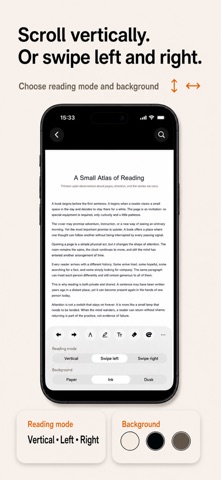
Use ZIP, RAR, CBZ, CBR, and more—22 file extensions in all. Bring PDFs, image archives, and images into one on-device library, then always pick up where you left off. File Reader is made for people who want to read the files they already have on their iPhone. Turn downloaded comics, self-scanned books, course handouts, work documents, and image collections into a calm, organized reading shelf. Import from Files or the Share menu, open, read, and come back later—without creating an account and without ads getting in the way. READ ZIP, RAR, CBZ, AND CBR IMAGE ARCHIVES • Open image-based ZIP/CBZ and RAR/CBR archives directly in the reader • Read pages in natural filename order, so 2 comes before 10 • Choose left-to-right or right-to-left page direction for comics and manga • Switch between fit-to-page and fit-to-width views • Choose Paper, Ink, or Dusk tones to suit the room and the material • Save reading progress automatically and resume from the same page • Enter a password when opening supported password-protected RAR archives The archive reader displays images inside your collection as pages in filename order. SEARCH, READ, AND MARK UP PDFs • Use continuous vertical scrolling or turn pages with horizontal swipes • Zoom in on diagrams, fine print, and scanned pages • Search the text layer of a PDF and move through matching results • Find imported PDFs from the library by title, filename, or indexed body text • See a short text snippet around each library search result • Write with the pencil, add marker strokes, erase your own marks, and undo or redo changes • Keep your current page and reading progress for the next session • Adjust the reading tone without changing the original document Text search works when the PDF contains selectable text. The app does not perform OCR on image-only scans, and its markup tools are for reading notes—not advanced PDF editing, conversion, forms, or digital signatures. ONE LOCAL LIBRARY FOR THE FILES YOU READ Instead of hunting through folders every time, keep reading material together in a simple on-device library. • Search by title and filename, plus body text for indexed PDFs • Filter the shelf by file type • Sort by recently opened, title, date added, or progress • Pin important items so they stay easy to reach • Rename imported items, remove them from the app, and see progress at a glance • Reopen a file and continue from your saved position When you import a file, the app keeps its own local copy so it remains available offline. That makes it useful on a commute, on a flight, while traveling, or anywhere you do not want reading to depend on a connection. 22 FILE EXTENSIONS AVAILABLE File Reader supports PDF, HTML, HTM, ZIP, CBZ, RAR, CBR, JPG, JPEG, PNG, HEIC, HEIF, TIF, TIFF, WebP, GIF, BMP, AVIF, JXL, JP2, J2K, and ICO. JPG/JPEG and TIF/TIFF are counted separately because they are distinct filename extensions. “22 extensions” does not mean 22 separate rendering engines. Some other files may open through the iOS Quick Look preview when the system supports them; availability and behavior can vary by file and iOS version. PRIVATE, QUIET, AND OFFLINE • No account registration • No advertising • Your imported reading library stays on the device • Core reading works without an internet connection • No cloud library, NAS, WebDAV, or cross-device sync to configure Because imported files are copied into the app, they use additional device storage. Keep the originals or a backup of anything important. TRY IT FREE, THEN EXPAND YOUR LIBRARY The free version lets you import and read up to 3 files, so you can test the readers with your own PDFs, comics, and images. Reader Pro removes the file-count limit. Current availability and purchase details are shown in the app. Import a file, settle into a focused reader, and let your iPhone remember the page for next time.
What's new · 1.3.10
We now support JXL images and animated WebP, AVIF, and JXL. You can also attach images and videos to your feedback.
Details