

NiblyNotes
PC-Future GmbH · Education
Independent analytics for this App Store listing. AppTracker is not affiliated with PC-Future GmbH.
Chart standing · US
What changed · US
Listing changes AppTracker has observed for this app in this storefront — new versions, price moves, rating shifts, and store copy.
What's New & Improvements Issues with the line tool on iPads with 60 Hz displays have been fixed. Scrolling issues that occurred after briefly displaying the Dock have been fixed. Saving notebook content when leaving the app has been optimized. The color switcher now allows you to select up to four colors for the marker. The “Active Area” button has been repositioned to make writing in the active area easier. Various minor optimizations and improvements have been made to the app. Issues with the straightening tool affecting lines underneath handwriting have been fixed. The lasso tool now also includes a “Cut” function. Minor display issues have been fixed when objects were open in editing mode and the app was briefly left. The thickness of the notebook lines can now be adjusted in the settings: Standard, Slightly Thicker, Thick, and Very Thick. Images with transparent backgrounds can now be imported. The set square now supports a snapping function when it is pinned. This allows the set square to snap to angles such as 45°, 90°, and others. The number of connected students is now displayed under the student notebooks.
In-app purchases · US
What this app sells inside itself, grouped by kind and priced for this storefront.
Screenshots





About
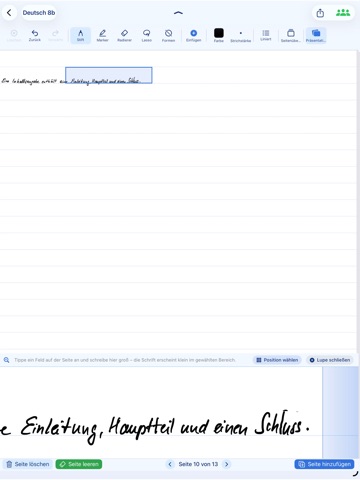
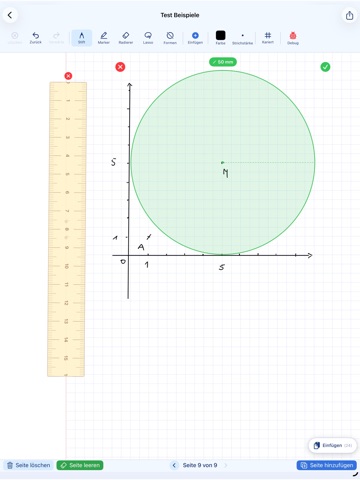
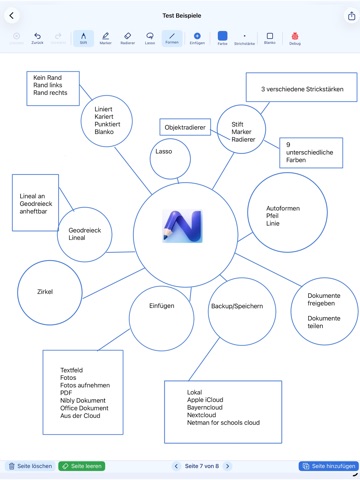
NiblyNotes is the digital exercise book for everyday school life — made in Germany with teachers. Every tool a lesson needs in one app: no subscription, no ads, no tracking. English and German. FREE AND AD-FREE NiblyNotes stays free for at least 5 years. In the supporter area you can buy us a coffee if you like — it unlocks nothing. WRITING AND DRAWING - Pen, fountain pen, pencil, highlighter and laser pointer, many colours and widths, plus two of your own - Lasso to move, scale, rotate and copy, even from book to book - Object eraser for whole strokes, Apple Pencil double-tap switches to it - Shape recognition for line, circle, rectangle, triangle and rhombus; rest the pen briefly and it straightens at once - Lines and arrows whose endpoints stay movable PAPER RULINGS Blank, ruled, 5 mm squares, dot grid, music staves with lyric lines, French Séyès ruling, isometric and dimetric paper to ISO 5456-3 — per page, with a margin left or right. RULER, SET SQUARE AND COMPASS Strokes snap to the edge, tools move and rotate with two fingers, the ruler attaches to the set square. The zoom adjusts so that 5 mm squares and 9 mm lines are exactly that size — check it with a real ruler. TEXT, TABLES AND STICKERS Text boxes with font, size, colour, word-by-word formatting, Scribble, web addresses recognised. Tables to write into with the pen. Stickers cover up answers and reveal them with a tap; next time you open the book they cover again. IMAGES, AUDIO AND VIDEO Photos from library or camera with a photo editor, audio files right on the page, videos embedded cookie-free. SPLIT PAGE A reading pane on the left with a PDF or a second book, the writable page on the right, the divider moves freely. SCANNER AND IMPORT Scan worksheets and blackboards with the iPad camera — multiple pages, black/white or colour, croppable. PDF, Word and PowerPoint become book pages. BOOKS AND PAGES Folders, duplicate books, take pages from other books. Insert, delete or clear pages — all recoverable. Page overview as a sidebar, outline that jumps to a topic. ZOOM WRITING An enlarged writing strip at the bottom — write big, it lands small in the book. CURTAIN, PRESENTATION, FULL SCREEN The curtain reveals a page step by step, on the external display too. When mirroring, presentation mode shows only the page, full screen leaves just a mini toolbar. PRINT, AIRDROP, SAVE AirPrint, AirDrop, save locally as PDF or NiblyNotes file. Teachers can hide the handwritten answer key on export. SCHOOL CLOUDS AND BACKUP BayernCloud Schule, Nextcloud and NetMan for Schools are built in: upload and share, open files straight into a book, daily backup. Local backups password-protected on request. CLASSROOM MODE Put worksheets, single objects or images into the class inbox by QR code and collect submissions — locally over the school Wi-Fi. For devices without NiblyNotes there is a compatibility mode you can switch on: files in the browser. If the Wi-Fi blocks the connection, the inbox runs encrypted via a web server. Can also be linked to BayernCloud Schule. VIEW STUDENTS' WORK Students release pages, the teacher writes notes into them, the class sees the corrections. Encrypted, own school server possible. SHARED BOOKS Work on one book together via iCloud — directly between Apple Accounts, no third-party server. FOR SCHOOL IT Configurable by MDM: preset cloud addresses, fix the language, hide the supporter area. PRIVACY Book contents are stored locally. Cloud connections are optional. Trademarks: Apple, Apple Pencil, iPad, iCloud, AirDrop, AirPrint (Apple Inc.), Word, PowerPoint (Microsoft), Nextcloud (Nextcloud GmbH), NetMan for Schools (H+H Software GmbH). BayernCloud Schule: Free State of Bavaria.
What's new · 1.0.8
What's New & Improvements Issues with the line tool on iPads with 60 Hz displays have been fixed. Scrolling issues that occurred after briefly displaying the Dock have been fixed. Saving notebook content when leaving the app has been optimized. The color switcher now allows you to select up to four colors for the marker. The “Active Area” button has been repositioned to make writing in the active area easier. Various minor optimizations and improvements have been made to the app. Issues with the straightening tool affecting lines underneath handwriting have been fixed. The lasso tool now also includes a “Cut” function. Minor display issues have been fixed when objects were open in editing mode and the app was briefly left. The thickness of the notebook lines can now be adjusted in the settings: Standard, Slightly Thicker, Thick, and Very Thick. Images with transparent backgrounds can now be imported. The set square now supports a snapping function when it is pinned. This allows the set square to snap to angles such as 45°, 90°, and others. The number of connected students is now displayed under the student notebooks.
Details