

PrivateSign: Sign PDF
RECRE8 BOX Inc. · Productivity
Independent analytics for this App Store listing. AppTracker is not affiliated with RECRE8 BOX Inc.
Chart standing · US
What changed · US
Listing changes AppTracker has observed for this app in this storefront — new versions, price moves, rating shifts, and store copy.
Single-document exports now support rewarded ads. A paid PrivateSign Pro subscription lets you export single documents without watching rewarded ads and export documents in batches.
Screenshots


About
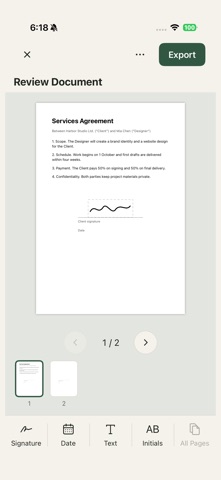
PrivateSign helps you prepare and sign documents on your iPhone or iPad. Create a handwritten signature, place it on a PDF or Word document, and add initials, text, or a date stamp. Free document preparation: - Import PDF, DOC, and DOCX files - Draw and save reusable signatures - Place and adjust signatures, initials, text, and dates - Scan paper documents into PDF - Prepare multiple documents for batch signing Single-document export with a rewarded ad: Complete a rewarded ad to unlock one single-document export, then save or share the resulting file. This option depends on ad availability and successful reward confirmation. It does not unlock batch exports. Requires a paid PrivateSign Pro subscription: - Export single documents without watching rewarded ads - Export multiple documents in a batch PrivateSign Pro is an auto-renewing subscription that renews until canceled. Importing, editing, and preparing documents does not require a subscription. Use PrivateSign for contracts, forms, agreements, school paperwork, and everyday documents. Terms of Service: https://recre8box.com/signimagemaker/terms.html Privacy Policy: https://recre8box.com/signimagemaker/privacy.html Apple Standard Terms of Use (EULA): https://www.apple.com/legal/internet-services/itunes/dev/stdeula/
What's new · 1.0.1
Single-document exports now support rewarded ads. A paid PrivateSign Pro subscription lets you export single documents without watching rewarded ads and export documents in batches.
Details