

Kids Mode & Child Lock
INNOXAPPS LLP · Utilities
Independent analytics for this App Store listing. AppTracker is not affiliated with INNOXAPPS LLP.
Chart standing · US
What changed · US
Listing changes AppTracker has observed for this app in this storefront — new versions, price moves, rating shifts, and store copy.
• Timeline: a new tab in Usage shows which apps were used, when and for how long, plus today, hour by hour. • More flexible schedules: each schedule can block everything, only allowed apps (learning apps stay open) or chosen apps. • Place schedules can now run at set times of day. • Group Limit: one daily total for a group of apps, like an hour of games.
Price & rating history · US
Reconstructed from the listing changes AppTracker has observed in this storefront. A field is charted once it has changed more than once, and each line starts at the value it moved from.
Average rating · ★ 4.20 now · 2 changes on record
Screenshots





About
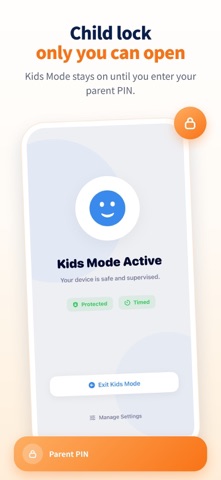
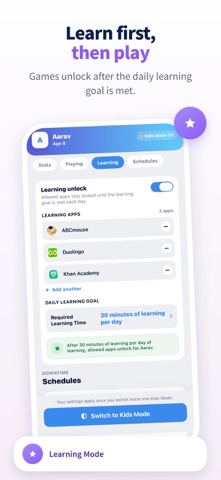
Kids Mode is the parental control app that keeps children safe on any iPhone or iPad. Set up a child lock in seconds, choose exactly which apps and websites are allowed, and let Kids Mode handle the rest. ▸ ALLOWED APPS ONLY Choose exactly which apps your child can access. Everything else stays blocked — including the App Store, in-app purchases, and unwanted content. ▸ WEBSITE ALLOWLIST Choose exactly which websites your child can visit. Every other site is blocked automatically — making browsing as safe as the apps you approve. ▸ ONE DAILY SCREEN TIME LIMIT Set a single daily limit that covers all allowed apps together, so your child learns to budget their time instead of racing through app after app. When the combined limit runs out, the child lock takes over for the rest of the day. ▸ LEARN TO EARN SCREEN TIME Encourage productivity with Learning Mode. Allow access to fun apps only after your child spends time on educational apps — making screen time rewarding and purposeful. ▸ SMART SCHEDULES Create custom schedules to block all apps during study time, bedtime, or family hours. Ensure distraction-free routines throughout the day. ▸ USAGE STATISTICS Monitor child app usage, see the day's full activity, and adjust the limit in a couple of taps. Kids Mode keeps daily and weekly screen time statistics, so you manage real numbers instead of guesswork. ▸ HOW IT WORKS 1. Pick the apps and websites your child is allowed to use. 2. Set the daily time limit and the schedules that suit your family. 3. Hand over the phone. The child lock enforces the rules, and a PIN only you know unlocks the settings. ▸ COMPLETE PARENTAL CONTROL • Child lock for apps, games and websites • Block the App Store and in-app purchases • Restrict inappropriate content and limit YouTube or TikTok • One combined daily screen time limit • Parental app lock with custom schedules • Kids safety lock, with PIN access only a parent has ▸ PARENTAL CONTROL FOR EVERY AGE • Toddlers — a baby-safe child lock, so a stray tap never opens the App Store • School age — homework schedules, kids app limits and safe web browsing • Teens — screentime management with monitoring you can both see ▸ WHY PARENTS CHOOSE KIDS MODE • Trusted parental control, free to set up with no account to create • A kid mode that works offline, with no child profiles stored in the cloud • Light on battery and simple enough to set up in one minute • A child lock app and a screen time tracker in one parent app • Keep kids safe on a shared family tablet or an old phone ▸ PERFECT FOR • Handing your phone to a toddler without worry • Homework time, bedtime and quiet family hours • Kid safe mode for a tablet used by more than one child • A child lock app for phones the whole family shares Kids Mode gives you complete parental control and healthy screen time in one simple app. It is the child lock app parents reach for when a phone has to be shared, and the parental control app that still works months later. Kids Mode works on iPhone and iPad. Terms of Use (EULA): https://www.apple.com/legal/internet-services/itunes/dev/stdeula/
What's new · 3.0.1
• Timeline: a new tab in Usage shows which apps were used, when and for how long, plus today, hour by hour. • More flexible schedules: each schedule can block everything, only allowed apps (learning apps stay open) or chosen apps. • Place schedules can now run at set times of day. • Group Limit: one daily total for a group of apps, like an hour of games.
Details