

WiMouse: Remote Mouse Keyboard
Aman Kumar · Utilities
Independent analytics for this App Store listing. AppTracker is not affiliated with Aman Kumar.
Chart standing · US
What changed · US
Listing changes AppTracker has observed for this app in this storefront — new versions, price moves, rating shifts, and store copy.
Macro Packs Stop building your shortcut deck from scratch. This version adds 15 ready-made Macro Packs — 161 shortcuts in total — under Macro Deck → Packs: Essentials · Text Editing · Window Management · Virtual Desktops · Browser · Files · Screenshot & Capture · System · Code Editor · Documents · Spreadsheets · Design · Meetings · Media · Terminal • Add an entire pack to your deck with one tap. Shortcuts you already have are skipped, and anything you renamed stays as you named it. • Every macro carries the right keys for both Windows and macOS, so the same button works whichever computer you connect to. • Anything you add to your deck instantly becomes a voice command — just say its name. Also in this release: bug fixes, performance work and connection stability improvements throughout.
Price & rating history · US
Reconstructed from the listing changes AppTracker has observed in this storefront. A field is charted once it has changed more than once, and each line starts at the value it moved from.
Average rating · ★ 3.50 now · 3 changes on record
Ratings breakdown · US
The star breakdown behind this app's rating in this storefront.
In-app purchases · US
What this app sells inside itself, grouped by kind and priced for this storefront.
Screenshots



About
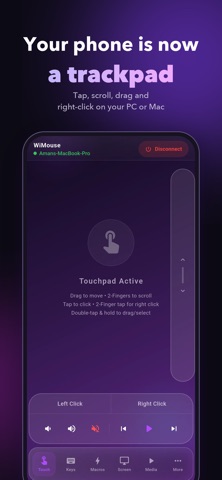
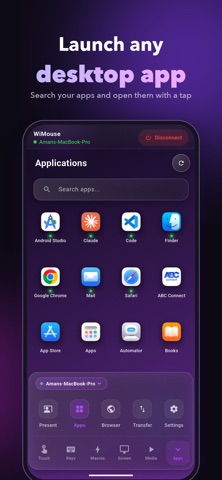
WiMouse: Remote Mouse and Trackpad Turn your phone into a powerful WiFi Remote Mouse and Keyboard for your PC or Mac! WiMouse is a fast, secure, and lightweight utility that gives you full control over your computer directly from your phone. Instantly transform your mobile device into a responsive wireless mouse, full-size keyboard, and multi-touch trackpad. No cables. No extra hardware. Simply connect your phone and your computer to the same WiFi network and take control in seconds. Powerful Remote Control Features WiMouse acts as a professional-grade remote for your desktop, offering seamless navigation from anywhere in the room. Precision Remote Mouse: Smooth, lag-free cursor movement. Wireless Keyboard: Type on your computer using your phone's keyboard (including hotkeys). Smart Trackpad: Full gesture support (two-finger scroll, pinch-to-zoom, right-click). Media Controller: Play, pause, adjust volume, and skip tracks on Spotify, YouTube, or Netflix. Presentation Clicker: Effortlessly slide through PowerPoint, Keynote, or Google Slides. Instant Connectivity: Automatic discovery over WiFi. Ultra-Low Latency: Optimized for high-speed performance without delays. Built for Windows and Mac WiMouse provides native support for your favorite devices: Windows: Fully compatible with Windows 10 and 11 (Laptops and Desktops). macOS: Optimized for MacBook Air, MacBook Pro, iMac, and Mac mini. Use WiMouse as your: WiFi Mouse for PC and Mac Remote Control for Windows and Apple Computers Wireless Keyboard for Desktop Professional Presentation Remote Home Theater Media Controller Why Choose WiMouse? Unlike bloated remote apps, WiMouse is designed for speed and simplicity: Lag-Free Performance: Real-time response for browsing and work. Secure Connection: Safe bridging between your mobile and desktop. Clean Interface: Ad-friendly, intuitive design that gets out of your way. Battery Efficient: Minimal power consumption on your phone. Quick 3-Step Setup Download: Install the free WiMouse Companion App on your Windows PC or Mac. Connect: Ensure both your phone and computer are on the same WiFi network. Control: Open the app and start navigating your desktop instantly! System Requirements Windows PC or macOS Device. Shared WiFi network. WiMouse desktop companion app installed. Download WiMouse Today Stop struggling with tangled wires or dead batteries. Turn your smartphone into a professional WiFi Remote Mouse, Keyboard, and Trackpad and boost your productivity today! Terms of Use (EULA): https://www.apple.com/legal/internet-services/itunes/dev/stdeula/ Privacy Policy: https://wimouse.vikramshilasoftwares.in/privacy-policy
What's new · 4.0.7
Macro Packs Stop building your shortcut deck from scratch. This version adds 15 ready-made Macro Packs — 161 shortcuts in total — under Macro Deck → Packs: Essentials · Text Editing · Window Management · Virtual Desktops · Browser · Files · Screenshot & Capture · System · Code Editor · Documents · Spreadsheets · Design · Meetings · Media · Terminal • Add an entire pack to your deck with one tap. Shortcuts you already have are skipped, and anything you renamed stays as you named it. • Every macro carries the right keys for both Windows and macOS, so the same button works whichever computer you connect to. • Anything you add to your deck instantly becomes a voice command — just say its name. Also in this release: bug fixes, performance work and connection stability improvements throughout.
Details