

Body Editor: Shape It Your Way
Trang Vu Thuy · Photo & Video
Independent analytics for this App Store listing. AppTracker is not affiliated with Trang Vu Thuy.
Chart standing · US
What changed · US
Listing changes AppTracker has observed for this app in this storefront — new versions, price moves, rating shifts, and store copy.
Price & rating history · US
Reconstructed from the listing changes AppTracker has observed in this storefront. A field is charted once it has changed more than once, and each line starts at the value it moved from.
Average rating · ★ 2.00 now · 3 changes on record
Ratings breakdown · US
The star breakdown behind this app's rating in this storefront.
In-app purchases · US
No in-app purchases.
Screenshots
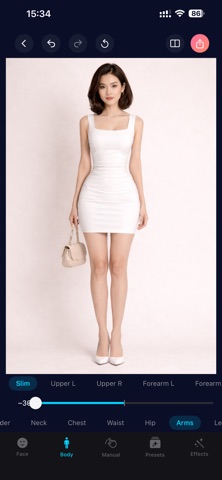
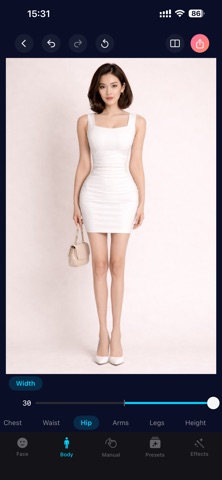


About
Body Editor — Shape It Your Way Reshape your body and face in photos with professional-grade tools, all running 100% on your device. 90+ ADJUSTMENTS ACROSS 5 TABS FACE (39 tools) Slim, width, temples, cheekbones, jawline, V-chin, chin height, forehead, crown, upper stretch — sculpt every face shape. Eyes: enlarge, height, distance, openness, width, tilt, iris size, tail/inner/outer lift, lower lid. Nose: reshape, width, tip height, wing width, bridge, length. Lips: full reshape, height, width, upper/lower thickness, smile curve. Eyebrows: thickness, length, lift, arch, tilt, distance. BODY (23 tools) Shoulder width and lift, neck width and length, chest size and lift, waist slim, hip width, arms (slim, left/right upper arm, left/right forearm), legs (slim, length, straighten, left/right thigh, left/right calf), and full-body height stretch (upper-only or full body). PRESETS (5 archetypes) Hourglass, Natural, Pear, Triangle, Inverted Triangle — apply a complete body silhouette in one tap, blend strength with a single slider. MANUAL (3 freeform tools) • Surface — drag a circle anywhere, bulge or pinch radially with smooth falloff. • Slim — pull a rectangular region around any body area, squeeze or expand horizontally with 5 draggable handles. • Refine — drag your finger directly on the photo to push pixels along the stroke path, like a liquify brush. Brush size slider + finger-following indicator circle. EFFECTS (21 adjustments + 8 filter presets) • Color: brightness, contrast, saturation • Light: exposure, warmth, highlights, shadows • Art: vignette, sharpen, bloom, grain, blur, tilt-shift • Filters: Noir, Chrome, Fade, Instant, Vintage, Warm, Cool, Dramatic — preview thumbnails generated from your photo. POLISHED EXPERIENCE • Real-time GPU rendering — every slider drag shows instant preview powered by Metal compute shaders. • Single-pass warp pipeline — all face, body, preset, and manual edits blend together for a clean final image. • Before/After comparison — full-screen split view with draggable divider. • Undo / Redo / Reset — full session history for every tool, including manual brush strokes. • Pinch-to-zoom + drag-to-pan on the photo preview. • Export as JPEG (with quality slider) or PNG. • Optional watermark setting. • 15 languages supported. • Dark mode interface. YOUR PRIVACY Every photo edit happens 100% on your device. No image is ever uploaded to any server. The app works completely offline. Privacy policy: https://trangvuthuy.netlify.app/policy Term of use: https://trangvuthuy.netlify.app/terms
What's new · 1.1
v1.1 — Manual Tab, 2.5× Faster, and More NEW: MANUAL TAB A whole new way to fine-tune any photo with three freeform tools: • Surface — drag a circle anywhere on the photo and bulge or pinch radially with a single slider. Great for adjusting localized curves. • Slim — drop a rectangular region around any body area and squeeze or expand horizontally. Five draggable handles let you shape the region precisely. • Refine — drag your finger directly on the photo to push pixels along the stroke path. A brush-size slider and a circle indicator that follows your finger make it easy to control. Undo any stroke instantly. NEW: SMARTER FILTER PICKER Filter thumbnails now generate from YOUR photo, so you can see exactly how each filter will look before tapping. Eight filter presets included: Noir, Chrome, Fade, Instant, Vintage, Warm, Cool, Dramatic. FASTER: 2.5× QUICKER PHOTO LOADING Opening a photo and preparing it for editing is now around 2.5× faster on supported devices. Slider drags feel snappier across face and body tools. IMPROVED: BEFORE / AFTER COMPARISON The Before / After split view now accurately reflects your latest edits — including manual brushwork and filters — so you can see the real difference. IMPROVED: EXPORT DIALOG The export sheet now gives your photo a much larger preview, with the format picker, quality slider, and export button grouped neatly at the bottom. FIXES • Watermark setting from Settings now correctly applies to exported photos. • Various stability and consistency improvements across the editor. Thanks for using Body Editor — keep the feedback coming!
Details