

LocalToolbox : Offline Tools
鹏 杨 · Utilities
Independent analytics for this App Store listing. AppTracker is not affiliated with 鹏 杨.
Chart standing · US
What changed · US
Listing changes AppTracker has observed for this app in this storefront — new versions, price moves, rating shifts, and store copy.
What’s New in V2.3 - Added ten local tools: Resize to Target, Convert Image Format, Document Scanner, Text from Image (offline OCR), QR & Barcode Scan, Auto Redact, Images to PDF, PDF Page Tools, File Hash Check, and Compress Video - Added two new categories: Files & PDF, and Media - Everything new runs offline: images, PDFs, videos, and text stay on your device and are never handed to an AI or cloud service Have a feature idea or want a new tool? Tell us in an App Store review.
Price & rating history · US
Reconstructed from the listing changes AppTracker has observed in this storefront. A field is charted once it has changed more than once, and each line starts at the value it moved from.
Price · 2.99 USD now · 7 changes on record
Screenshots




About
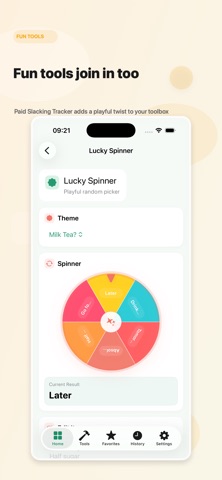
Local Toolbox is a privacy-first, fully offline utility app that now includes 203 practical tools for daily life, work, local records, study, image tasks, PDF and media handling, and professional use. It brings measurement tools, timers, date and unit converters, text utilities, developer tools, finance and record tools, field and workplace helpers, image tools, PDF and file tools, media tools, and fun utilities into one app. Many small tools that would normally require a separate download, or an upload to a cloud website, are already here and run entirely on device. Everything runs locally on your device. No login, no internet required, no cloud sync, no content upload, and no ads, subscriptions, or in-app purchases getting in the way. Text from image, document scanning and auto redaction are all done on device by iOS itself, so your photos, PDFs and videos never need to be handed to an AI service. It is built for people who want practical tools without privacy trade-offs. V2.3 adds ten local tools: Resize to Target (exact pixels or file size), Convert Image Format (JPEG/PNG/HEIC), Document Scanner (auto edge detection and shadow cleanup), Text from Image (offline OCR with txt export), QR & Barcode Scan (and Wi-Fi QR creation), Auto Redact (card numbers, IBANs, emails, phone numbers, IPs and faces), Images to PDF, PDF Page Tools (merge, split, rotate, delete, export pages), File Hash Check (SHA-256/SHA-1/MD5/CRC32) and Compress Video (size limit, trim, extract audio). Key features include: Measurement, timer, date, and unit conversion tools Text utilities, JSON, regex, UUID/ULID, JWT, URL parsing, Text Find and Replace, and Voice to Text Everyday helpers like bill split, unit price compare, work hours, time zone conversion, a general Date Calculator, and Exam Countdown Finance and record tools such as compound growth, fixed deposit, recurring investment, goal planning, mortgage comparison, Simple Ledger, savings records, gift records, and local logs for borrowing, inventory, warranty, recurring payments, receipts, and medication Image tools such as compression and resizing to target, format conversion, stitching, color picking, text watermark, EXIF viewing and stripping, screenshot and auto redaction, document scanning, text from image, and QR and barcode tools PDF and file tools such as Images to PDF, PDF merge/split/rotate/delete/page export, and file hash verification Media tools such as video compression and trimming, and M4A audio extraction Privacy tools such as a local authenticator, text redaction, photo metadata stripping, screenshot redaction, link tracking cleanup, and a privacy checkup checklist Professional tools for engineering, workplace, logistics, renovation, and field use Fun tools like Lucky Spinner, coin toss, reaction speed, color guess, a Yes / No Decider, Paid Slacking Tracker, and more Supports Simplified Chinese, Traditional Chinese, English, Japanese, Korean, Spanish, Brazilian Portuguese, German, and French. Have a feature idea or want a new tool? Tell us in an App Store review.
What's new · 2.3
What’s New in V2.3 - Added ten local tools: Resize to Target, Convert Image Format, Document Scanner, Text from Image (offline OCR), QR & Barcode Scan, Auto Redact, Images to PDF, PDF Page Tools, File Hash Check, and Compress Video - Added two new categories: Files & PDF, and Media - Everything new runs offline: images, PDFs, videos, and text stay on your device and are never handed to an AI or cloud service Have a feature idea or want a new tool? Tell us in an App Store review.
Details