

PixelBead: Bead Pattern
笑海 吕 · Graphics & Design
Independent analytics for this App Store listing. AppTracker is not affiliated with 笑海 吕.
Chart standing · US
What changed · US
Listing changes AppTracker has observed for this app in this storefront — new versions, price moves, rating shifts, and store copy.
What's new in this update: - A new palette library: browse brand palettes, create custom palettes, and add colors manually or import multiple colors from another palette. - Use custom palettes for new patterns, or update and switch palettes in existing patterns.
Price & rating history · US
Reconstructed from the listing changes AppTracker has observed in this storefront. A field is charted once it has changed more than once, and each line starts at the value it moved from.
Average rating · ★ 5.00 now · 2 changes on record
In-app purchases · US
What this app sells inside itself, grouped by kind and priced for this storefront.
Screenshots




About
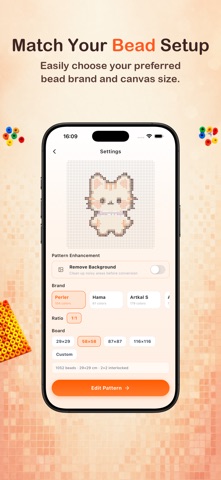
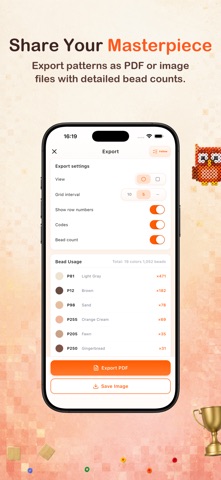
PixelBead helps you turn photos into clean bead patterns you can actually make. Import an image from your photo library or camera, generate a bead pattern in seconds, then refine the result with tools built for real bead projects. Whether you are making Perler, Hama, Artkal, or Nabbi designs, PixelBead helps you move from idea to printable pattern faster. WHAT YOU CAN DO ▸ Photo To Bead Pattern — Turn photos into bead patterns with automatic color matching and grid generation. ▸ AI Extraction (Premium) — Isolate a subject or simplify image content before conversion for cleaner results. ▸ Brand & Custom Palettes — Browse Perler, Hama, Artkal S, Artkal C, and Nabbi palettes; create your own palettes, add or import colors, and use them in new or existing patterns. ▸ Full Pattern Editing — Refine every pattern with brush, eraser, eyedropper, fill, batch replace, trim edges, and center tools. ▸ Building Guide — Build color by color, mark completed colors, and resume progress later. ▸ Clear Export (Premium) — Export high-resolution PDF or PNG files for printing, saving, and sharing. ▸ Bead Usage Stats — Check color counts, bead codes, row numbers, and total bead quantity before you start making. HOW IT WORKS 1. Import a photo from your library or camera. 2. Generate a bead pattern with color matching. 3. Edit details by hand and start making your pattern. WHY PIXELBEAD? ▸ Built for real fuse bead projects, not just simple image filters. ▸ Faster planning for pixel art, pegboard crafting, and printable bead patterns. ▸ Easier to move from photo to finished pattern on your phone. AI Extraction, Pattern Enhancement, batch color replacement, full Building Guide, and high-resolution PDF/PNG export require a Premium subscription. Terms of Use: https://neolabsapp.com/terms Privacy Policy: https://neolabsapp.com/privacy
What's new · 1.3.0
What's new in this update: - A new palette library: browse brand palettes, create custom palettes, and add colors manually or import multiple colors from another palette. - Use custom palettes for new patterns, or update and switch palettes in existing patterns.
Details