
Chart standing · US
What changed · US
Listing changes AppTracker has observed for this app in this storefront — new versions, price moves, rating shifts, and store copy.
Added support for new languages. At the same time, we have improved the stability of in-app purchase processing and restoration, and reviewed the timing for prompting users to leave a review.
Price & rating history · US
Reconstructed from the listing changes AppTracker has observed in this storefront, so each line starts at the first change on record.
Average rating
Screenshots


About
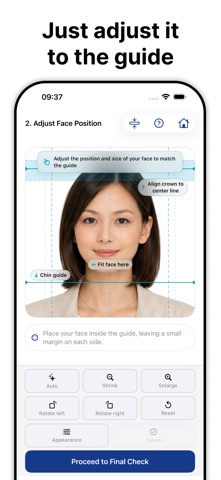
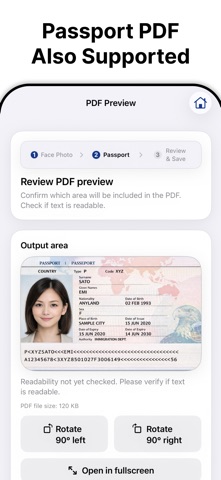
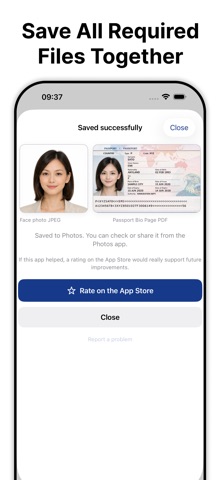
India Visa Photo helps you prepare photo and PDF files for India e-Visa and Regular / Paper Visa routes — all on your iPhone. Choose your route, create the upload files you need, and check them before saving. The app guides you through preparing a face photo JPEG and a passport page PDF with route-specific size and format requirements. All photos and personal documents are processed on your device. They are never uploaded to a server. WHAT YOU CAN DO • Choose between India e-Visa and Regular / Paper Visa • Create a square visa photo JPEG • Adjust face position, brightness, and a white or light background • Create a passport page PDF for upload or submission use • Check file size and format before saving • Save files for use on the relevant application website or submission process FOR REGULAR / PAPER VISA Regular / Paper Visa requirements can vary by visa type, nationality, and submission office. This app prepares individual photo and PDF files only. Please follow the checklist in your application and the instructions from your submission office for which documents you need. COMMON UPLOAD PROBLEMS THIS APP HELPS WITH • Your phone photo is too large or in the wrong format • You need a square visa photo JPEG • Your passport page needs to be converted into a readable PDF • e-Visa and Regular / Paper Visa use different file requirements • You want to check the file before saving or sharing PRICING Capture, edit, and preview are free. A one-time in-app purchase unlocks export of the files you prepare. IMPORTANT This app is an independent file preparation tool for Indian visa uploads. It is not connected with any government agency, visa service, Indian Visa Online, or the India e-Visa portal. This app does not submit visa applications, does not act on your behalf, and does not provide submission, review, acceptance, or approval guarantees. You must complete the application yourself on the relevant website or through the required submission process. Upload requirements can change. Always confirm the latest requirements on the application website or with your submission office before submitting.
What's new · 2.1
Added support for new languages. At the same time, we have improved the stability of in-app purchase processing and restoration, and reviewed the timing for prompting users to leave a review.
Details