

EarPal Translator
Alvaro Escarcha Esteban · Travel
Independent analytics for this App Store listing. AppTracker is not affiliated with Alvaro Escarcha Esteban.
Chart standing · US
What changed · US
Listing changes AppTracker has observed for this app in this storefront — new versions, price moves, rating shifts, and store copy.
NEW: Send audio straight to EarPal Got a voice message or a recording in another app? Share it to EarPal from Files, Mail, WhatsApp or anywhere with a share button, and the transcript and translation start on their own. Nothing is uploaded — the file is handled on this iPhone. NEW: EarPal in Shortcuts and Siri (Pro) Three new actions — Translate audio file, Transcribe audio file, Translate text — now show up when you search for EarPal in the Shortcuts editor. They hand back the transcript and the translation as outputs your next step can use, and they run in the background without opening the app. NEW: Bring a WhatsApp chat in Export any chat from WhatsApp and share the .txt or .zip to EarPal. It becomes a conversation like any other: translate it, ask Apple Intelligence questions about it, search it, export it. Free, and it never spends a minute of your listening quota. NEW: A calmer look, if you prefer it Settings → Appearance → Style now offers Clean next to EarPal's original Bold look: soft colours, thin lines and lighter type, in light and dark. Bold stays the default, and you can switch back any time. CHANGED: A main screen that asks less of you The Translate / Transcribe only buttons are gone. To transcribe without translating, open the second language chip at the top and choose "No translation". The first time you open the app you now get two short steps instead of a wall of text. The camera, text, audio-file and video tools no longer hide in a menu: the app now has four tabs at the bottom (Voice, Text, Camera and Files), and while EarPal is listening, a bar above the tabs says so, with a Stop button. FIXED: No more crash at launch on iOS 27 If EarPal was ever closed while it was still downloading what it needs to tell voices apart, it could crash every time it opened on iOS 27 — and on iOS 26 it quietly stopped telling voices apart. It now notices the unfinished download and finishes it. FIXED: Translations no longer lose their last words In Passive mode with Live translation, a sentence's translation could stop a word or two short and miss its full stop. Each sentence is now translated in full once it's finished, including the last one before you stop. CHANGED: Greek, Thai, Hindi and more now transcribe offline Languages that need the downloadable speech pack now work with no connection once the pack is on your iPhone, and EarPal no longer contacts the download server each time you use one. CHANGED: Audio files in English, Spanish and more need no download Voice notes and recordings in the languages iOS already understands — English, Spanish, French, German, Japanese and more — are now transcribed by iOS's own speech model: no speech pack to download first, and much faster. Subtitling a video in those languages works the same way. Other languages keep using the speech pack. PLUS: Translating a whole imported chat is far faster, and the transcript Q&A now tells you how much of a long conversation it is answering from. And EarPal no longer takes up more space after every update: models compiled for the previous version are now cleared.
Price & rating history · US
Reconstructed from the listing changes AppTracker has observed in this storefront. A field is charted once it has changed more than once, and each line starts at the value it moved from.
Average rating · ★ 4.92 now · 2 changes on record
In-app purchases · US
What this app sells inside itself, grouped by kind and priced for this storefront.
Screenshots



Similar apps
Competitors and close alternatives, as estimated by AppTracker.
 Prau: Offline Voice Translator
Liliia Pantiushenko
Prau: Offline Voice Translator
Liliia Pantiushenko
 RealTime Translator - OmniTalk
HTF Publishing Inc.
RealTime Translator - OmniTalk
HTF Publishing Inc.
 Dialog - Translate Speech
Heavy Plumb Apps, SOCIEDAD LIMITADA
Dialog - Translate Speech
Heavy Plumb Apps, SOCIEDAD LIMITADA
 Live Translator - AI Translate
DigitalSail (HK) Limited
Live Translator - AI Translate
DigitalSail (HK) Limited
 Speak & Translate - Translator
Mosaic S.r.l.
Speak & Translate - Translator
Mosaic S.r.l.
 Video Translator: Voice & AI
Kateryna Petrenko
Video Translator: Voice & AI
Kateryna Petrenko
 AI Translator, Voice Translate
VAN HOANG DO
AI Translator, Voice Translate
VAN HOANG DO
 Subear
栋 张
Subear
栋 张
About
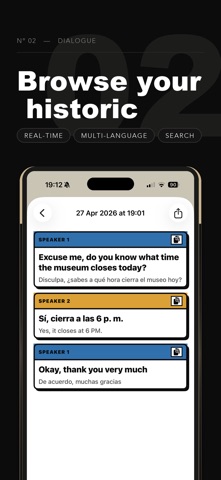
EarPal is the private interpreter for the world around you. Just tap Listen and EarPal hears the conversation, identifies each voice, and shows you a live translation in your language. Open the camera and EarPal reads any text it sees and translates it in place — menus, signs, packaging, screenshots from your library. No buttons to push, no turn-taking, no recording — just understanding. EVERYTHING ON-DEVICE Audio, photos, and recognised text never leave your iPhone. EarPal uses Apple's on-device speech, vision, and translation models, plus a state-of-the-art on-device speaker recognition engine. No cloud. No ads. No tracking. MULTI-SPEAKER, COLOR-CODED EarPal can follow several people at once. Each voice gets its own color in text mode — or its own distinct synthetic voice when you're listening through AirPods. Finally, you can sit at a dinner table with locals and follow the actual conversation. CAMERA TRANSLATION Point your camera at any text and watch translations land over each block in real time. Snap a still photo or pick from your library to translate menus, signs, screenshots, forwarded messages — all on-device. TWO LISTENING MODES - ACCURATE: waits for the speaker to finish their sentence, then shows a polished translation - LIVE: streams a rolling translation as words arrive, like live subtitles 30+ LANGUAGES Spanish, French, German, Italian, Portuguese, Dutch, Polish, Russian, Ukrainian, Turkish, Czech, Slovak, Croatian, Hungarian, Romanian, Catalan, Greek, Hebrew, Mandarin, Cantonese, Japanese, Korean, Vietnamese, Thai, Indonesian, Malay, Filipino, Arabic, Hindi, Finnish, Danish, Norwegian, Swedish, and English (multiple variants). ACCESSIBILITY Live captions of conversations, color-coded by speaker, in your own language. Built for travelers, language learners, mixed-language families, and deaf or hard-of-hearing users. PRICING THAT MAKES SENSE - Free: 60 minutes of listening per month, all features, 2 voices, photo + gallery translation included - Pro Monthly: €1.99 - Pro Yearly: €14.99 (best value, 7-day free trial) - Pro Lifetime: €39.99 — pay once, never again Subscriptions auto-renew at the end of each period (monthly or yearly) at the price shown above unless cancelled at least 24 hours before. Manage anytime in Settings → Apple ID → Subscriptions. PRIVACY PROMISE EarPal does not collect or upload your audio, photos, or transcripts. Speech recognition, speaker identification, OCR, and translation all happen on your iPhone. Built by a solo iOS developer who got tired of translation apps that either spy on you, lock everything behind a $9.99/week subscription, or both. Privacy Policy: https://frostdev.eu/privacy Terms of Service: https://frostdev.eu/terms Terms of Use (EULA): https://www.apple.com/legal/internet-services/itunes/dev/stdeula/
What's new · 26.9.1
NEW: Send audio straight to EarPal Got a voice message or a recording in another app? Share it to EarPal from Files, Mail, WhatsApp or anywhere with a share button, and the transcript and translation start on their own. Nothing is uploaded — the file is handled on this iPhone. NEW: EarPal in Shortcuts and Siri (Pro) Three new actions — Translate audio file, Transcribe audio file, Translate text — now show up when you search for EarPal in the Shortcuts editor. They hand back the transcript and the translation as outputs your next step can use, and they run in the background without opening the app. NEW: Bring a WhatsApp chat in Export any chat from WhatsApp and share the .txt or .zip to EarPal. It becomes a conversation like any other: translate it, ask Apple Intelligence questions about it, search it, export it. Free, and it never spends a minute of your listening quota. NEW: A calmer look, if you prefer it Settings → Appearance → Style now offers Clean next to EarPal's original Bold look: soft colours, thin lines and lighter type, in light and dark. Bold stays the default, and you can switch back any time. CHANGED: A main screen that asks less of you The Translate / Transcribe only buttons are gone. To transcribe without translating, open the second language chip at the top and choose "No translation". The first time you open the app you now get two short steps instead of a wall of text. The camera, text, audio-file and video tools no longer hide in a menu: the app now has four tabs at the bottom (Voice, Text, Camera and Files), and while EarPal is listening, a bar above the tabs says so, with a Stop button. FIXED: No more crash at launch on iOS 27 If EarPal was ever closed while it was still downloading what it needs to tell voices apart, it could crash every time it opened on iOS 27 — and on iOS 26 it quietly stopped telling voices apart. It now notices the unfinished download and finishes it. FIXED: Translations no longer lose their last words In Passive mode with Live translation, a sentence's translation could stop a word or two short and miss its full stop. Each sentence is now translated in full once it's finished, including the last one before you stop. CHANGED: Greek, Thai, Hindi and more now transcribe offline Languages that need the downloadable speech pack now work with no connection once the pack is on your iPhone, and EarPal no longer contacts the download server each time you use one. CHANGED: Audio files in English, Spanish and more need no download Voice notes and recordings in the languages iOS already understands — English, Spanish, French, German, Japanese and more — are now transcribed by iOS's own speech model: no speech pack to download first, and much faster. Subtitling a video in those languages works the same way. Other languages keep using the speech pack. PLUS: Translating a whole imported chat is far faster, and the transcript Q&A now tells you how much of a long conversation it is answering from. And EarPal no longer takes up more space after every update: models compiled for the previous version are now cleared.
Details