

Macdio — Live Internet Radio
Sait Firat Nemis · Music
Independent analytics for this App Store listing. AppTracker is not affiliated with Sait Firat Nemis.
Chart standing · US
What changed · US
Listing changes AppTracker has observed for this app in this storefront — new versions, price moves, rating shifts, and store copy.
This update is about finding local radio, staying on air when the station directory is down, and podcasts at night. Local radio - Search for a city like Chicago or Istanbul and Macdio shows the stations around it. It works in every language and needs no location access. - Country pages list their regions and states. - Search results are split into Stations and Podcasts, stations first, and more results load as you scroll. Always on - I gave Macdio its own copy of the station directory. When Radio Browser is down, Macdio keeps working. - If nothing answers, Macdio tells you and offers Try Again instead of showing no results. Podcasts - AirPods: double press skips forward, triple press skips back. You can turn this off in Settings > Podcasts. - New episode notifications show the show's cover. Sleep timer - Turn on Repeat Timer and the same timer starts again every time you press Play after it stopped. Made for podcasts at bedtime. Also - Station logos now reach Apple Watch reliably after the watch app updates. - Fixed a rare case where Macdio was closed in the background right after starting.
Price & rating history · US
Reconstructed from the listing changes AppTracker has observed in this storefront. A field is charted once it has changed more than once, and each line starts at the value it moved from.
Average rating · ★ 4.92 now · 5 changes on record
Ratings breakdown · US
The star breakdown behind this app's rating in this storefront.
In-app purchases · US
No in-app purchases.
Screenshots




Keywords this app targets
Search terms AppTracker associates with this app — estimates, not search volume. ❝ = in the app's title; a highlighted number is its current position for that term.
Similar apps
Competitors and close alternatives, as estimated by AppTracker.
 Radio Adfree
Stefan Werner Moises
2 shared topics · 1 shared title word
Radio Adfree
Stefan Werner Moises
2 shared topics · 1 shared title word
 RadioApp - A Simple Radio App
Firetruck Productions Ltd.
2 shared topics · 1 shared title word
RadioApp - A Simple Radio App
Firetruck Productions Ltd.
2 shared topics · 1 shared title word
 FM Radio App
Rocket Apps GmbH
2 shared topics · 1 shared title word
FM Radio App
Rocket Apps GmbH
2 shared topics · 1 shared title word
 netRadio
Adrian Gajda
netRadio
Adrian Gajda
 Simple Radio - FM AM Stations
Streema, Inc.
2 shared topics · 1 shared title word
Simple Radio - FM AM Stations
Streema, Inc.
2 shared topics · 1 shared title word
 Playdio Radio
Thomas van Empelen
Playdio Radio
Thomas van Empelen
 Podcasts Music Radio FM: Podio
Happy Bees Limited
1 shared topic · 1 shared title word
Podcasts Music Radio FM: Podio
Happy Bees Limited
1 shared topic · 1 shared title word
 Streamlets
Paul Carmody
2 shared topics
Streamlets
Paul Carmody
2 shared topics
About
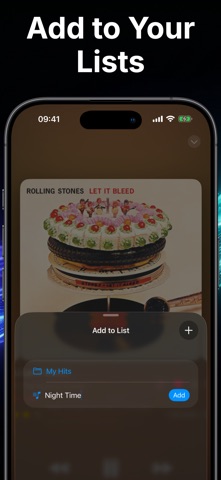
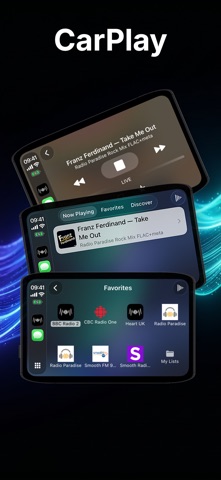
Macdio plays live radio and podcasts in one app, with no ads, no subscription and no tracking. You buy it once and it runs on iPhone, iPad, Mac, Apple TV, Apple Watch and in CarPlay. RADIO Thousands of live stations from around the world, FM, AM and internet, sorted by country, genre and popularity. Jazz, classical, news, sports, talk, electronic, hip-hop, whatever you listen to. Save favorites, build your own lists and see stats on what you play most. When a song comes on and you want to keep it, Macdio identifies it from the stream itself and never turns on the microphone. The song goes to your saved list and, if you want, straight into your Apple Music library. Synced lyrics appear when a station sends them. Hit record to keep a live moment and play it back later, even offline. PODCASTS Search millions of shows, subscribe, download and play with skip intervals, playback speed and a queue. A radio station can sit in that queue next to episodes, so a live show follows an episode without switching apps. Every episode can be transcribed on your device, in the languages Apple's speech models support, with no upload and no account. From that transcript Macdio builds chapters and a summary when the feed ships none. It uses Apple's language model on the device, or Private Cloud Compute on iOS 27 devices with Apple Intelligence. Songs played inside an episode are listed with their timestamps. The intro, outro and sponsor spots a show repeats in every episode are learned once and skipped from then on. Mark a highlight while you listen and send it to Apple Notes, Obsidian, Bear, Craft, Notion or Readwise. EVERYWHERE On Apple Watch it is a full app with its own Podcasts tab. Stations and episodes play on the watch itself, and Auto Shazam names the songs as they play. On Apple TV it has a Top Shelf and game controller support. On the Mac there is a menu bar player. On iPhone there is a bedside Clock Mode, a sleep timer, an alarm, widgets and Siri shortcuts. In the car, CarPlay shows your favorites, your podcasts and what is playing. Favorites, subscriptions, saved songs and listening history sync between your devices through iCloud. The Apple Watch gets them straight from the iPhone. PRIVACY Macdio has no account, no analytics and no tracking. Listening history stays on your devices and in your own iCloud. The app goes online only to find, play and identify what you listen to, and to reach a service you ask for, like a note app or a summary from Private Cloud Compute. ONE PURCHASE No ads. No in-app purchases. No subscriptions. One price, every platform, every update. Made by one developer who listens to radio every day.
What's new · 3.0.4
This update is about finding local radio, staying on air when the station directory is down, and podcasts at night. Local radio - Search for a city like Chicago or Istanbul and Macdio shows the stations around it. It works in every language and needs no location access. - Country pages list their regions and states. - Search results are split into Stations and Podcasts, stations first, and more results load as you scroll. Always on - I gave Macdio its own copy of the station directory. When Radio Browser is down, Macdio keeps working. - If nothing answers, Macdio tells you and offers Try Again instead of showing no results. Podcasts - AirPods: double press skips forward, triple press skips back. You can turn this off in Settings > Podcasts. - New episode notifications show the show's cover. Sleep timer - Turn on Repeat Timer and the same timer starts again every time you press Play after it stopped. Made for podcasts at bedtime. Also - Station logos now reach Apple Watch reliably after the watch app updates. - Fixed a rare case where Macdio was closed in the background right after starting.
Details