
Chart standing · US
Screenshots



About
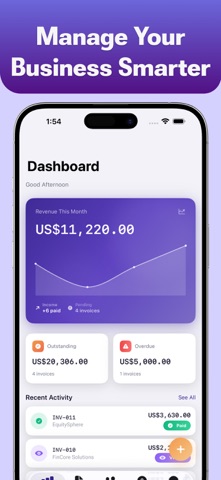
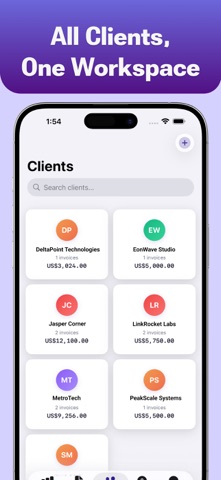
Ledger is the simple, professional invoicing app built for freelancers, contractors, creators, and small businesses. Create polished invoices in seconds, track payments, manage clients, and stay organized — all without complicated accounting software. Whether you’re sending your first invoice or managing recurring clients, Ledger gives you the tools you need in a clean, fast, and privacy-focused experience. CREATE PROFESSIONAL INVOICES • Create invoices on a single screen — no complicated setup • Choose from 4 beautiful PDF invoice templates • Add line items, taxes, discounts, and notes • See totals update live as you type • Share invoices instantly via Email, Messages, AirDrop, and more • Generate professional PDF invoices ready for clients TRACK PAYMENTS & BUSINESS PERFORMANCE • Monitor paid, pending, overdue, and outstanding invoices • Revenue dashboard with clear charts and insights • Invoice workflow tracking: Draft → Sent → Viewed → Paid → Overdue • Stay updated with recent activity history CLIENTS & ESTIMATES • Manage all your clients in one place • View invoice history and outstanding balances per client • Create estimates and convert them into invoices instantly • Add notes and keep communication organized EXPENSE TRACKING • Record business expenses by category • Add dates, notes, and details • View monthly expense summaries • Export CSV reports for accounting and tax filing PRIVACY-FIRST DESIGN • No sign-up or account required • Works completely offline • Your data stays on your device • No tracking, analytics, or third-party SDKs • Optional Face ID / Touch ID protection FREE TO START Ledger’s free version includes all core features: • Up to 2 invoices • 5 clients • 1 estimate • 10 expenses • Access to all PDF templates LEDGER PRO Unlock unlimited access with Ledger Pro: • Unlimited invoices, clients, estimates, and expenses • Recurring invoices • Saved invoice templates • Advanced analytics • CSV & PDF exports Subscriptions are available as weekly or yearly plans and renew automatically unless cancelled at least 24 hours before the current billing period ends. You can manage or cancel subscriptions anytime in your Apple ID settings. Privacy Policy: https://swiftygarage.com/privacy-policy.html Terms of Use: https://swiftygarage.com/terms-of-use.html
Details