

Cadence: Family Activity Hub
EVLA LLC · Lifestyle
Independent analytics for this App Store listing. AppTracker is not affiliated with EVLA LLC.
Chart standing · US
What changed · US
Listing changes AppTracker has observed for this app in this storefront — new versions, price moves, rating shifts, and store copy.
Choose who is handling drop-off and pickup for any day, from the dashboard or the day's sheet, and send a carpool driver the plan in one tap. Your subscription now covers four people who can edit. Calendar sync now writes only what changed, so shared calendars stay quiet unless an activity actually moves.
Ratings breakdown · US
The star breakdown behind this app's rating in this storefront.
Screenshots




About
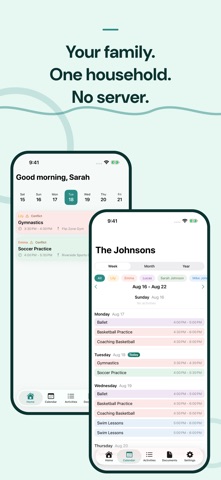
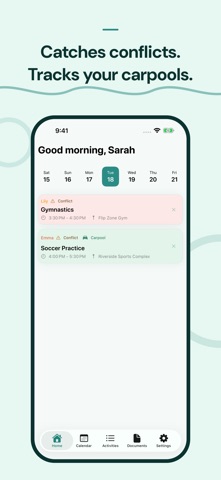
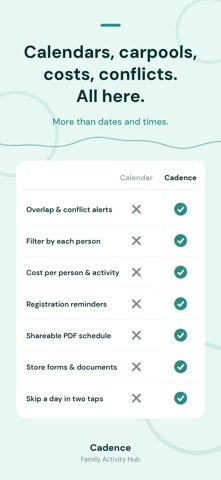
Your Family's Activity Hub Cadence puts your whole household's activities in one app. Kids, parents, grandparents, caregivers: everyone on one schedule. Your family's schedule lives in three places: a wall calendar, a group chat that never stops, a sticky note on the counter. And somehow you still forgot about soccer practice. When the kids have practices, the adults have their own commitments, and Grandma babysits Tuesdays, things fall through the cracks. Try Cadence free for 14 days. Cancel anytime. NEW IN 1.2: SHARE YOUR HOUSEHOLD Invite the other parent, a grandparent, or a caregiver. They see the same activities, calendar, costs, and documents on their own iPhone, through their own iCloud account. No Cadence login, no Cadence server. Choose whether they can edit or only view. If your setup changes, move ownership between devices. Your activities, costs, and documents carry over. SEE YOUR WHOLE DAY AT A GLANCE Open the app to color-coded cards for every person's activities: times, locations, who's driving. A NOW badge shows what's happening this moment. Conflict flags catch collisions before they turn into arguments, and when you set a carpool, the driver's name shows right on the day's card. PLAN THE WAY YOU WANT View your week day by day, your month in one screen, or a full year timeline showing every activity's season. Filter by any family member with one tap. SCHEDULE ANYTHING Weekly practice, a biweekly book club, piano on the 2nd Tuesday of the month. Set locations, assign activities to any family member, add start and end dates for seasonal activities, and create one-time entries for field trips, tryouts, and reunions. KNOW WHAT IT ALL COSTS Add costs per session, per month, per season, per year, or one time. Set a household budget and per-person budgets: a ring fills as you spend and tells you whether you're ahead of pace, with last year to compare against. Split one shared fee across participating kids. NEVER MISS A DEADLINE Set reminders months before sign-ups open. Tap a deadline banner to open the registration link, mark it done, and turn it into a scheduled activity. Leave-by alerts with a travel buffer tell you when to walk out the door. A weekly PDF schedule goes to any caregiver on the day you choose. EVERYWHERE YOU LOOK Widgets show today and what's next. Ask Siri for the schedule. A Lock Screen countdown runs to the next event. The Apple Watch app puts today on your wrist. On iPad, the Activity Board is a full-screen live view of the whole family's day. Each device can add the schedule to its own calendar, so two people can sync without seeing everything twice. Document storage keeps waivers, forms, and rosters organized by activity. Photos for everyone in the household. PRIVATE BY DESIGN No account, no sign-up form, no tracking. Cadence syncs through your own private iCloud. There is no Cadence server. Works on iPhone, iPad, and Apple Watch. Subscription: free to download with a 14-day free trial. One subscription covers your household. Up to four people can edit. Monthly: $6.99/mo Annual: $59.99/yr (save 28%) Already subscribed on another device? Tap Restore Purchases on the subscription screen. Cancel anytime from your iPhone settings. Payment is charged to your Apple ID at confirmation and auto-renews unless cancelled 24 hours before the period ends. Privacy Policy: cadencefamilyhub.com/privacy-policy Terms of Use: apple.com/legal/internet-services/itunes/dev/stdeula
What's new · 1.3
Choose who is handling drop-off and pickup for any day, from the dashboard or the day's sheet, and send a carpool driver the plan in one tap. Your subscription now covers four people who can edit. Calendar sync now writes only what changed, so shared calendars stay quiet unless an activity actually moves.
Details