

Routine: Calendar & Planner
TD Studios, LLC · Productivity
Independent analytics for this App Store listing. AppTracker is not affiliated with TD Studios, LLC.
Chart standing · US
What changed · US
Listing changes AppTracker has observed for this app in this storefront — new versions, price moves, rating shifts, and store copy.
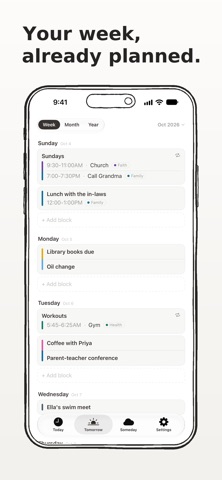
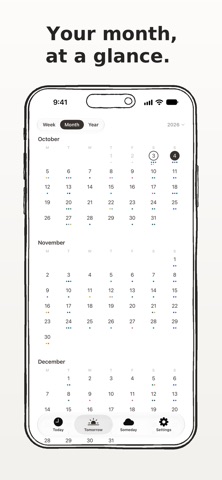
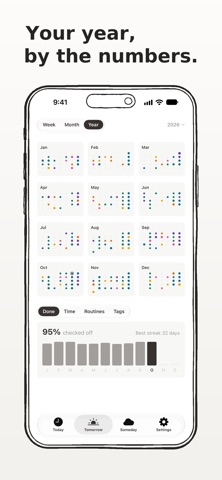
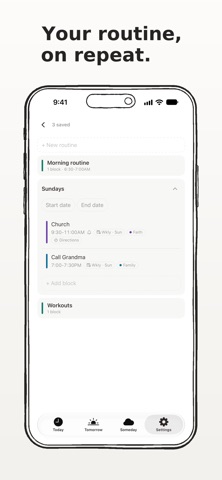
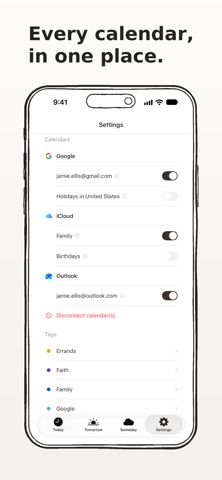
Welcome to version 5.2, here's what we have been working on for you to make your Routine so much better! Tomorrow, rebuilt • Switch between Week, Month and Year at the top. Each one zooms smoothly into the next. • Week lays out the days ahead as a list, so your whole week is right there. • Month rings today and marks tomorrow in solid black. • Year shows every month at once, ten years back and ten ahead. Tap a month to jump into it. • Tap the month or year in the top right and spin the wheel to go anywhere. • New year stats: how much you checked off and your best streak, hours planned, how each routine went, and where your time goes by tag. Settings and Routines, together • Settings now sits at the end of the tab bar. • Your routines live inside Settings, right at the top. • Preferences and Settings are now one page. Someday, simplified • Add anything for later with no date to pick. • Hold an item to edit it or set its day. The calendar pops right out. Widgets, updated • iOS 27 full screen widget added • All small to large widgets updated and made cleaner
Price & rating history · US
Reconstructed from the listing changes AppTracker has observed in this storefront. A field is charted once it has changed more than once, and each line starts at the value it moved from.
Average rating · ★ 4.60 now · 2 changes on record
Ratings breakdown · US
The star breakdown behind this app's rating in this storefront.
In-app purchases · US
What this app sells inside itself, grouped by kind and priced for this storefront.
Screenshots




About
Build the day you want to repeat, and stop rebuilding it every morning. Most days are not new. They have a shape, and your phone should already know it. Welcome to your Routine. No onboarding questionnaire, no streaks to protect, and no collecting of your data. Download it, write out a day once, choose which days it runs, and it fills those days in for you. That's it. Today is the screen you live in. No week strip, no month grid, nothing to navigate. What is happening is in front of you, and anything else that comes up goes straight onto the day. Tomorrow holds every day ahead for a year, already filled in by your routines. Add to any of them. Lift a routine off a single day when life happens, and the rest of the week stays where it is. Someday is for the things with no date yet. Park them, and give them a day when you are ready. Give a block a time, a tag, a reminder, and a place. Name and color your own tags. Ask Siri to run a routine, add a block, or read your day back to you (coming in iOS 27). Put it on your Home Screen and Lock Screen, and open it on iPad and Mac. Your day stays yours. Everything syncs privately through your own iCloud, with no account to create and no one watching. You decide what your days look like, not an algorithm. Build it once, and let it carry you. Download Routine today and see the difference it will make in your life! Terms of Use (EULA): https://www.apple.com/legal/internet-services/itunes/dev/stdeula/
What's new · 5.2
Welcome to version 5.2, here's what we have been working on for you to make your Routine so much better! Tomorrow, rebuilt • Switch between Week, Month and Year at the top. Each one zooms smoothly into the next. • Week lays out the days ahead as a list, so your whole week is right there. • Month rings today and marks tomorrow in solid black. • Year shows every month at once, ten years back and ten ahead. Tap a month to jump into it. • Tap the month or year in the top right and spin the wheel to go anywhere. • New year stats: how much you checked off and your best streak, hours planned, how each routine went, and where your time goes by tag. Settings and Routines, together • Settings now sits at the end of the tab bar. • Your routines live inside Settings, right at the top. • Preferences and Settings are now one page. Someday, simplified • Add anything for later with no date to pick. • Hold an item to edit it or set its day. The calendar pops right out. Widgets, updated • iOS 27 full screen widget added • All small to large widgets updated and made cleaner
Details