

HomeSnap - Smart Home Insights
LVL35 LLC · Utilities
Independent analytics for this App Store listing. AppTracker is not affiliated with LVL35 LLC.
Chart standing · US
What changed · US
Listing changes AppTracker has observed for this app in this storefront — new versions, price moves, rating shifts, and store copy.
Support for the iPhone Duo
Ratings breakdown · US
The star breakdown behind this app's rating in this storefront.
In-app purchases · US
No in-app purchases.
Screenshots


About
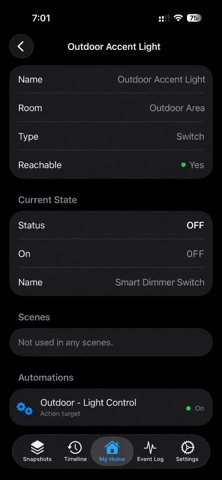
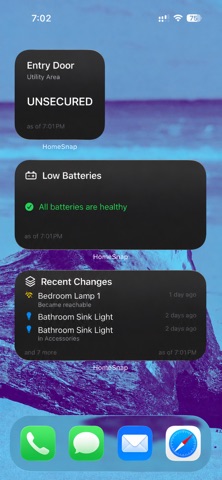
HomeSnap gives you a clear, private view of your HomeKit home: glance at it from a widget, get told the moment something needs attention, ask it questions, and see exactly what changed over time. Read-only. On-device. No accounts. AT A GLANCE Add HomeSnap widgets to your Home Screen, Lock Screen, and StandBy: - Low Batteries: every device running low, most urgent first, with a threshold you set per widget. - Unreachable Devices: anything offline, so you catch a dropped lock or camera fast. - Recent Changes: the latest activity in your home. - Device Status: choose one or more devices and see what they are doing right now. Larger sizes show more. ALERTS Get notified the first time a battery drops below your chosen level, or when a device goes offline. Both are optional, and both appear in your change history. A device's own low-battery warning always counts. Batteries section listing every battery device and its level, most urgent first. SIRI, SHORTCUTS & CONTROLS Say "Take a HomeSnap snapshot," add a one-tap button to Control Center or your Lock Screen, or build a daily automation so a fresh capture is guaranteed. SNAPSHOTS & CHANGES HomeSnap snapshots your entire HomeKit setup once a day (or whenever you want) and compares each capture to the last. You will know exactly when an accessory was added, removed, renamed, or moved; when a room, automation, or scene changed; when a device went offline. Every difference is color-coded, grouped by date, and searchable. You can easily now restore any devices that were removed. LIVE STATUS & EVENT LOG See what each device is doing right now across the app. Turn on the Event Log to capture a live stream of activity: lights, locks, doors, sensors, button presses. Lite mode keeps the signal; Full mode captures everything. Filter, search, and export. Always-On Mode turns an old iPhone or iPad on a charger into a continuous recorder. PRIVATE WEB DASHBOARD Flip on the Local Web Dashboard and open it from any device on your Wi-Fi: live tiles, an activity heatmap, charts, a streaming event feed, and per-room and per-device drill-ins. Served on your LAN only, with an optional password. PRIVACY HomeSnap is strictly read-only. It cannot toggle accessories, run scenes, or change any HomeKit configuration. Your home data stays on your device: no accounts, no cloud sync, no analytics, no tracking. Nothing about you or your home is ever transmitted off your device. Built for anyone who runs a HomeKit home and wants to see, at a glance and over time, how it is doing.
What's new · 6.10.06
Support for the iPhone Duo
Details