

Only Text Editor
Randy Tjahjono · Utilities
Independent analytics for this App Store listing. AppTracker is not affiliated with Randy Tjahjono.
Chart standing · US
What changed · US
Listing changes AppTracker has observed for this app in this storefront — new versions, price moves, rating shifts, and store copy.
- Stability and performance improvements
Ratings breakdown · US
The star breakdown behind this app's rating in this storefront.
In-app purchases · US
What this app sells inside itself, grouped by kind and priced for this storefront.
Screenshots



About
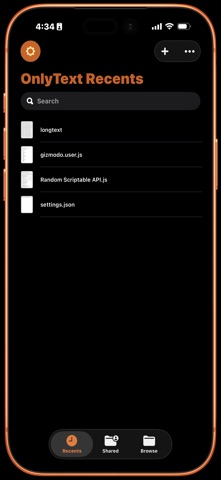
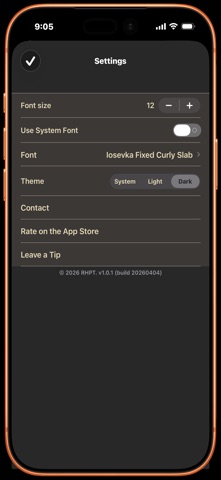
Meet Only Text, a stripped-down text editor for iOS that brings back the simplicity of classic text editing. Inspired by the beloved, no-nonsense text editors of the past, Only Text focuses entirely on doing one thing perfectly: letting you view and edit plain text files. No markdown formatting, no color-coding, and no distractions. Just your words. Key Features: * Pure Plain Text - Seamlessly open, view, and save plain text files from your device, iCloud Drive, or anywhere else the Files app can reach. * Save Exactly Where You Want - When you create a new document, nothing is written to disk until you choose to save it at which point you pick the destination yourself, whether that's iCloud Drive, On My iPhone, or another location entirely. * Never Lose Your Work - Existing documents save continuously as you type. If Only Text is ever interrupted before you've saved a brand-new document, it's offered back to you the next time you open the app. * Zero Clutter - No complex toolbars, formatting menus, or markdown to learn. The interface gets out of your way so you can focus on writing. * Built-in Search - Quickly find text within long documents without leaving the editor. * Custom Typography - Enjoy the beautiful, monospaced Iosevka Curly Slab font set as the default, switch to your device's system font, or pick any custom font installed on your device with adjustable sizing to match your taste. * Adaptive Light & Dark Themes - Follow the system appearance or choose your own; the whole app, including documents already open, updates instantly. * Share & Print - Send a document to any app, or print it directly, right from the editor. * Modern iOS Integration - Built natively for iOS to ensure smooth performance, fast load times, and perfect integration with the Files app. * Lightweight & Fast - Opens instantly. Perfect for quick notes, writing code snippets, or keeping track of your thoughts on the go. Only Text is free to use, with no ads and no subscriptions. If you enjoy it, you can leave an optional tip to support future updates.
What's new · 1.0.9
- Stability and performance improvements
Details