

Stamp Maker - PDF Signer
Hashim Sultan Abbasi · Productivity
Independent analytics for this App Store listing. AppTracker is not affiliated with Hashim Sultan Abbasi.
Chart standing · US
What changed · US
Listing changes AppTracker has observed for this app in this storefront — new versions, price moves, rating shifts, and store copy.
What's new in 4.1 • Refreshed design for iOS 26 with a new floating tab bar • Smoother pinch-to-zoom in the stamp editor — zooming no longer selects elements by accident • New Lock / Unlock and Deselect buttons in the editor toolbar • The reset-zoom button now stays visible at any zoom level • Search your gallery right from the tab bar • New Manage Subscription screen and a compact PRO badge on Home • Pro members are no longer shown the upgrade screen at launch • Bug fixes and performance improvements
Ratings breakdown · US
The star breakdown behind this app's rating in this storefront.
In-app purchases · US
What this app sells inside itself, grouped by kind and priced for this storefront.
Screenshots




About
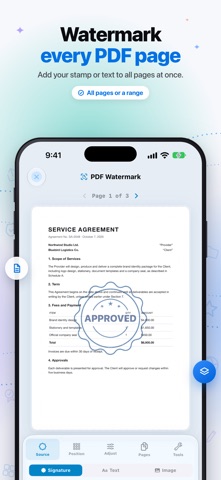
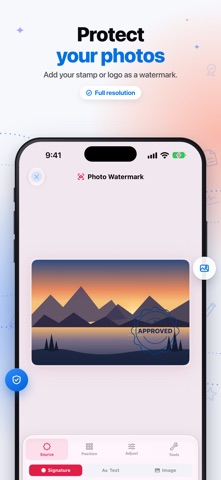
Turn your iPhone into a professional stamp studio. Design custom stamps, watermark photos & documents, and sign PDFs — all in one app. Tired of ordering expensive rubber stamps, waiting days for delivery, or juggling multiple apps just to mark up a document? Stamp Maker gives you everything you need to create, customize, and apply professional stamps in minutes — right from your pocket. Whether you're a business owner approving invoices, a notary authenticating documents, a teacher grading papers, or a photographer protecting your work, this is the only tool you'll need. WHAT YOU CAN CREATE: - CUSTOM STAMP DESIGNER - Build stamps from scratch using 13 element types — shapes, text, icons, QR codes, barcodes, and more. Full control over colors, gradients, shadows, glow effects, and blend modes. - CURVED TEXT & TYPOGRAPHY - Add professional curved lettering, choose from hundreds of fonts, adjust kerning, and apply text outlines for that authentic seal look. - ADVANCED DESIGN TOOLS - Snap-to-grid, smart alignment guides, Bezier pen tool, freehand drawing, and boolean shape operations (union, subtract, intersect) for precision designs. - 50+ READY-MADE TEMPLATES - Professionally designed templates across 11 categories — Official, Business, Legal, Education, Personal, Holiday, Security, and more. Every template is fully editable. - PHOTO WATERMARKING - Protect your images with stamp watermarks. Choose from 9 placement positions or tile across the entire photo. Adjust opacity, scale, and rotation in real time. - PDF WATERMARKING - Apply stamps to multi-page PDFs with custom page range selection. Watermark all pages, specific pages, or custom ranges like "1,3,5-8." - PDF SIGNING - Draw freehand signatures, type text signatures, or use your saved stamps. Place multiple signatures per page, resize and reposition freely, and apply across all pages instantly. - PDF EDITING - Annotate documents with text, highlights, shapes, drawings, and stamp overlays. Full page-by-page control with real-time preview. - QR CODES & BARCODES - Generate and embed QR codes or barcodes directly into your stamp designs for document tracking and verification. - PRECISION CONTROLS - 50-step undo/redo, layer management, element locking, rulers, and zoom — everything you need for pixel-perfect results. - HIGH-QUALITY EXPORT - Save stamps as transparent PNGs at up to 600 DPI. Share directly or save watermarked photos and signed PDFs in professional quality. WHY PROFESSIONALS CHOOSE STAMP MAKER PRO: • All-in-one solution — no need to switch between stamp, watermark, and signing apps • Works completely offline — everything processes on your device • Available in 20 languages including Arabic, Urdu, Spanish, French, German, Chinese, Japanese, Korean, Hindi, and Turkish • Intuitive interface designed for both iPhone and iPad • No account required — start creating immediately FROM STAMPS TO SIGNED DOCUMENTS IN MINUTES: 1. Pick a template or start from scratch 2. Customize every detail — colors, effects, text, shapes 3. Save your stamp and apply it anywhere — photos, PDFs, documents 4. Export and share in high resolution Create your first professional stamp in under 5 minutes. Download Stamp Maker now and take control of your documents. Privacy Policy: https://stampmaker.myportfoliodata.com/privacy-policy Terms of Use: https://stampmaker.myportfoliodata.com/terms
What's new · 4.1.0
What's new in 4.1 • Refreshed design for iOS 26 with a new floating tab bar • Smoother pinch-to-zoom in the stamp editor — zooming no longer selects elements by accident • New Lock / Unlock and Deselect buttons in the editor toolbar • The reset-zoom button now stays visible at any zoom level • Search your gallery right from the tab bar • New Manage Subscription screen and a compact PRO badge on Home • Pro members are no longer shown the upgrade screen at launch • Bug fixes and performance improvements
Details