

Color Hunt - Daily Challenges
Can Bi · Photo & Video
Independent analytics for this App Store listing. AppTracker is not affiliated with Can Bi.
Chart standing · US
What changed · US
Listing changes AppTracker has observed for this app in this storefront — new versions, price moves, rating shifts, and store copy.
New • Pull a palette out of a shared photo without opening the app first — Color Hunt now appears when you share a photo. • Siri & Search: open the camera or today's challenge with Siri, and find your saved palettes in Spotlight. Switch it on or off in Settings. • A new Privacy & Legal section in Settings, with the privacy policy and terms. • Extract a photo’s palette or get today’s color from Siri and Shortcuts, without opening the app. Palette extraction is Pro. Improved • Long-press the Color Hunt icon on your Home Screen to request a feature or report a bug. • Settings > Advanced now has a Show IDs option, so you can copy an item’s ID in one tap when support asks for it. • Settings pages now show your current choices right away. Fixed • Opening the app from a widget, Siri or Spotlight no longer interrupts a backup, restore or Delete All Data. • Saved palettes now reliably leave Spotlight when you turn Siri & Search off. • Something you shared into the app no longer gets stuck before it arrives. • If your saved data can’t be opened, you now get a recovery screen instead of the app closing — your data stays on your device, and you can try again or send a report. Have feedback? Write to support@can.bi
In-app purchases · US
What this app sells inside itself, grouped by kind and priced for this storefront.
Screenshots


Keywords this app targets
Search terms AppTracker associates with this app — estimates, not search volume. ❝ = in the app's title; a highlighted number is its current position for that term.
Similar apps
Competitors and close alternatives, as estimated by AppTracker.
 Color Hunt Game
Carbon Club LLC
3 shared title words
Color Hunt Game
Carbon Club LLC
3 shared title words
 Foto Color Hunt(er)
Marius Kildedal
1 shared topic · 3 shared title words
Foto Color Hunt(er)
Marius Kildedal
1 shared topic · 3 shared title words
 Color Identifier
Yolleg Ltd
1 shared topic · 1 shared title word
Color Identifier
Yolleg Ltd
1 shared topic · 1 shared title word
 What Color?
Valgy
1 shared topic · 1 shared title word
What Color?
Valgy
1 shared topic · 1 shared title word
 Color Identifier - Paint match
Anastasiya Evseenko
1 shared topic · 1 shared title word
Color Identifier - Paint match
Anastasiya Evseenko
1 shared topic · 1 shared title word
 Color Identifier: Paint Match
Mobile Card Games & Travel Apps LLC
1 shared title word
Color Identifier: Paint Match
Mobile Card Games & Travel Apps LLC
1 shared title word
 Happy Color® – Coloring Games
X-Flow
1 shared topic · 1 shared title word
Happy Color® – Coloring Games
X-Flow
1 shared topic · 1 shared title word
 ColorID: Color Identifier
Zeisoft Yazilim Limited Sirketi
1 shared title word
ColorID: Color Identifier
Zeisoft Yazilim Limited Sirketi
1 shared title word
About
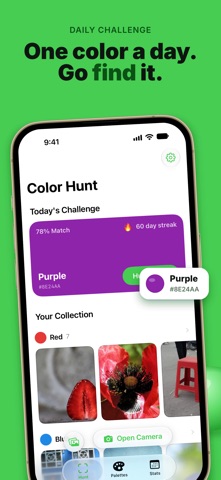
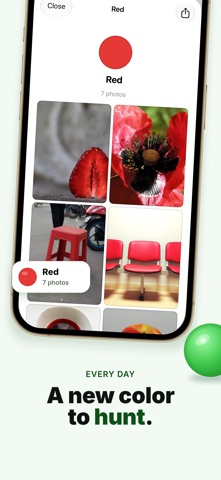
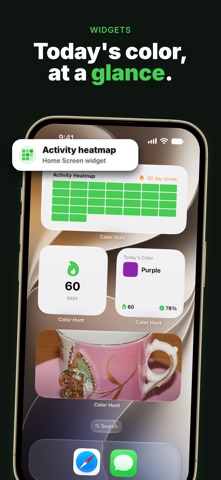
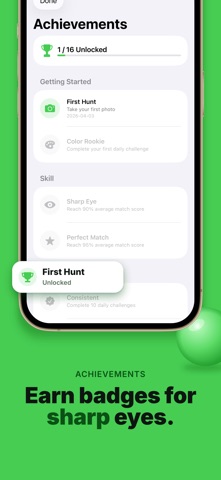
Hunt for colors in the real world. Every day brings a new target color — find it around you, capture it with your camera, and see how closely your photo matches. Build your collection, earn achievements, and share your best captures. Free to download. No ads. No tracking — ever. Color Hunt turns everyday life into a colorful adventure. Open the app, see today's challenge color, and go hunting. The camera detects colors in real time with hex and RGB values, helping you find the perfect match. Now with widgets, advanced camera controls, and more. ▸ DAILY COLOR CHALLENGE A new target color every day. Find it in the world around you — in nature, architecture, food, or anything you spot. Capture a photo and get your match score instantly. ▸ CAPTURE & SCORE Take a photo and see how closely the detected color matches the daily target. Higher scores mean a closer match. Drag to pick the exact color you want from your photo — a precise color picker built for real-world swatches. ▸ ADVANCED CAMERA Switch between front and back cameras, choose your lens, lock white balance, and adjust exposure. Haptic feedback guides you closer to the target color as you aim. ▸ BUILD YOUR COLLECTION Every photo is sorted into one of 12 color families — Red, Orange, Yellow, Green, Teal, Blue, Purple, Pink, Brown, Beige, Black, and White. Watch your palette collection grow as you hunt. ▸ ACHIEVEMENTS Earn milestones for streaks, scores, collections, and more. Track your progress and unlock new achievements as you improve. ▸ SHARE & EXPORT Export your captures as beautiful color cards or share a summary of your day's hunt with friends. Great for designers, photographers, and anyone who loves color. ▸ WIDGETS & QUICK ACTIONS Put the Today's Color widget on your Home Screen for free. Pro adds four more — Streak, Color Collection, Photo of the Day, and Activity Heatmap. Control Center and Lock Screen buttons launch the camera or today's challenge, no Pro needed. ▸ TRACK YOUR STREAK Complete daily challenges to build your streak. Set daily reminders so you never miss a challenge. View your progress on the calendar and aim for longer streaks. ▸ HISTORY & STATS See your challenge history, best scores, total photos, and collection progress. Every day is tracked on a visual calendar showing completed and missed challenges. ▸ FULLY OFFLINE & PRIVATE No account. No cloud. No tracking. No ads. All your photos and data stay on your device only. ▸ TRY FREE Complete the daily challenge loop, browse your full collection, earn achievements, and share color cards — no watermarks. ▸ PRO UNLOCKS THE FULL TOOLKIT Free-hunt any color, unlimited photo imports, advanced camera controls, category and day exports, four extra Home Screen widgets, and .colorhunt backup. Monthly, annual, or lifetime. Color Hunt is a simple, beautiful, ad-free color hunting app that respects your privacy. Download now and start hunting for colors. Have feedback? Reach us at support@can.bi Privacy Policy: https://canbi.notion.site/Privacy-Policy-3356cac95bdb800aa9ccc08131f1c7ca Terms of Use (EULA): https://canbi.notion.site/Terms-of-Service-3356cac95bdb801ea866d19c1a761488
What's new · 1.6.1
New • Pull a palette out of a shared photo without opening the app first — Color Hunt now appears when you share a photo. • Siri & Search: open the camera or today's challenge with Siri, and find your saved palettes in Spotlight. Switch it on or off in Settings. • A new Privacy & Legal section in Settings, with the privacy policy and terms. • Extract a photo’s palette or get today’s color from Siri and Shortcuts, without opening the app. Palette extraction is Pro. Improved • Long-press the Color Hunt icon on your Home Screen to request a feature or report a bug. • Settings > Advanced now has a Show IDs option, so you can copy an item’s ID in one tap when support asks for it. • Settings pages now show your current choices right away. Fixed • Opening the app from a widget, Siri or Spotlight no longer interrupts a backup, restore or Delete All Data. • Saved palettes now reliably leave Spotlight when you turn Siri & Search off. • Something you shared into the app no longer gets stuck before it arrives. • If your saved data can’t be opened, you now get a recovery screen instead of the app closing — your data stays on your device, and you can try again or send a report. Have feedback? Write to support@can.bi
Details