

Pen Licence: Handwriting Kids
Alexandru Ghita · Education
Independent analytics for this App Store listing. AppTracker is not affiliated with Alexandru Ghita.
Chart standing · US
What changed · US
Listing changes AppTracker has observed for this app in this storefront — new versions, price moves, rating shifts, and store copy.
A tidy-up, with apologies to everyone who holds their phone sideways. • Bug: on iPhone in landscape, Restore Purchase and the legal links hid below the screen with no way to scroll to them. Fix: the unlock screen scrolls now, so nothing hides. • Bug: the first handwriting check squeezed the writing area into a strip about as tall as a grain of rice. Fix: you get a proper writing box on every screen. • Bug: finger writers who scored 91 got the tip "Focus on Pressure", from a finger that has no pressure to give. Fix: pressure tips are for Apple Pencil only, and fingers no longer get fake compliments on their grip either. • Bug: Progress said "100 XP needed for Level 1" to people already on Level 1. Fix: it now counts down to the next level, like a sensible progress bar. • Bug: a word with a missing translation showed a blank meaning. Fix: it falls back to English instead of staring at you. Plus a sturdier save file, so your progress survives even if the app has a bad day.
In-app purchases · US
What this app sells inside itself, grouped by kind and priced for this storefront.
Screenshots



About
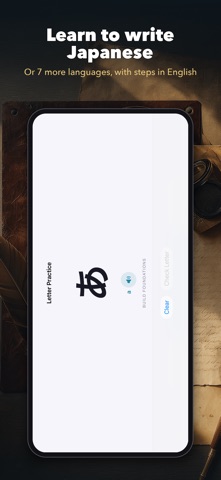
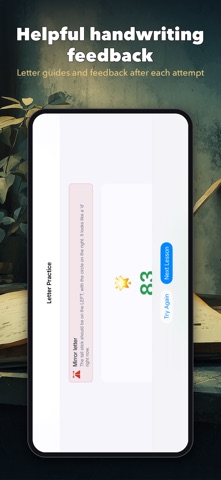
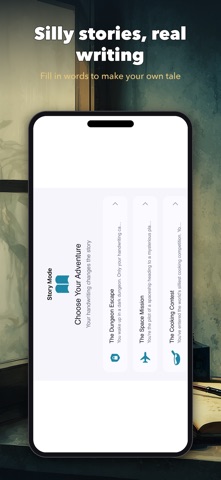
Write beautifully in any script. Inkla helps you learn to write Japanese, Chinese, Hindi and more, one letter, word and sentence at a time, with clear models, guided practice and feedback after every attempt. WRITE IN 8 LANGUAGES • Choose the language you practice separately from the app language: English, French, German, Spanish, Romanian, Japanese hiragana, a starter set of 60 Simplified Chinese characters, or Hindi in Devanagari. • Keep the app in English and learn to write Japanese: stroke-by-stroke instructions stay in your language. • Made for adults picking up a new script, bilingual families, heritage languages and curious young writers. LEARN WITH RESEARCH-BACKED METHODS • Meaning Quiz: 10 quick questions. Read it, hear it, then write it from memory. • Words come back on later days until you know them for good. The quiz follows well-studied learning methods: spaced review, practice testing and writing from memory. WORD EXPLORER • See what every word and sentence means in your language, and hear how every letter sounds. • Hear it read aloud at normal or slow speed, with pinyin, romaji or Hindi romanization alongside. • Sentences break down word by word, with short grammar notes and memory tricks for characters. • Tap any word to practice writing it. BETTER HANDWRITING, STEP BY STEP • Follow letter formation steps in print and joined cursive for Latin letters. • Get feedback on shape, spacing, line control, pressure and rhythm. Pressure feedback depends on the input device; Apple Pencil and finger practice both work. • Mirror-letter mix-ups such as b and d are spotted, so reversals get caught early. • Try words, sentences, silly stories, postcards and other creative writing. • Progress is saved per language, and each one picks up where you left off. FOR CHILDREN AND PARENTS • Kids learn letter formation with clear models and short, guided steps. • Follow practice history for each language in the parent dashboard and export a PDF summary when you choose. • Purchases, links, sharing and resetting progress ask a grown-up first. PRIVATE, SIMPLE AND YOURS Try Inkla free for 7 days, then unlock it with a one-time in-app purchase. No subscription or ads. No account required. Practice is stored on your device; you control any exported reports. Audio uses the voices built into your device. If a language's voice isn't installed, you can add it in iOS Settings. Inkla is a practice tool, not a diagnosis or a full language course. Its progress indicators can support a conversation with a teacher. Works on iPhone and iPad.
What's new · 1.4.0
A tidy-up, with apologies to everyone who holds their phone sideways. • Bug: on iPhone in landscape, Restore Purchase and the legal links hid below the screen with no way to scroll to them. Fix: the unlock screen scrolls now, so nothing hides. • Bug: the first handwriting check squeezed the writing area into a strip about as tall as a grain of rice. Fix: you get a proper writing box on every screen. • Bug: finger writers who scored 91 got the tip "Focus on Pressure", from a finger that has no pressure to give. Fix: pressure tips are for Apple Pencil only, and fingers no longer get fake compliments on their grip either. • Bug: Progress said "100 XP needed for Level 1" to people already on Level 1. Fix: it now counts down to the next level, like a sensible progress bar. • Bug: a word with a missing translation showed a blank meaning. Fix: it falls back to English instead of staring at you. Plus a sturdier save file, so your progress survives even if the app has a bad day.
Details