

Monster Remote
Jan Sallads · Utilities
Independent analytics for this App Store listing. AppTracker is not affiliated with Jan Sallads.
Chart standing · US
What changed · US
Listing changes AppTracker has observed for this app in this storefront — new versions, price moves, rating shifts, and store copy.
Update to new version 3.12.00 Minor bugfixes
Price & rating history · US
Reconstructed from the listing changes AppTracker has observed in this storefront. A field is charted once it has changed more than once, and each line starts at the value it moved from.
Average rating · ★ 4.47 now · 4 changes on record
Screenshots




About
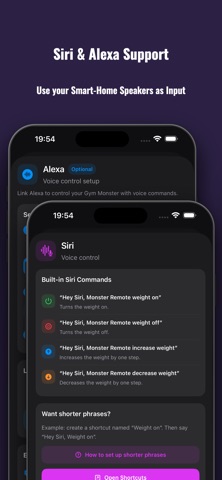
Monster Remote is a wireless remote-control app for compatible home gym machines like the Speediance Gym Monster 1 & 2. Use your iPhone or iPad to control weight, open a live screen mirror, tap and swipe on the mirrored display, configure workout overlays, launch videos or websites on the machine screen, and trigger supported actions with Hot Mic voice commands, Siri Shortcuts, Alexa, and smart home integrations. Main features: • Quick weight control Turn weight on or off and increase or decrease the load in configurable steps. • Live Remote Mirror View the machine screen directly on your iPhone or iPad. • Tap and swipe control Use the mirrored screen like a remote touch display. Tap buttons, swipe through screens, and control supported areas from your device. • Workout overlays Show useful training information directly on the machine screen, including current exercise progress, cable position, bench angle, accessories, and recent set history. • Customizable overlay display Choose which overlay elements should be visible and adjust the overlay background, border, and transparency to match your workout view. (workout number, cable setting, bench angle, historical weight + reps for each exercise) • Recent set history Display previous set values for the current exercise so you can quickly compare your latest training performance without leaving the workout screen. • Hot Mic voice commands Control supported workout actions by voice without reaching for the machine screen. Use commands like weight on, weight off, heavier, lighter, weight to, start training, pause, skip rest, continue set, new set, new movement, spotter controls, training mode changes, accessory changes, and screen flip. • Bluetooth microphone support Use the built-in microphone, AirPods, or other compatible Bluetooth microphones and headsets for voice control. • YouTube on the machine screen Open YouTube videos on the GM display for workouts, tutorials, coaching content, or entertainment during training. • Websites on the machine screen Send websites to the machine display for training programs, timers, notes, instructions, or anything else you want available while working out. • Siri Shortcuts Trigger supported actions through Siri Shortcuts and personal automations. • Alexa support Control supported actions through Alexa voice routines and compatible automation setups. • Smart home integration Connect Monster Remote with your personal smart home workflows and automation scenes. • No extra hardware required Monster Remote works over your local network. No additional remote, bridge, hub, or dedicated hardware is required. • Wireless setup Connect to your supported machine over the local network after setup. • Clean workout-focused design Fast access to the controls you need without unnecessary clutter. Monster Remote is designed for users who want easier access to their training controls, especially during workouts where reaching the machine screen is inconvenient. Important: Monster Remote requires a compatible machine, local network access, and a completed wireless setup. Some features depend on the machine software version, screen state, voice setup, network quality, and device configuration. Network note: Monster Remote communicates with your machine over your local Wi-Fi network. For the best experience, use a stable connection and keep your iPhone or iPad on the same local network as your machine. Disclaimer: Monster Remote is an unofficial app. It is not affiliated with, endorsed by, sponsored by, or connected to Speediance. Speediance and Gym Monster are trademarks or product names of their respective owners. Use at your own risk.
What's new · 2.10.0
Update to new version 3.12.00 Minor bugfixes
Details