
Chart standing · US
What changed · US
Listing changes AppTracker has observed for this app in this storefront — new versions, price moves, rating shifts, and store copy.
Better tap targets in the Contact Spotlight widget, and contact photos that survive a tinted Home Screen. Contact Spotlight taps: The widget is built around a single person, but tapping it only ever opened one date. Tapping the contact's name or photo now opens their contact screen, where all of their dates, sync switches, and defaults live. On the medium and large sizes, the empty space around the date rows does the same. Tapping a specific date row still opens that date. Photos on a tinted Home Screen: With the Home Screen set to the tinted or clear look, contact photos in KeepDates widgets rendered as solid colored circles rather than faces, and the initials shown for contacts without a photo became filled dots. Photos now keep their shading, and initials stay readable. Lock Screen widgets got the same fix.
Screenshots




About
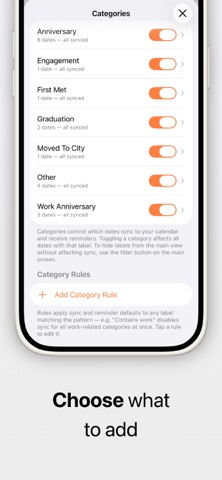
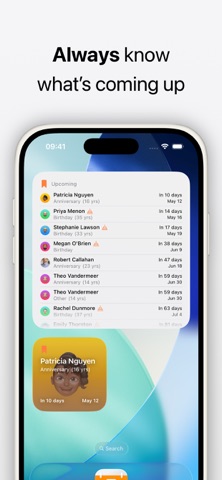
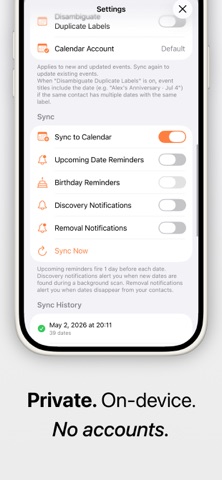
Your iPhone remembers birthdays. But important dates like anniversaries are easy to miss. KeepDates fixes that automatically. # What it does KeepDates finds dates stored in your contacts — anniversaries, custom events, and more — and turns them into reminders you’ll actually see. It works quietly in the background and keeps everything up to date as your contacts change. # Why it’s useful * Never forget anniversaries, milestones, or important personal dates * See all upcoming dates in one simple list * Get reminders before they happen * Works automatically — no manual setup # How it works * Scans your contacts for date fields * Lets you review and choose what to include * Syncs selected dates into a dedicated calendar * Keeps everything updated in the background # Key Features * Automatic contact date detection * Calendar sync with yearly recurring events * Optional reminders (day before by default) * Widgets for quick access to upcoming dates * Background sync — always up to date * Works completely offline # Widgets * Small widget — next upcoming date * Medium widget — multiple upcoming dates * Lock screen widget — quick glance countdown # Privacy KeepDates is built to be simple and private: * No accounts * No cloud sync * No tracking * All data stays on your device # Premium (Optional) Unlock additional control and customization: * Smart reminders (multiple timings) * More events in widgets + large widget * Look-ahead window control * Pinned contacts * Advanced filtering and customization ### KeepDates is designed to feel like a missing system feature — simple, automatic, and out of the way.
What's new · 26.11
Better tap targets in the Contact Spotlight widget, and contact photos that survive a tinted Home Screen. Contact Spotlight taps: The widget is built around a single person, but tapping it only ever opened one date. Tapping the contact's name or photo now opens their contact screen, where all of their dates, sync switches, and defaults live. On the medium and large sizes, the empty space around the date rows does the same. Tapping a specific date row still opens that date. Photos on a tinted Home Screen: With the Home Screen set to the tinted or clear look, contact photos in KeepDates widgets rendered as solid colored circles rather than faces, and the initials shown for contacts without a photo became filled dots. Photos now keep their shading, and initials stay readable. Lock Screen widgets got the same fix.
Details