

Audio & Video Converter
said oujakane · Utilities
Independent analytics for this App Store listing. AppTracker is not affiliated with said oujakane.
Chart standing · US
What changed · US
Listing changes AppTracker has observed for this app in this storefront — new versions, price moves, rating shifts, and store copy.
Price & rating history · US
Reconstructed from the listing changes AppTracker has observed in this storefront. A field is charted once it has changed more than once, and each line starts at the value it moved from.
Average rating · ★ 4.50 now · 3 changes on record
Ratings breakdown · US
The star breakdown behind this app's rating in this storefront.
In-app purchases · US
No in-app purchases.
Screenshots
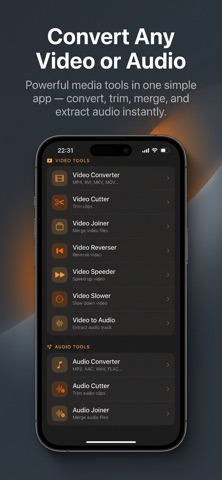


About
Transform your media with a professional yet simple media converter on your device. Video & Audio Converter gives you full control to convert, trim, merge and edit both video and audio — powered by a robust conversion engine. Convert - Convert video to mp3 or convert mp4 to mp3 and other audio formats: mp3, wav, ogg, m4a, aac, flac and more. - Video converter supports mp4, mkv, flv, avi, wmv, mov, webm, 3gp and common containers. - Change resolution, custom resolution presets (480p, 720p, 1080p, 4K), change frame rate (fps), and adjust bitrate for optimal output. - Choose video codecs (H.264, H.265/HEVC, VP8/VP9, AV1) and audio codecs (AAC, MP3, Opus, AC3, FLAC) for high quality or smaller files. Edit & Trim - Video cutter and mp4 cutter: trim video with a precise range slider and preview before export. - Cut audio, mp3 cutter and audio cutter: trim songs, podcasts or recordings with frame-accurate editing. - Fade in / fade out, volume boost and sound boost controls to polish your clips. - Cut trim video or trim audio without re-encoding when possible to save time and preserve quality. Join & Merge - Video merger and join videos: combine clips into one seamless file with automatic scaling and normalization. - Audio joiner / audio merger: merge multiple audio files into a single continuous track for songs or podcasts. - Merge music or audio tracks and export in your preferred format. Extract & Ringtones - Extract audio from video or music extractor: save audio tracks as standalone files. - Create ringtone and ringtone maker: cut a segment, add fade effects and export as a ringtone file. Export options include set as alarm, set as notification or save for manual import. - Extract mp3 or song extractor for quick audio pulls. Advanced Settings - Bitrate options and sample rate selection from 8000 Hz to 48000 Hz, mono or stereo channels, CBR/VBR encoding. - Preset profiles, custom format settings and estimated output size preview before conversion. - Edit tag and edit metadata: add or modify title, artist, album, genre and add cover image. - Add cover art and manage file renaming and sharing. Batch & Background - Batch conversion and batch processing to convert multiple files at once. - Background conversion keeps jobs running while you use other apps; persistent progress notifications with cancel option. - Offline converter with no account required and fast conversion performance. Creative Tools & Utilities - Speed controls: video speed up (time-lapse), slow motion and change playback speed. - Reverse video for creative effects, rotate video, flip video and crop or resize clips. - Compress video and video compressor to reduce file size with minimal quality loss; mp4 compressor and size reducer presets. - Remux and container conversion for quick format swaps without re-encoding. File Management - Smart file browser with folder view, thumbnail previews and multi-select for easy batching. - Manage converted files, search, share and export to other apps or cloud services you use. - In-app player for previewing audio and video before exporting. Why choose Video & Audio Converter? - Fast converter with high quality mp3 and lossless options. - All-in-one media converter: media converter, format converter, audio extractor, audio editor and video editor in one app. - Designed for both casual users and power users who need control over codecs, bitrate and metadata. Get started: import a file, choose the output format, tweak the settings and tap Convert. Video & Audio Converter handles the rest — fast, reliable and packed with professional options that are easy to use.
What's new · 1.3
Added review prompt
Details