

LangBeat
California First Strategies LLC · Music
Independent analytics for this App Store listing. AppTracker is not affiliated with California First Strategies LLC.
Chart standing · US
What changed · US
Listing changes AppTracker has observed for this app in this storefront — new versions, price moves, rating shifts, and store copy.
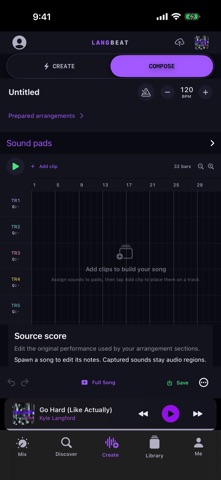
Create is live on your phone. - LIVE: the song you're playing as six stem lanes that move with the music. Hold a dot to keep a sound (with Undo), open Song Genome to see every sound in the song, and tap the pen to make it yours. - COMPOSE: lanes run left to right like Studio. Move, trim and drop in sounds from your collections, and share any sound. - Sessions: pick up a song that's open on another device. Edits from the web and the phone stay in step, and mixing done on the web (EQ, compression, fades, automation) now plays on the phone. Lyrics - On duets, each line takes its singer's colour. The sheet glides to the line being sung, fills in word by word and glows with the voice. Tap a line to jump there, or open the lyrics full screen. - Downloaded songs keep their lyrics offline. - Lyrics is now an icon beside your audio output, shown only when a song has lyrics. - Artists: set the lyrics for your own songs right on your phone. Paste the words, then tap along as each line starts. Now Playing - A NEW MIX tag appears when a song you made has a newer mix. Tap it to switch without losing your place. - Listen Together shows up during a FaceTime call. - Share now covers copying the link. Turn on Appearance > Queue palette colours and the queue icon takes the colours of the next three covers. - The buttons under the play controls are evenly spaced and centred. Run Mode - Just you and your music. A switch at the top of the settings drawer strips the app down to your Library, so nothing pulls you out of the run. Your next songs are kept on the phone, so a dead zone doesn't stop the music. Smaller fixes and stability improvements.
Ratings breakdown · US
The star breakdown behind this app's rating in this storefront.
Screenshots


About
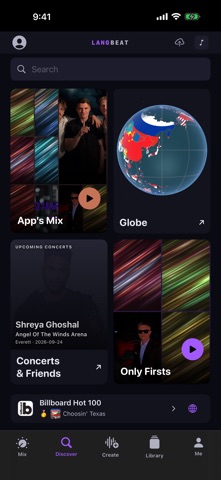
LangBeat is a DJ and music-making app for your own music. Import songs from Files, mix them on twin decks, pull the drums, bass or vocals out of any track, and build new ideas in Create. A starter library of original LangBeat songs is included, so you can start mixing straight away. MIX - Twin decks with play, cue, sync and tempo control - Crossfader, per-deck EQ, loops and hot cues - Colour waveforms with a beat grid and bar numbers - Live BPM and Camelot key, so you can see what fits together - Stems: mute or solo drums, bass, vocals and more while a track plays CREATE - Pad launcher for triggering clips in time - Capture clips from any song in your library - Arrangement timeline with undo LIBRARY - Import your own audio from Files (MP3, AAC, WAV, AIFF) - Playlists, saved songs and search - Sort and filter by BPM, key, date or length LISTEN - Now Playing with live stem meters - Vibe mode: each instrument lights the edge of the screen in its own colour - Magic Playlist builds a beat-matched set from your library DISCOVER - Music charts from markets around the world - Concerts near you and what your friends are listening to - Follow artists and listeners Sign in with Apple or email, or try LangBeat as a guest. Plans: listening and mixing are free. GA and VIP are optional auto-renewing subscriptions (monthly or annual; annual plans start with a 7-day free trial) that add monthly allowances for stem separations, cloud songs, Studio renders and video, plus private storage. Payment is charged to your Apple ID at confirmation and renews automatically unless cancelled at least 24 hours before the end of the period. Manage or cancel anytime in Settings > Apple ID > Subscriptions. Terms of Use (EULA): https://langbeat.live/terms Privacy Policy: https://langbeat.live/privacy
What's new · 1.4
Create is live on your phone. - LIVE: the song you're playing as six stem lanes that move with the music. Hold a dot to keep a sound (with Undo), open Song Genome to see every sound in the song, and tap the pen to make it yours. - COMPOSE: lanes run left to right like Studio. Move, trim and drop in sounds from your collections, and share any sound. - Sessions: pick up a song that's open on another device. Edits from the web and the phone stay in step, and mixing done on the web (EQ, compression, fades, automation) now plays on the phone. Lyrics - On duets, each line takes its singer's colour. The sheet glides to the line being sung, fills in word by word and glows with the voice. Tap a line to jump there, or open the lyrics full screen. - Downloaded songs keep their lyrics offline. - Lyrics is now an icon beside your audio output, shown only when a song has lyrics. - Artists: set the lyrics for your own songs right on your phone. Paste the words, then tap along as each line starts. Now Playing - A NEW MIX tag appears when a song you made has a newer mix. Tap it to switch without losing your place. - Listen Together shows up during a FaceTime call. - Share now covers copying the link. Turn on Appearance > Queue palette colours and the queue icon takes the colours of the next three covers. - The buttons under the play controls are evenly spaced and centred. Run Mode - Just you and your music. A switch at the top of the settings drawer strips the app down to your Library, so nothing pulls you out of the run. Your next songs are kept on the phone, so a dead zone doesn't stop the music. Smaller fixes and stability improvements.
Details