

PaintingLens
Basaltbytes · Photo & Video
Independent analytics for this App Store listing. AppTracker is not affiliated with Basaltbytes.
Chart standing · US
What changed · US
Listing changes AppTracker has observed for this app in this storefront — new versions, price moves, rating shifts, and store copy.
New: Reproduction mode. Enter your artwork's size in centimeters, then photograph it on the guided camera screen, where a level indicator and a capture timer help you shoot straight-on, or import a photo. PaintingLens builds a full-resolution master from the unedited capture, on your device, and saves it to your photo library. The result screen tells you how large you can print it the unedited capture, on your device, and saves it to your photo library. The result screen tells you how large you can print it and gives you three files: the master, a 300 DPI printer JPEG with an embedded sRGB profile, and a web version. Also in this update: - Quick fix mode keeps your original camera shot in your photo library, untouched. - The editor preview is straightened by the same native engine that produces the print files, so what you see is what gets saved. Photos keep their orientation on iOS and Android. - Edge detection runs in the background with a time limit, so the editor stays responsive on large photos, and it tells you when auto-detect is ready. - Cancelling the camera or the photo picker no longer leaves the home screen loading.
Ratings breakdown · US
The star breakdown behind this app's rating in this storefront.
In-app purchases · US
No in-app purchases.
Screenshots



About
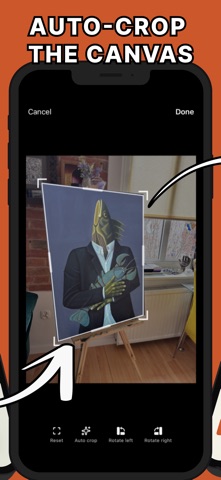
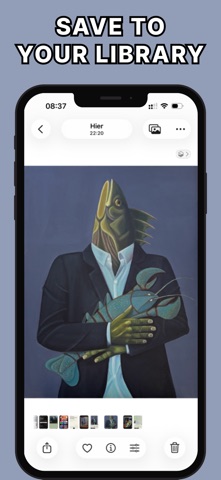
PaintingLens helps artists clean up photos of paintings and get the perfect version of it. Capture a painting or import a photo from your library. The app detects artwork edges, corrects perspective, lets you fine-tune the corners, and saves a clean straight image to your device. • Detect painting edges • Correct perspective • Fine-tune corners manually • Apply preset or custom ratios • Save or share the result Built for accurate painting documentation and presentation. Terms of Use (EULA): https://www.apple.com/legal/internet-services/itunes/dev/stdeula/
What's new · 1.3.0
New: Reproduction mode. Enter your artwork's size in centimeters, then photograph it on the guided camera screen, where a level indicator and a capture timer help you shoot straight-on, or import a photo. PaintingLens builds a full-resolution master from the unedited capture, on your device, and saves it to your photo library. The result screen tells you how large you can print it the unedited capture, on your device, and saves it to your photo library. The result screen tells you how large you can print it and gives you three files: the master, a 300 DPI printer JPEG with an embedded sRGB profile, and a web version. Also in this update: - Quick fix mode keeps your original camera shot in your photo library, untouched. - The editor preview is straightened by the same native engine that produces the print files, so what you see is what gets saved. Photos keep their orientation on iOS and Android. - Edge detection runs in the background with a time limit, so the editor stays responsive on large photos, and it tells you when auto-detect is ready. - Cancelling the camera or the photo picker no longer leaves the home screen loading.
Details