

NanoClip - Clipboard Manager
Digital Toys LLC · Productivity
Independent analytics for this App Store listing. AppTracker is not affiliated with Digital Toys LLC.
Chart standing · US
What changed · US
Listing changes AppTracker has observed for this app in this storefront — new versions, price moves, rating shifts, and store copy.
Meet your Mac’s perfect companion. • Discover what NanoClip for Mac can do in the new welcome screen. • Send the Mac download link to yourself with AirDrop, Messages, or Mail. • Find Mac setup anytime in Settings, with a dismissible reminder in your library. • Get clearer guidance for connecting devices with Mac Pro and iCloud sync. NanoClip on iPhone and iPad stays free, including creating snippets and importing items locally.
Screenshots



About
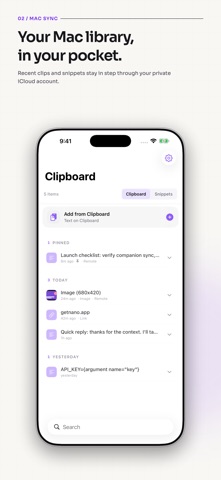
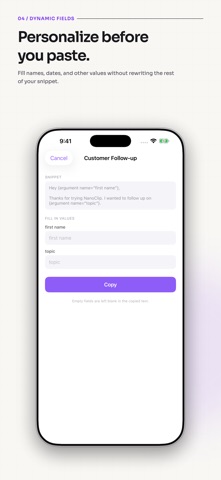
Your iPhone’s perfect Mac companion. Keep reusable snippets close, and bring your Mac clipboard with you using NanoClip for Mac and iCloud sync. BETTER TOGETHER WITH MAC NanoClip for Mac remembers the text, links, and images you copy so you can find and paste them again. Mac clipboard history and three Mac snippets are free. Mac Pro adds unlimited snippets, Flows, and iCloud sync. New to NanoClip on Mac? Share the Mac download link to yourself with AirDrop, Messages, or Mail, then open it on your Mac. Find the setup guide during onboarding or in Settings. USE IPHONE AND IPAD FOR FREE Create snippets, fill dynamic fields, and share text, links, and images into NanoClip. The iPhone and iPad app works on its own and has no purchase requirement for these features. SMART SNIPPETS Keep replies, addresses, prompts, signatures, code, and templates ready to use. Organize snippets with tags, pin favorites, and find the right one quickly. YOUR MAC CLIPBOARD, WITH YOU With NanoClip Pro on Mac, enable iCloud Sync and use the same Apple Account on both devices. Browse, search, pin, edit, and copy your recent synced clips and snippets. Sync uses your private iCloud account, with no separate NanoClip account or developer-run sync server. PASTE FROM THE KEYBOARD Use the optional NanoClip keyboard to find and insert snippets or clipboard items while writing in another app. Full Access lets the keyboard read NanoClip’s shared on-device library; NanoClip does not transmit what you type. DYNAMIC FIELDS Add names, dates, numbers, and other arguments to a reusable snippet. Fill the values when you use it instead of rewriting the whole message. THEMES Choose a focused look for the app and its keyboard. PRIVACY FIRST Your library stays on your devices or in your private iCloud. NanoClip does not require an account and does not run analytics or advertising in the iOS app. Website links open only when you choose them. Mac sync requires NanoClip Pro for Mac, the same Apple Account, and iCloud enabled. Flows run on Mac. Privacy Policy: https://getnano.dev/privacy Terms of Use: https://getnano.dev/terms Support: support@digitaltoys.xyz
What's new · 1.0.2
Meet your Mac’s perfect companion. • Discover what NanoClip for Mac can do in the new welcome screen. • Send the Mac download link to yourself with AirDrop, Messages, or Mail. • Find Mac setup anytime in Settings, with a dismissible reminder in your library. • Get clearer guidance for connecting devices with Mac Pro and iCloud sync. NanoClip on iPhone and iPad stays free, including creating snippets and importing items locally.
Details