

RSVP Gita - Bhagavad Gita
Mahanti Corporation LLC · Reference
Independent analytics for this App Store listing. AppTracker is not affiliated with Mahanti Corporation LLC.
Chart standing · US
What changed · US
Listing changes AppTracker has observed for this app in this storefront — new versions, price moves, rating shifts, and store copy.
A chapters sidebar now sits beside the reader on iPad and iPhone Duo, tucking away while you read. When you finish a chapter, Share sits right beside the next-chapter button.
In-app purchases · US
What this app sells inside itself, grouped by kind and priced for this storefront.
Screenshots




About
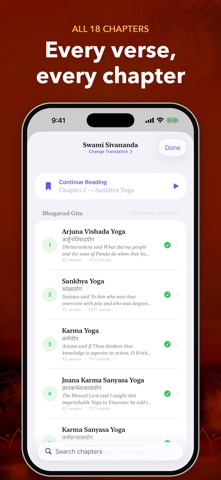
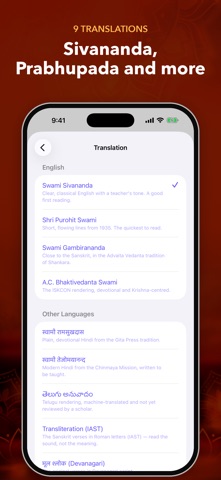
Read the Bhagavad Gita one word at a time. Each word appears in the same spot, so your eyes stay still and your attention stays on the verse, not on keeping your place. All 18 chapters and 700 verses are here, each chapter listed under its Sanskrit name in roman letters and Devanagari, with its verse count and opening verse. Pick the text you want to read: - English: Swami Sivananda, Shri Purohit Swami, Swami Gambirananda, or A.C. Bhaktivedanta Swami Prabhupada - Hindi: Swami Ramsukhdas or Swami Tejomayananda - Sanskrit: the original verses in Devanagari, or an IAST transliteration - Telugu: a machine translation, not yet reviewed by a scholar Set any pace from 100 to 1,200 words a minute. Warm-up starts you slower and eases you up to your speed. Pauses follow the punctuation: a short beat at a comma, a longer one at the end of a verse, and the longest at the danda that closes a Sanskrit line. Each word is aligned on the letter your eye naturally lands on, marked in colour, so you never hunt for where to look. The shortest chapter, Bhakti Yoga, takes about two minutes at 250 words a minute. The reader shows which verse you are on as you go. When a chapter ends, one tap starts the next. Close the app mid-chapter and it reopens at the word you left. The Progress tab keeps your daily streak, the chapters you have finished and how much of the Gita you have read. A verse of the day, drawn from passages such as 2.47 and 18.66, can arrive as a reminder at the time you choose. Charts show the words you read each day and how your speed changes. Works on iPhone, iPad and Mac. Terms: https://www.apple.com/legal/internet-services/itunes/dev/stdeula/ Privacy Policy: https://mahanticorp.vercel.app/gita/privacy-policy
What's new · 1.0.35
A chapters sidebar now sits beside the reader on iPad and iPhone Duo, tucking away while you read. When you finish a chapter, Share sits right beside the next-chapter button.
Details