

MoE Code
BENJAMIN ANDREW HOOPER · Developer Tools
Independent analytics for this App Store listing. AppTracker is not affiliated with BENJAMIN ANDREW HOOPER.
Chart standing · US
What changed · US
Listing changes AppTracker has observed for this app in this storefront — new versions, price moves, rating shifts, and store copy.
Added: • Action "Extract Named Non-Magic Variables". • Action "Extract Named Magic Variables". • Action "Find Invalid If Statements". • Action "Get MoE Code App Version". • App Store listing: Apple Watch complication settings screenshots. Functional changes / improvements: • "Get Value(s) Position(s) In List": Changed output from first match to all matches. • "Find Invalid Variable References": Fixed bug where parameter "Pretty Print JSON" wasn't actually used, and enabled by default to match prior behaviour. Cosmetic changes / improvements: • Action "Save Files": Made description clearer regarding replacing invalid characters. • Renamed actions: ◦ "Get Value Position In List" → "Get Value(s) Position(s) In List" ◦ "Remove Value From List" → "Remove Value(s) From List" ◦ "Transform List / Dictionaries / JSON Using JQ" → "Transform List / Dictionaries / JSON Using SwiftJQ"
Ratings breakdown · US
The star breakdown behind this app's rating in this storefront.
In-app purchases · US
No in-app purchases.
Screenshots






Keywords this app targets
Search terms AppTracker associates with this app — estimates, not search volume. ❝ = in the app's title; a highlighted number is its current position for that term.
Similar apps
Competitors and close alternatives, as estimated by AppTracker.




About
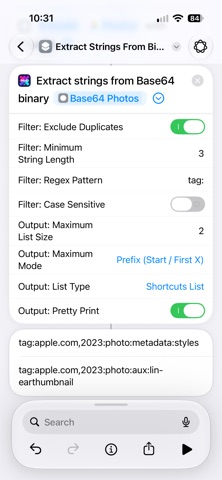
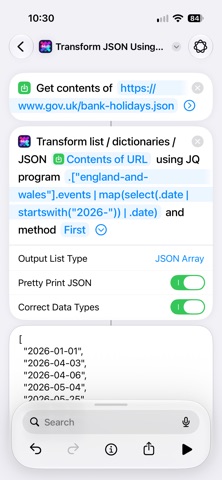
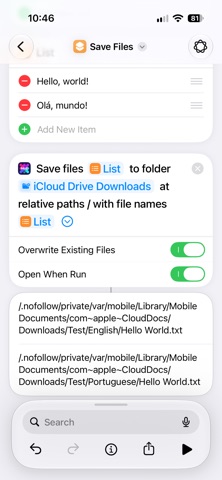
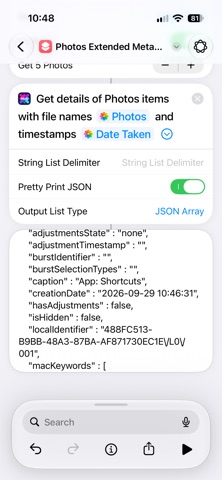
MoE Code adds 61 actions to solve functionality gaps in the Shortcuts app. Where lists are mentioned: Shortcuts lists, JSON arrays, and delimited strings (e.g., CSVs) are supported for input, and the first two for output. • AI ◦ "Count Tokens For On-Device AI Model" (iOS 27+ only) ◦ "Is Apple Intelligence Functional?" ◦ "Is Apple Intelligence-Capable?" ◦ "Use On-Device AI Model (Extended)" (iOS 27+ only): Images / files, max tokens, and temperature • Clipboard (arbitrary formats, binary supported via Base64) ◦ "Get Clipboards" ◦ "Set Clipboards": Used by MoE Shortcuts Toolkit (routinehub.co/shortcut/22016/) • Data: HTML ◦ "Convert HTML Tables To JSON" ◦ "Extract HTML Elements Using SwiftSoup" • Data: JSON ◦ "Delete Nested Dictionary / JSON Object Key" ◦ "Pretty Print Dictionaries / JSON" ◦ "Set Nested Dictionary / JSON Object Value" ◦ "Transform List / Dictionaries / JSON Using JQ": Extract, filter, deduplicate, etc. Used by Summarise YouTube Video (routinehub.co/shortcut/21809/) • Data: Lists (significantly faster than using loops) ◦ "Add Value(s) To List / Merge Lists" ◦ "Convert JSON Array To Shortcuts List" ◦ "Convert String / Shortcuts List To JSON Array" ◦ "Get Items From List At Indexes (Values)" ◦ "Get Items From List At Indexes (Files)" ◦ "Get Value Position In List" ◦ "List Contains List?" ◦ "List Contains Value?" ◦ "Remove Value From List" ◦ "Sort Keys Of Dicts In List" ◦ "Subtract Lists" • Data: Text ◦ "Extract Strings From Binary" ◦ "Multi Replace Text": Lists of strings, string or regex targets, and substitutions. Used by MoE Shortcuts Backup (routinehub.co/shortcut/26330/) • Device ◦ "Get Device Ground Speed" ◦ "Get Device Model" ◦ "Get Device Type" ◦ "Is App Installed?": Actions, Microsoft Outlook, Pythonista, Scriptable, and WhatsApp • Files ◦ "Get Details of File / Folder": Unescaped file paths, top-level folder paths in the same format as Shortcuts ◦ "Save Files": List of files to list of relative paths. Used by MoE Shortcuts Backup (routinehub.co/shortcut/26330/) • Media (changes are made in-place for a smoother experience) ◦ "Change Photos Items' Captions" (iOS 27+ only): Used by Auto Tag Screenshots (routinehub.co/shortcut/26535/) and Replicate Media Metadata (routinehub.co/shortcut/21792/) ◦ "Change Photos Items' Creation Dates" ◦ "Change Photos Items' Locations": Used by Auto Tag Screenshots (routinehub.co/shortcut/26535/) and Replicate Media Metadata (routinehub.co/shortcut/21792/) ◦ "Chunk Video" ◦ "Find Photos Items By Captions" (iOS 27+ only) ◦ "Get Details of Photos Items (Extended)" (iOS 27+ only) ◦ "Mark Photos Items As Favourited, Unfavourited, Or Hidden" ◦ "Play System Sound" ◦ "Remove Photos Items' Captions" (iOS 27+ only) ◦ "Remove Photos Items' Locations" (iOS 27+ only) ◦ "Resize Images With Fill (HDR)" (iOS 26+ only): Used by routinehub.co/shortcut/21785/ • Network ◦ "Get Certificate Chain" ◦ "Is Internet-Connected?": Used by MoE Airplane Mode (routinehub.co/shortcut/24566/) ◦ "Make HTTP Request": Used by Summarise YouTube Video (routinehub.co/shortcut/21809/) • Settings ◦ "Get Reminders Default List" ◦ "Open Settings Deep Link" • Shortcuts: All used by MoE Shortcuts Toolkit (routinehub.co/shortcut/22016/) ◦ "Convert JSON To PLIST" (XML or Base64-encoded binary) ◦ "Convert PLIST Binary To JSON" ◦ "Extract Action Blocks" ◦ "Extract Named Non-Magic Variables" ◦ "Extract Named Magic Variables" ◦ "Find Invalid If Statements" ◦ "Find Invalid Variable References" ◦ "Get MoE Code App Version" • UI ◦ "Show Markdown" • Widget: All used by Starling Bank Balances Widgets (routinehub.co/shortcut/25942/) ◦ "Delete Widget / Complication Key" ◦ "Get Widget / Complication Value" ◦ "Set Circular Widget / Complication Value" ◦ "Set Text Widget / Complication Value" ◦ "Sync And Reload App Widgets"
What's new · 1.24.0
Added: • Action "Extract Named Non-Magic Variables". • Action "Extract Named Magic Variables". • Action "Find Invalid If Statements". • Action "Get MoE Code App Version". • App Store listing: Apple Watch complication settings screenshots. Functional changes / improvements: • "Get Value(s) Position(s) In List": Changed output from first match to all matches. • "Find Invalid Variable References": Fixed bug where parameter "Pretty Print JSON" wasn't actually used, and enabled by default to match prior behaviour. Cosmetic changes / improvements: • Action "Save Files": Made description clearer regarding replacing invalid characters. • Renamed actions: ◦ "Get Value Position In List" → "Get Value(s) Position(s) In List" ◦ "Remove Value From List" → "Remove Value(s) From List" ◦ "Transform List / Dictionaries / JSON Using JQ" → "Transform List / Dictionaries / JSON Using SwiftJQ"
Details