

Frequency Counter+ Hz FFT
Kyu-Hee Jang · Utilities
Independent analytics for this App Store listing. AppTracker is not affiliated with Kyu-Hee Jang.
Chart standing · US
What changed · US
Listing changes AppTracker has observed for this app in this storefront — new versions, price moves, rating shifts, and store copy.
If the microphone is turned off, the button on the Meter screen takes you to Settings. Turn the mic on, come back, and you now land straight on the meter, with no full-screen ad in between. The same goes for coming back from sharing a result.
Ratings breakdown · US
The star breakdown behind this app's rating in this storefront.
In-app purchases · US
No in-app purchases.
Screenshots


About
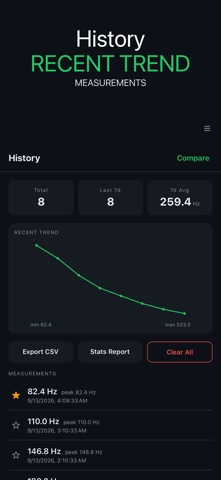
Frequency Counter Hz Tuner combines guided instrument tuning with a microphone-based Hz meter, measurement history, tone tools, and an ultrasonic scanner. Use the new guided flow to tune a guitar or ukulele one string at a time, or open the meter when you want to inspect the dominant frequency in a sound. GUIDED GUITAR AND UKULELE TUNING Choose guitar or ukulele and work through the strings in order. The guide listens to each string separately. When fresh readings stay within ±5 cents long enough to meet the stability check, the Confirm button becomes available. Tap it to save that string as verified. Each confirmed string records the observed Hz value, cents offset, and verification time. If you stop before finishing, the app saves the partial session and can offer to continue it after relaunch. INSTRUMENT TUNER The tuner includes standard string targets for guitar, bass, ukulele, and violin. Adjust the A4 reference when your tuning setup calls for a different reference. Guided string-by-string sessions are available for guitar and ukulele; the other instrument targets remain available in the regular tuner. DOMINANT FREQUENCY METER Use the microphone to view the dominant frequency of a sound in Hz. Select Auto, Music, Motor, or Hum mode to match the kind of reading you want to inspect. The meter and tuner provide distinct views, so you can move between a general Hz reading and instrument-focused pitch information without leaving the app. MEASUREMENT HISTORY Keep up to 500 measurement records for later reference. Add a note to identify a sound or session, and mark useful records as favorites. The history screen makes it easier to return to selected readings instead of relying on memory or separate notes. TONE AND SWEEP TOOLS Generate sine, square, triangle, or sawtooth waves from 20 Hz to 20 kHz. Use a steady tone when you need one frequency, or use sweep mode to move through a range. These controls are grouped in the Tone screen and can support listening, instrument, and audio experiments. ULTRASONIC SCANNER Scan the 17–24 kHz band, view the detected peak and a source hint, and review the recent detection log. Microphone response differs by device, especially at high frequencies, so the scanner does not promise that every phone can cover the entire band. A PRACTICAL MULTI-TOOL FOR SOUND • Tune guitar or ukulele with a guided string sequence • Continue a saved partial tuning session after relaunch • Use standard targets for guitar, bass, ukulele, and violin • Read dominant sound frequency in Hz through the microphone • Choose Auto, Music, Motor, or Hum meter modes • Keep measurement records with notes and favorites • Generate four waveform types in tone or sweep mode • Inspect peaks and recent events in the ultrasonic band Microphone permission is required for listening features. Readings and high-frequency coverage depend on the microphone, device hardware, the sound source, and the surrounding environment. The app is designed as an audio measurement, listening, and instrument-tuning aid.
What's new · 1.0.47
If the microphone is turned off, the button on the Meter screen takes you to Settings. Turn the mic on, come back, and you now land straight on the meter, with no full-screen ad in between. The same goes for coming back from sharing a result.
Details