

meshTerm SSH Client Tailscale
AG Applications Ltd · Developer Tools
Independent analytics for this App Store listing. AppTracker is not affiliated with AG Applications Ltd.
Chart standing · US
What changed · US
Listing changes AppTracker has observed for this app in this storefront — new versions, price moves, rating shifts, and store copy.
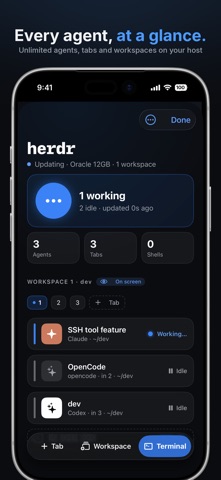
Herdr, built in free! One unlimited herdr session at a time, with unlimited agents, tabs and workspaces inside it. Pro adds more hosts and parallel sessions. Keep Claude, Codex, Gemini and other coding agents running on your host in herdr, whether or not your phone is connected, and see them all from the new herdr side of the Agents tab: what needs you at the top, then every session on every host. Tap Review to read an agent's request and answer it from your phone, or open the terminal right at its pane. Set Up herdr checks a host, installs herdr in one tap, turns on notifications and starts your first session. Private alerts Notifications are opt-in. Alerts come through Apple Push Notification service (APNs) via our relay, over encrypted connections, and carry nothing that identifies you, your hosts or your work. Your terminal never touches our servers. Your tmux sessions, the way tmux meant them On every host with tmux 3.2 or newer, meshTerm now attaches through tmux control mode. Reconnects put you back in the same session at the same size, with no resize storm and no frozen screen. Rotate the phone, bring the keyboard up or switch panes, and tmux reflows to fit the space you have. Windows and panes from the keyboard palette A new tmux page in the palette lists your windows and the panes of the current window. Create, split, zoom, rename, close, resize and even out panes with a tap, and use Fit to this screen when a desktop client has left the session at another size. Splits on iPad On a regular-width screen the panes of a window sit side by side, each its own terminal, with dividers you can drag. On iPhone you see one pane at a time and swipe, or tap the pane dots, to switch.
Price & rating history · US
Reconstructed from the listing changes AppTracker has observed in this storefront. A field is charted once it has changed more than once, and each line starts at the value it moved from.
Average rating · ★ 4.67 now · 2 changes on record
Ratings breakdown · US
The star breakdown behind this app's rating in this storefront.
In-app purchases · US
What this app sells inside itself, grouped by kind and priced for this storefront.
Screenshots




Keywords this app targets
Search terms AppTracker associates with this app — estimates, not search volume. ❝ = in the app's title; a highlighted number is its current position for that term.
Similar apps
Competitors and close alternatives, as estimated by AppTracker.
 ShadowTerm ssh & mosh Terminal
Carlos Savcic
3 shared topics · 1 shared title word
ShadowTerm ssh & mosh Terminal
Carlos Savcic
3 shared topics · 1 shared title word
 TermRover - SSH Terminal
Anh Trinh
3 shared topics · 1 shared title word
TermRover - SSH Terminal
Anh Trinh
3 shared topics · 1 shared title word
 VVTerm: Native SSH Client
Vivy Technologies
4 shared topics · 1 shared title word
VVTerm: Native SSH Client
Vivy Technologies
4 shared topics · 1 shared title word
 SSH Term X
Haga Kunihiko
2 shared topics · 1 shared title word
SSH Term X
Haga Kunihiko
2 shared topics · 1 shared title word
 GateShell
HEFTY INNOVATIONS
3 shared topics
GateShell
HEFTY INNOVATIONS
3 shared topics
 Termix: SSH Client & Terminal
Simon Zvara
3 shared topics · 1 shared title word
Termix: SSH Client & Terminal
Simon Zvara
3 shared topics · 1 shared title word
 MTerm - SSH Terminal
kazuki oinuma
2 shared topics · 1 shared title word
MTerm - SSH Terminal
kazuki oinuma
2 shared topics · 1 shared title word
 Tmux Term
Erdinc Curebal
2 shared topics
Tmux Term
Erdinc Curebal
2 shared topics
About
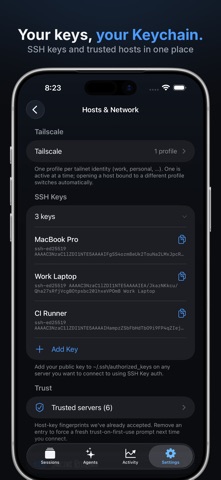
meshTerm: your agents and servers, from your phone A fast, private SSH and SFTP client built around the coding agents you run on your own servers. Keep Claude, Codex and Gemini and any other supported agent working in herdr, see what needs you at a glance, and answer from your phone. Your sessions keep running when your phone does not, so your shell and scrollback are still there tomorrow. HERDR, BUILT IN herdr is the open-source workspace that keeps your coding agents running on your host whether or not your phone is connected, and meshTerm is built for it. herdr is free on your host: One unlimited session, run multiple agents, tabs, workspaces. You only need Pro to use herdr on more than one host. The herdr side of the Agents tab puts what needs you first, then every session on every host. Tap Review to read an agent's request and approve it from your phone, or open the terminal right at its pane. Set Up herdr checks a host, installs herdr in one tap, turns on notifications and starts your first session. TMUX, THE WAY TMUX MEANT IT On any host with tmux 3.2 or newer, meshTerm speaks tmux's control protocol. It knows every window and pane, sizes them to your screen, and reattaches to the exact session you left, at the size you left it, with the scrollback intact. A tmux page in the keyboard palette creates, splits, zooms, renames, resizes and closes windows and panes in a tap, and on iPad the panes of a window sit side by side with dividers you can drag. Nothing to install on your server. BUILT-IN TAILSCALE meshTerm has its own Tailscale stack, running entirely in the app, so there is no separate Tailscale app and no conflict with any other VPN. Sign in or add an auth key and your device joins your tailnet over WireGuard. Add a tailnet device as a host in one tap. Multiple profiles switch between work and personal tailnets. AGENT CHAT Run Claude Code, Codex and Gemini on your own servers from a native chat: streaming replies, approvals that stay pinned until you answer, plan mode, usage chips, slash commands and file attachments. Get notified when an agent needs you, and resume past chats. DOCKER AND PODMAN (Pro) Manage containers on any host you have added: containers, images, volumes and networks, Compose stacks, logs, exec and prune. Nothing to install and nothing to expose, just the docker or podman CLI already on your server, over SSH. A KEYBOARD BUILT FOR THE TERMINAL A palette of features, your own key groups and one-tap session switching. A predictive strip suggests commands from your shell history, and a pill takes you back to the live prompt in full-screen tools. FILES, FORWARDS, SECRETS Browse, upload and download files over SFTP with iOS Files integration. Local forwards and SOCKS5 proxies per host. A Snippet Vault and a one-tap macro bar, with secret values kept in the iOS Keychain behind Face ID. Secret Profiles (Pro) inject keys into a running session, and a hidden key is brokered only to the commands you allow, so an agent can use it without ever reading it. SSH KEYS, SEARCH, ACCESSIBILITY Generate Ed25519 or ECDSA keys on-device, import passphrase-protected keys and install public keys in one tap. Search scrollback, tag and filter hosts, and read the terminal with VoiceOver. Full Spanish throughout. PRIVACY BY DESIGN No analytics, no telemetry, no tracking SDKs. Credentials and keys live in the iOS Keychain, hardware-encrypted and device-only. Your terminal never routes through us. Agent alerts, if you turn them on, come through Apple Push Notification service (APNs) via our relay, over encrypted connections, and carry nothing that identifies you, your hosts or your work. meshTerm Pro One host, one live session and one agent are free, and herdr is unlimited on that host. Pro lifts those limits, so herdr works on every host in one view, and adds Docker and Podman, Secret Profiles, agent Resume and iCloud Sync, which keeps hosts, keys, macros and preferences on every device, end-to-end encrypted.
What's new · 2.2.0
Herdr, built in free! One unlimited herdr session at a time, with unlimited agents, tabs and workspaces inside it. Pro adds more hosts and parallel sessions. Keep Claude, Codex, Gemini and other coding agents running on your host in herdr, whether or not your phone is connected, and see them all from the new herdr side of the Agents tab: what needs you at the top, then every session on every host. Tap Review to read an agent's request and answer it from your phone, or open the terminal right at its pane. Set Up herdr checks a host, installs herdr in one tap, turns on notifications and starts your first session. Private alerts Notifications are opt-in. Alerts come through Apple Push Notification service (APNs) via our relay, over encrypted connections, and carry nothing that identifies you, your hosts or your work. Your terminal never touches our servers. Your tmux sessions, the way tmux meant them On every host with tmux 3.2 or newer, meshTerm now attaches through tmux control mode. Reconnects put you back in the same session at the same size, with no resize storm and no frozen screen. Rotate the phone, bring the keyboard up or switch panes, and tmux reflows to fit the space you have. Windows and panes from the keyboard palette A new tmux page in the palette lists your windows and the panes of the current window. Create, split, zoom, rename, close, resize and even out panes with a tap, and use Fit to this screen when a desktop client has left the session at another size. Splits on iPad On a regular-width screen the panes of a window sit side by side, each its own terminal, with dividers you can drag. On iPhone you see one pane at a time and swipe, or tap the pane dots, to switch.
Details