

Pixomi AI: AI Photo Editor
WhaleSwing LLC · Graphics & Design
Independent analytics for this App Store listing. AppTracker is not affiliated with WhaleSwing LLC.
Chart standing · US
What changed · US
Listing changes AppTracker has observed for this app in this storefront — new versions, price moves, rating shifts, and store copy.
• Improved image and video detail pages to make downloading and sharing easier • Fixed known issues to improve the overall experience
Price & rating history · US
Reconstructed from the listing changes AppTracker has observed in this storefront. A field is charted once it has changed more than once, and each line starts at the value it moved from.
Average rating · ★ 4.00 now · 2 changes on record
Screenshots


About
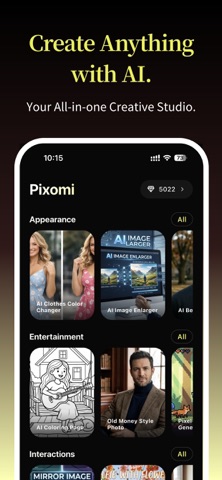
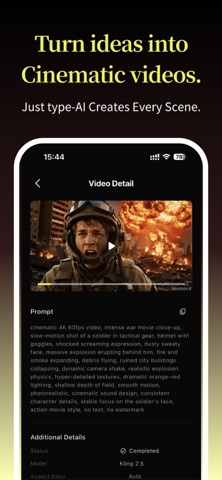
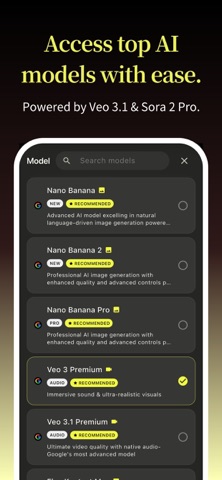
Pixomi AI is a professional AI tool for generating and editing images, as well as creating high-quality videos with sound. With access to multiple top-tier AI models and intuitive workflows, Pixomi AI helps you turn ideas into stunning visuals faster than ever. AI IMAGE GENERATOR - Create high-quality images from text prompts using advanced AI models - Generate realistic, anime, cinematic, and artistic visuals - Change image size, angle, refine lighting, and fine-tune details - Make viral photo for social media, product showcases, and creative artwork AI PHOTO EDITOR (Image to Image) - Edit and enhance existing photos with precise prompt - Edit images using prompts while preserving identity and structure - Change hairstyle, outfits, backgrounds, style, and more - Enhance image quality, sharpen details, and upscale resolution - Perfect for portraits, product images, and creative transformations AI VIDEO GENERATOR - Turn ideas or images into dynamic AI-generated videos with immersive audio - Convert text or images into engaging video content - Animate static images with smooth, realistic motion - Support multiple video styles and cinematic outputs - Ideal for social media, storytelling, marketing, and short-form content ALL-IN-ONE WORKFLOW EXPERIENCE - A structured AI creation environment designed for efficiency - Easily switch between image generation, editing, and video creation - Regenerate results with different models using the same prompt - Continue editing based on generated results without restarting - Seamless creative pipeline from idea to final output MULTIPLE TOP-TIER AI MODELS & 200+ TEMPLATES - Experience industry-leading AI models and create instantly with ready-made templates - Nano Banana series (including Nano Banana 2), Midjourney, Seedream, GPT, Grok Imagine for image generation, and latest Seedance and Veo for video generation - 200+ ready-to-use templates for instant creation. Start without prompts using pre-built styles and workflows - Create popular content like different hairstyle try-on, background remove, avatar generation, outfit try-on, and art style change - Turn photos into short videos, animate portraits, apply style transformations, or create before-and-after comparisons instantly USE CASES - Content Creators: Generate consistent, high-quality visuals and videos for social media - Marketers: Create ads, product photography, and promotional content quickly - Designers: Explore ideas, styles, and variations efficiently - Entrepreneurs: Build brand visuals without expensive tools - Everyday Users: Turn ideas into images and videos for fun and creativity WHY CHOOSE Pixomi AI - Generate images, edit photos, and create videos in one seamless workflow, no need to switch between multiple apps or tools. - Access industry-leading models including Nano Banana, Veo, Midjourney, GPT, Seedance, Seedream, and more. - Create, refine, regenerate, and transform your content without restarting. IMPORTANT INFORMATION - Pixomi AI offers optional premium subscriptions with monthly or yearly plans - Payment will be charged to your App Store account upon purchase confirmation - Subscriptions automatically renew unless auto-renew is turned off at least 24 hours before the end of the current billing period - You can manage or cancel your subscription at any time in your App Store account settings ACCOUNT & DATA SYNC Pixomi AI supports flexible login options based on your needs: - Use a Google account to seamlessly sync your creations across web and mobile - Use an Apple account for a standalone app experience on your device - Your data sync behavior depends on your selected sign-in method Terms of Service: https://bananaproai.com/terms-of-service/ Privacy Policy: https://bananaproai.com/privacy-policy/ Refund Policy: https://bananaproai.com/refund-policy/
What's new · 1.0.8
• Improved image and video detail pages to make downloading and sharing easier • Fixed known issues to improve the overall experience
Details