

Guitar Tuner - Simple Tuner
Jonathan de Gaston · Music
Independent analytics for this App Store listing. AppTracker is not affiliated with Jonathan de Gaston.
Chart standing · US
What changed · US
Listing changes AppTracker has observed for this app in this storefront — new versions, price moves, rating shifts, and store copy.
Less needle wobble. More time to play. This update brings steadier guitar tuning, refreshed string sounds and better audio handling to your next practice session. - Improved pitch tracking: the updated tuning engine follows more sustained notes through some background noise and waits for a clearer note when the sound is uncertain. - Steadier tuning guidance: smoother sharp and flat feedback reduces distracting needle jumps, helping you dial in each string with small, precise adjustments. - Refreshed guitar reference tones: tap the E, A, D, G, B and high E string buttons to hear the updated sounds for standard EADGBE tuning and compare your strings by ear. - Better reference playback on iPhone and iPad: fixed an issue that made string sounds play too quietly. - More reliable audio when switching apps: microphone tuning pauses when you leave and resumes when you return with microphone permission. Reference tones now stop when the app leaves the foreground. - A focused first launch: new installations open in guitar mode. Chromatic mode is still available, and your saved mode is remembered. Get the best of both approaches: tune by ear, then check the needle. Pluck one string at a time, let it ring and get ready for your next song.
Price & rating history · US
Reconstructed from the listing changes AppTracker has observed in this storefront. A field is charted once it has changed more than once, and each line starts at the value it moved from.
Average rating · ★ 4.44 now · 25 changes on record
Ratings breakdown · US
The star breakdown behind this app's rating in this storefront.
In-app purchases · US
No in-app purchases.
Screenshots



About
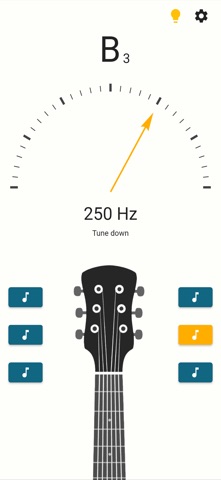
Your next song starts in tune. Guitar Tuner gives each EADGBE string a clear pitch check, with a tuning needle, note name and frequency reading. Its pitch tracker follows a sustained plucked note through some background noise, so you can make precise adjustments without chasing every stray sound. Standard EADGBE tuning Use Guitar Tuner for the familiar E, A, D, G, B and high E strings. The instrument layout keeps reference sounds close at hand, whether you are preparing for a lesson, warming up at home, or checking your instrument between songs. - See the detected note, octave and frequency. - Follow visual feedback for sharp or flat pitch. - Tap a string button to hear its reference sound. - Work through one string at a time at your own pace. Precision you can see Guitar Tuner shows the note, octave and frequency in hertz. Its cent-based needle helps you move from “almost there” to in tune with small, accurate adjustments. When the sound is too uncertain, the detector waits for a clearer note instead of guessing. Get the best of both approaches: follow the needle or tap a recorded reference and tune by ear. Chromatic mode and reference pitch Switch to chromatic mode when you want to follow notes beyond the standard strings. Guitar Tuner lets you set the A4 reference from 430 to 450 Hz, including 432, 440 and 442 Hz, for your pitch-detection display. Recorded string sounds are fixed references and do not transpose with this setting. Tune by sight or by ear Compare your string with its reference sound, then use the needle to check your adjustment. This gives new players a straightforward way to connect what they hear with the note shown on screen. Before you begin Allow microphone access and play one sustained note at a time. For your most accurate reading, let one string ring clearly near the microphone. If nearby noise drowns out your guitar, move closer or find a quieter spot. For an electric guitar, make sure its sound is audible to your phone’s microphone. Open Guitar Tuner for a focused check before practice. Built on tuner experience Our tuner apps have helped millions of users. Guitar Tuner brings that experience to a focused six-string tuning check.
What's new · 4.7.2
Less needle wobble. More time to play. This update brings steadier guitar tuning, refreshed string sounds and better audio handling to your next practice session. - Improved pitch tracking: the updated tuning engine follows more sustained notes through some background noise and waits for a clearer note when the sound is uncertain. - Steadier tuning guidance: smoother sharp and flat feedback reduces distracting needle jumps, helping you dial in each string with small, precise adjustments. - Refreshed guitar reference tones: tap the E, A, D, G, B and high E string buttons to hear the updated sounds for standard EADGBE tuning and compare your strings by ear. - Better reference playback on iPhone and iPad: fixed an issue that made string sounds play too quietly. - More reliable audio when switching apps: microphone tuning pauses when you leave and resumes when you return with microphone permission. Reference tones now stop when the app leaves the foreground. - A focused first launch: new installations open in guitar mode. Chromatic mode is still available, and your saved mode is remembered. Get the best of both approaches: tune by ear, then check the needle. Pluck one string at a time, let it ring and get ready for your next song.
Details