

Vivid: Aesthetic Daily Journal
THE LIKELI LAB LLC · Lifestyle
Independent analytics for this App Store listing. AppTracker is not affiliated with THE LIKELI LAB LLC.
Chart standing · US
What changed · US
Listing changes AppTracker has observed for this app in this storefront — new versions, price moves, rating shifts, and store copy.
Choose which days each block shows up on, right from its menu, and your layout now carries forward the way you'd expect. • Repeats: open any block's ··· menu to see and change the days it appears: every day, weekdays, certain days, or just today • When you add a block, Vivid says which days it will repeat, with a Change button • A block you added to another day can repeat too: pick its days in Repeats • Remove a block from its Customize screen: Remove Block is now at the bottom • Moving or resizing a block on today now carries over to the days ahead • Days you've opened but haven't written on keep up with changes to your daily layout • Set as Daily Default keeps blocks that only show on certain days • A block you've logged on stays on that day, even if you change its days later • Insights charts show how many of the days they cover have entries • Clearer choices in the day picker, such as "Every few days" • Fixed: a second device could show an extra, empty Daily Reflection journal • Theme names in the Theme Collection are easier to read • Add Block no longer suggests blocks already on your page • VoiceOver improvements in block settings and the day picker
Ratings breakdown · US
The star breakdown behind this app's rating in this storefront.
In-app purchases · US
What this app sells inside itself, grouped by kind and priced for this storefront.
Screenshots


About
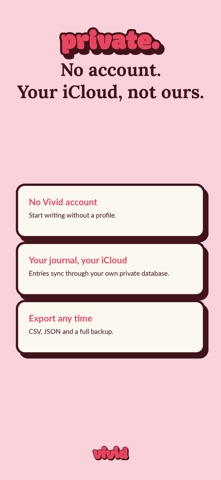
Vivid puts the mood, routines, books, and notes you choose on one reusable daily page. Tap to log, rearrange anytime, and—with your permission—let selected trackers fill from Apple Health. SET IT UP ONCE • Choose page blocks for writing, mood, habits, tasks, sleep, water, photos, drawings, reading, and custom trackers • Reuse your layout each day, then change it whenever your routine changes • Move and resize blocks so the page fits what you want to remember CHECK IN FROM THE HOME SCREEN • Check a habit or log water from an interactive Home Screen widget • Show today's progress or a streak on your Lock Screen • With permission, use selected Apple Health data including steps, sleep, water, and exercise minutes CHOOSE HOW YOUR PAGE LOOKS • Choose from 18 built-in themes, including Coquette, Cottagecore, Matcha, Sakura, and five made for the night • Coordinate your page, Home Screen widgets, wallpaper, and app icon • Create a theme or page setup and share it with a link SEE WHAT THE DAYS ADD UP TO • Review weekly summaries, mood trends, habit heatmaps, and Year in Pixels • Keep written reflections beside the numbers that help explain them PRIVATE JOURNAL CONTENT • No Vivid account and no ads • Your journal entries, photos, moods, tracker values, and Health data stay on your device and in your private iCloud; Likeli Lab cannot read them • Optional pseudonymous diagnostics never include journal content and can be turned off in Settings • Export to CSV, JSON, or a restorable backup On an eligible device, first use starts a 7-day no-card Pro preview. Reinstalling does not restart it. After it ends, keep using the free plan with a core set of page blocks, 3 photos per photo block, all built-in themes, Home Screen widgets, and export. Vivid Pro adds unlimited page blocks, up to 10 photos per photo block, custom themes, advanced insights, premium page styles, premium icons, and the custom Home Screen design builder. Choose monthly, yearly, or lifetime. When Apple confirms eligibility, the yearly subscription may offer a separate 7-day App Store free trial; all terms appear before purchase. Privacy Policy: https://vivid.likelilab.com/privacy Terms of Use: https://www.apple.com/legal/internet-services/itunes/dev/stdeula/
What's new · 1.7.3
Choose which days each block shows up on, right from its menu, and your layout now carries forward the way you'd expect. • Repeats: open any block's ··· menu to see and change the days it appears: every day, weekdays, certain days, or just today • When you add a block, Vivid says which days it will repeat, with a Change button • A block you added to another day can repeat too: pick its days in Repeats • Remove a block from its Customize screen: Remove Block is now at the bottom • Moving or resizing a block on today now carries over to the days ahead • Days you've opened but haven't written on keep up with changes to your daily layout • Set as Daily Default keeps blocks that only show on certain days • A block you've logged on stays on that day, even if you change its days later • Insights charts show how many of the days they cover have entries • Clearer choices in the day picker, such as "Every few days" • Fixed: a second device could show an extra, empty Daily Reflection journal • Theme names in the Theme Collection are easier to read • Add Block no longer suggests blocks already on your page • VoiceOver improvements in block settings and the day picker
Details