

AJ-Manga
JAMSoft Inc · Graphics & Design
Independent analytics for this App Store listing. AppTracker is not affiliated with JAMSoft Inc.
Chart standing · US
What changed · US
Listing changes AppTracker has observed for this app in this storefront — new versions, price moves, rating shifts, and store copy.
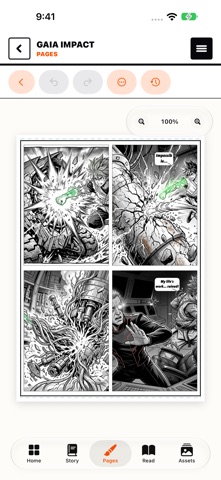
AJ-Manga 2.1 gives you more control over your manga, from the first draft to the finished page. - New speech bubble shapes, adjustable tails, screentones, speed lines, and drawing directly on the page. - Copy and paste panels and bubbles, move panels between pages, and reorder pages with expanded undo and redo support. - Refine AI artwork by redrawing a character, fixing a selected region, or reusing another panel’s visual style. - Continue conversations with the Story Assistant and import scripts from PDF and Final Draft files. - New Webtoon reading mode, improved guided reading and hands-free Read Aloud, game controller support, and iCloud syncing for reading positions and bookmarks. - Organize your library with collections, tags, and pinned favorites. Import CBZ, PDF, and comic EPUB files for reading. - Create share cards, export multiple manga together, and use new JPEG and printing options. - Improved performance, iPhone and iPad layouts, and fixes for crashes, editing history, generation recovery, and exports.
Ratings breakdown · US
The star breakdown behind this app's rating in this storefront.
In-app purchases · US
What this app sells inside itself, grouped by kind and priced for this storefront.
Screenshots





About
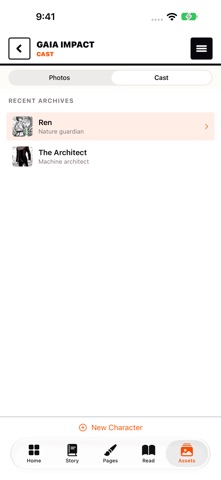
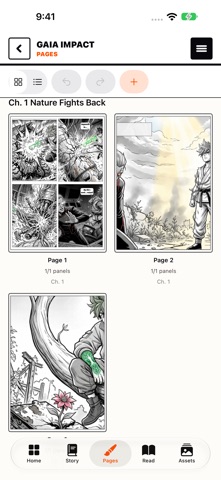
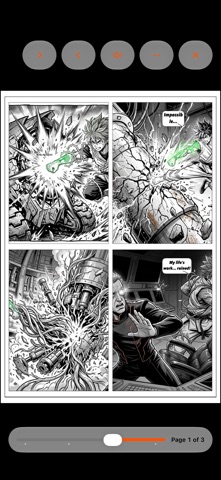
AJ-Manga is an AI-powered manga creation studio for building one-shots and series on iPhone and iPad. Plan your story, shape your cast, generate manga artwork, lay out pages, read your finished chapter, and export polished files from one workspace. With AJ-Manga you can: - Start a one-shot or series project with genre, format, reading direction, and art style controls - Use AI Story Assistant to draft chapters, scenes, dialogue, page breakdowns, and panel beats - Import photos from Photos, Files, or the iOS share sheet and turn them into manga-ready references - Reuse character likeness, poses, props, outfits, and environments across pages for better continuity - Generate panel art from prompts or photo references, then refine the result inside your project - Organize characters, chapters, pages, panels, and speech bubbles in a dedicated manga workflow - Read your manga in paged, spread, or scrolling modes with guided panel reading - Export as PDF, image sets, or webtoon strips, including print-oriented options for covers and page packages - Sync projects and preferences across devices with iCloud when available AJ-Manga includes a free tier and offers optional subscriptions, credit packs, and style packs for higher generation limits and premium creation tools. https://www.apple.com/legal/internet-services/itunes/dev/stdeula/ https://jamsoftinc.com/ajmanga-priv
What's new · 2.1
AJ-Manga 2.1 gives you more control over your manga, from the first draft to the finished page. - New speech bubble shapes, adjustable tails, screentones, speed lines, and drawing directly on the page. - Copy and paste panels and bubbles, move panels between pages, and reorder pages with expanded undo and redo support. - Refine AI artwork by redrawing a character, fixing a selected region, or reusing another panel’s visual style. - Continue conversations with the Story Assistant and import scripts from PDF and Final Draft files. - New Webtoon reading mode, improved guided reading and hands-free Read Aloud, game controller support, and iCloud syncing for reading positions and bookmarks. - Organize your library with collections, tags, and pinned favorites. Import CBZ, PDF, and comic EPUB files for reading. - Create share cards, export multiple manga together, and use new JPEG and printing options. - Improved performance, iPhone and iPad layouts, and fixes for crashes, editing history, generation recovery, and exports.
Details