

Framework: Daily Planner
Samuel Ogden · Productivity
Independent analytics for this App Store listing. AppTracker is not affiliated with Samuel Ogden.
Chart standing · US
What changed · US
Listing changes AppTracker has observed for this app in this storefront — new versions, price moves, rating shifts, and store copy.
Framework has been redesigned from the ground up. It's cleaner and softer, and your day is easier to take in at a glance. New Home screen • Swipe through your weeks, with coloured dots for each task • The Next Up card shows what's on now and what's coming • Focus Score ring, plus your Free Time and Planned Time • A timeline of your day that expands to show everything • Tick off tasks with a new animation, and get a little celebration when you finish them all This Week • See your whole week in one place, with tasks, shifts, events and planned time • Open any day to see and tick off its tasks Work Schedule • Switch between Week and Month views • See your total hours, shift count and a breakdown by shift type • See your days off alongside your shifts • Tap a shift to edit it Improved PDF export • A new list layout alongside the calendar • Full-screen preview that turns with your phone • Holidays no longer count towards your shift totals Everything else • New designs for creating and editing tasks, shifts, shift types and routines • Icons are suggested from the name you type, and you can still pick your own • Tap a tab again to jump back to today • Haptics throughout the app • Now available in 17 languages • Bug fixes and performance improvements
In-app purchases · US
No in-app purchases.
Screenshots

Keywords this app targets
Search terms AppTracker associates with this app — estimates, not search volume. ❝ = in the app's title; a highlighted number is its current position for that term.
Similar apps
Competitors and close alternatives, as estimated by AppTracker.
 Structured: Daily Planner Todo
unorderly GmbH
2 shared topics · 3 shared title words
Structured: Daily Planner Todo
unorderly GmbH
2 shared topics · 3 shared title words
 Daily Planner - DayBlocks
Sangwoo Byeon
3 shared topics · 3 shared title words
Daily Planner - DayBlocks
Sangwoo Byeon
3 shared topics · 3 shared title words
 DayBuilder - Design Your Day
Alex Yasinskiy
2 shared topics
DayBuilder - Design Your Day
Alex Yasinskiy
2 shared topics
 Today Planned: Daily Planner
Elaine Rocha
1 shared topic · 3 shared title words
Today Planned: Daily Planner
Elaine Rocha
1 shared topic · 3 shared title words
 Today: Life Planner
Jeffrey Igot
Today: Life Planner
Jeffrey Igot
 J Plan - Daily Planner
Wen Wei Li
J Plan - Daily Planner
Wen Wei Li
 ShiftlyWork
Mohamad Gashteh
1 shared topic
ShiftlyWork
Mohamad Gashteh
1 shared topic
 To do cards by Frido
Madsen Vale
1 shared topic
To do cards by Frido
Madsen Vale
1 shared topic
About
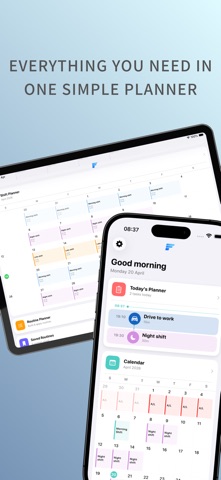
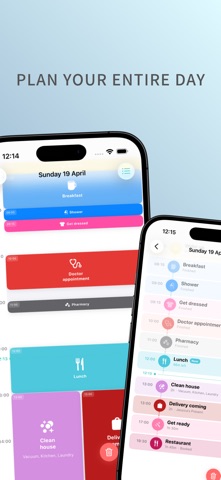
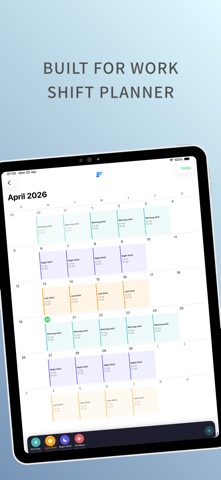
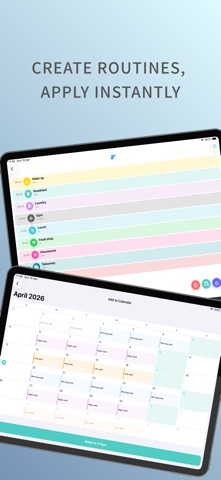
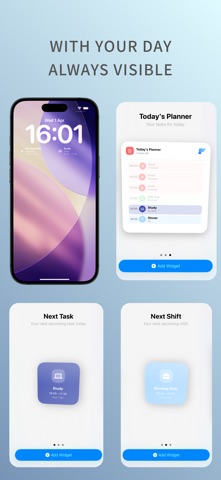
Framework – Daily Planner Take control of your entire day with one clear timeline. No subscriptions. No clutter. Just a simple, visual way to plan your time. Feel in control of your day again. See exactly where you are, what’s next, and how your day flows — all in one place. Why people choose Framework – No subscriptions or hidden costs – Your entire day in one clear timeline – Built for real life, including shift work – Works offline, with optional iCloud sync – Clean, fast, and distraction-free A Clear View of Your Day Your Home View brings everything together: – A live timeline of today that updates in real time – Instantly see what’s active, what’s next, and what’s done – Built-in calendars for both tasks and shifts – Quick access to your routines and saved plans Plan Your Day with Precision – Full 24-hour timeline for complete control – Tasks shown as visual blocks, scaled to their duration – Overlapping tasks automatically organised – All-day tasks and shifts kept separate and clear – Add, edit, or clear your day in seconds No guesswork — just a clear structure from morning to night. Built for Real Life (Including Shift Work) – Create custom shift types with roles, times, colours, and icons – Assign shifts to any day in seconds – View shifts alongside your daily tasks – Adjust your schedule at any time Balance work and life — without the stress. Routines That Save You Time – Build your ideal day once – Apply it to any date instantly – Manage and edit all saved routines Spend less time planning, more time doing. Full Calendar Overview – Scroll through past and future months – See all tasks directly inside each day – Open any day for a full detailed timeline Always know what’s coming next. Works with Apple – Import Apple Calendar events (read-only) – Export your tasks and shifts to a dedicated calendar – Full control over what syncs Optional iCloud Sync keeps everything updated across your devices — privately and securely. Widgets That Keep You on Track – See your day at a glance from your Home Screen or Lock Screen – View upcoming tasks and shifts instantly – Stay updated without opening the app – Clean, minimal designs that match your planner perfectly Your schedule — always within reach. Stay on Track – Set reminders for any task – Choose alert or silent notifications – See your next task or shift at a glance Built Around You – 12 or 24-hour time format – Custom start day of the week – Light, Dark, or System appearance – Full control over your data No Subscriptions. No Lock-ins. Framework is a one-time purchase. Everything is included — no monthly fees, no locked features. Pay once. Plan forever. Your data stays yours.
What's new · 1.5
Framework has been redesigned from the ground up. It's cleaner and softer, and your day is easier to take in at a glance. New Home screen • Swipe through your weeks, with coloured dots for each task • The Next Up card shows what's on now and what's coming • Focus Score ring, plus your Free Time and Planned Time • A timeline of your day that expands to show everything • Tick off tasks with a new animation, and get a little celebration when you finish them all This Week • See your whole week in one place, with tasks, shifts, events and planned time • Open any day to see and tick off its tasks Work Schedule • Switch between Week and Month views • See your total hours, shift count and a breakdown by shift type • See your days off alongside your shifts • Tap a shift to edit it Improved PDF export • A new list layout alongside the calendar • Full-screen preview that turns with your phone • Holidays no longer count towards your shift totals Everything else • New designs for creating and editing tasks, shifts, shift types and routines • Icons are suggested from the name you type, and you can still pick your own • Tap a tab again to jump back to today • Haptics throughout the app • Now available in 17 languages • Bug fixes and performance improvements
Details