

HEIC to JPG & PDF Converter
RUEBEN ANSOLIWEN AKANKOBATENG · Productivity
Independent analytics for this App Store listing. AppTracker is not affiliated with RUEBEN ANSOLIWEN AKANKOBATENG.
Chart standing · US
What changed · US
Listing changes AppTracker has observed for this app in this storefront — new versions, price moves, rating shifts, and store copy.
Improved conversion and export reliability, refreshed onboarding, and a smoother experience for batch HEIC conversions.
In-app purchases · US
What this app sells inside itself, grouped by kind and priced for this storefront.
Screenshots



About
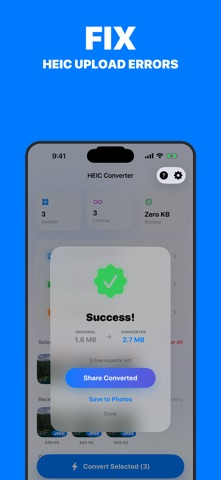
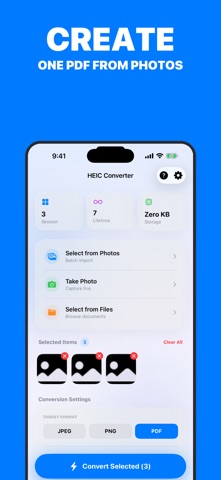
Can’t upload your iPhone photos? HEIC not supported? Convert HEIC photos to JPG, PNG, or PDF in seconds directly on your device. No errors. No compatibility issues. No waiting. Fix photo upload problems instantly iPhone photos are saved as HEIC, but many websites, apps, and computers don’t support it. This app converts your photos so you can: • Upload images to websites and forms • Send photos that actually open on any device • Share files on WhatsApp, email, and social media • Print photos without compatibility issues Convert to the formats you need • JPG / JPEG best for sharing and universal use • PNG high quality for design and editing • PDF combine multiple photos into one document Fast, simple, powerful • Batch convert multiple photos at once • 100% offline your files stay private • Adjust quality and file size • Keeps original metadata (date, location, camera info) • Share instantly via AirDrop, Mail, Messages, or Files Built for real everyday use Perfect for: • Job applications and document uploads • Students submitting assignments • Professionals sending photos to clients • Anyone tired of “file not supported” errors Download now and convert your first photos in seconds. • Terms of Use: https://www.apple.com/legal/internet-services/itunes/dev/stdeula/ • Privacy Policy: https://docs.google.com/document/d/1Y4Mhhyeza2RJlpv2dAGQ2yM7A4Lisr6Y8B_jnYcvg-c/edit?usp=sharing
What's new · 1.0.2
Improved conversion and export reliability, refreshed onboarding, and a smoother experience for batch HEIC conversions.
Details